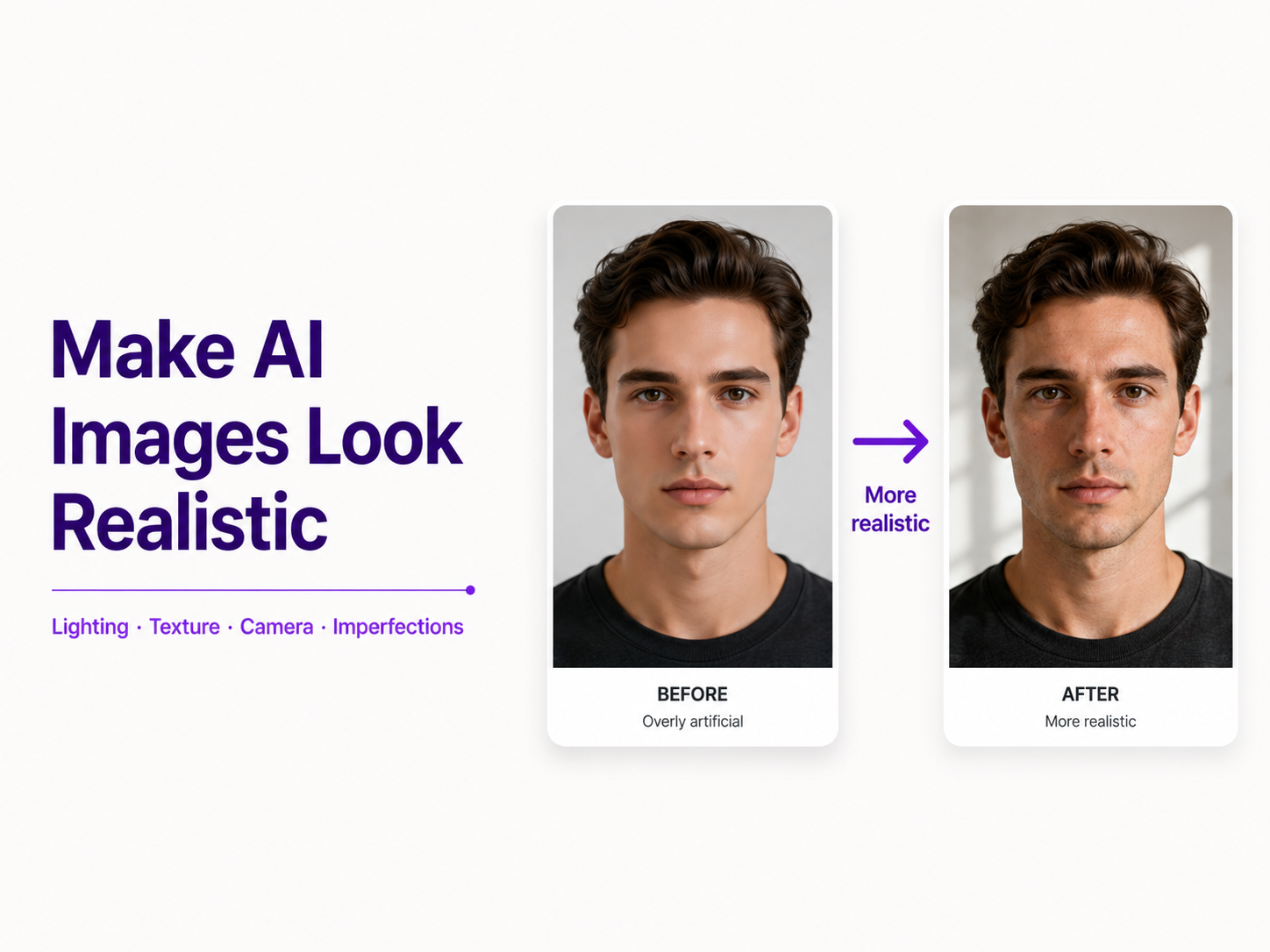
AI image generators can create impressively detailed pictures, but detail alone does not make an image look real. A portrait may have perfect skin yet feel artificial. A product photo may be sharp but look like a 3D render. An interior may contain realistic furniture while the lighting makes no physical sense.
The difference usually comes from the cues humans associate with real photography: imperfect skin, believable shadows, natural reflections, consistent perspective, realistic materials, sensible depth of field, and lighting that behaves consistently across the scene.
If your AI images look too polished, plastic, or obviously generated, the fix is usually not more random quality keywords. Describe the scene more like a photographer would.
Quick Answer: How Do You Make AI Images Look More Realistic?
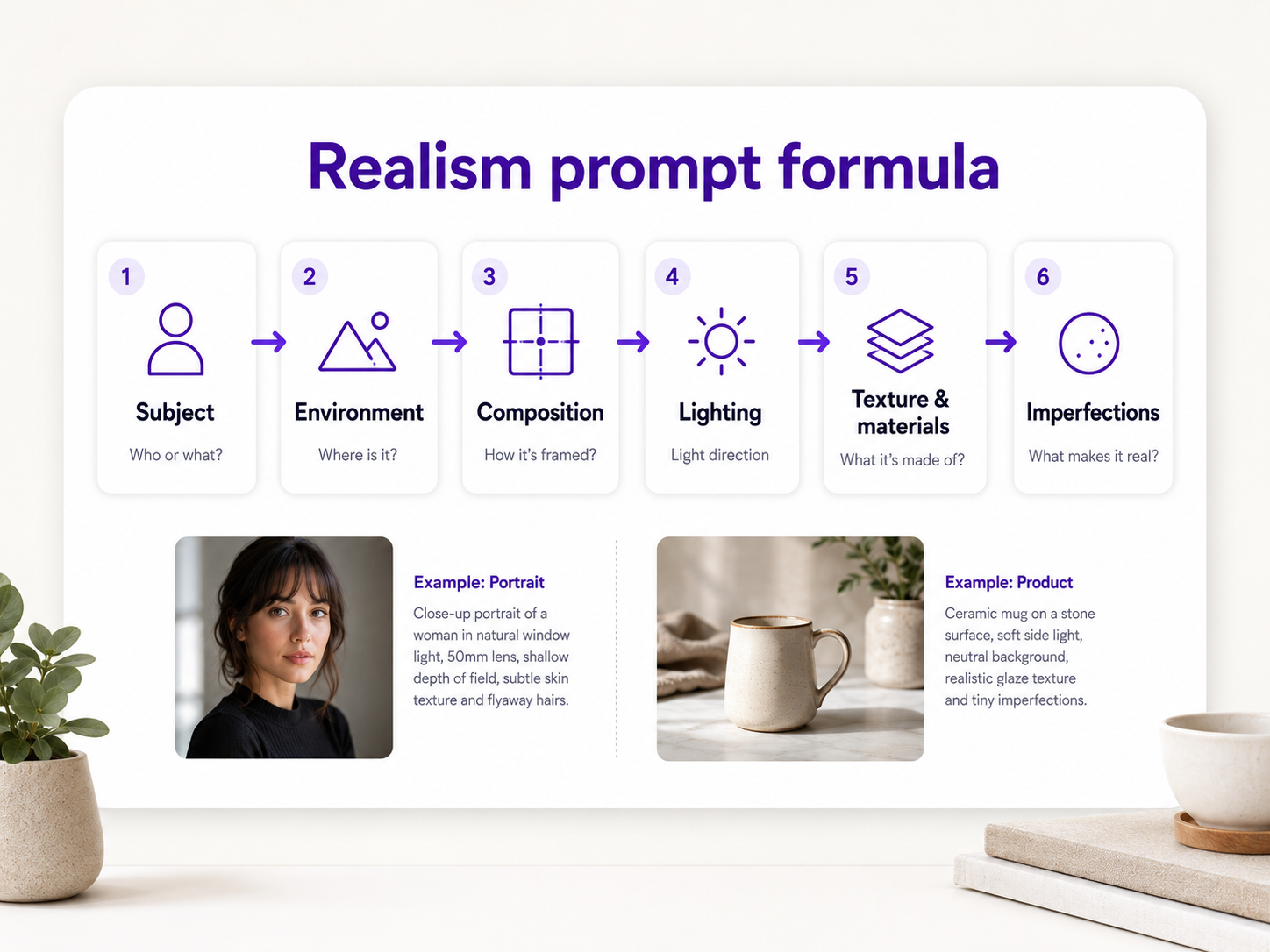
Describe a believable subject in a specific environment, then control composition, camera perspective, lighting, focus, and material texture. Prefer natural imperfections over flawless surfaces, and use reference images when you need to preserve a real person, product, object, or visual style.
A useful realism prompt often includes five things: the subject, the environment, the type of photograph, the lighting, and the physical details that should remain visible.
Why Do AI Images Sometimes Look Fake?
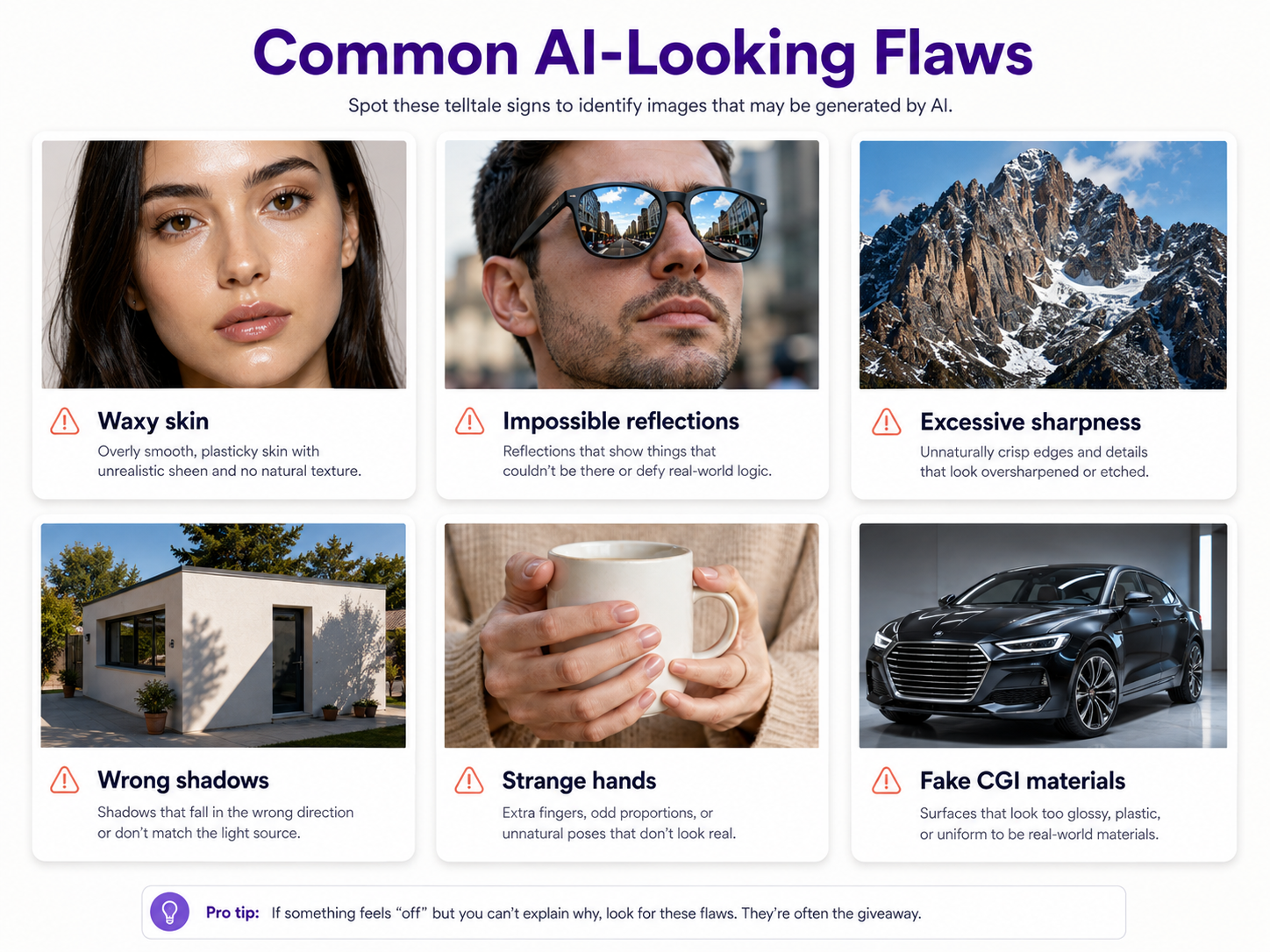
Many AI images feel artificial because several small details are slightly wrong at once: skin that is too smooth, lighting that conflicts with shadows, glass reflecting objects that do not exist, blur that starts at an impossible distance, or clothing without natural folds.
Common Signs of an AI-Looking Image
Watch for waxy skin, excessive sharpness, perfect facial symmetry, strange hands, inconsistent reflections, objects merging together, unrealistic depth of field, impossible shadows, oversaturated color, heavy glow, and surfaces that look more like polished CGI than real materials.
1. Start With a Real Scene, Not Quality Keywords
Phrases such as masterpiece, ultra-detailed, 16K, hyperrealistic, cinematic, and award-winning do not automatically create believable images. In some models, stacked aesthetic language can push the result toward an exaggerated AI look.
Establish a concrete photographic situation instead: where the subject is, what time of day it is, where the light comes from, how close the camera is, and what surrounds the subject.
Weak Realism Prompt
More Realistic Prompt
2. Describe Lighting Like It Exists in the Real World
Instead of writing only 'cinematic lighting,' specify the source and direction: soft window light, overcast daylight, late-afternoon side sun, a large softbox camera left, overhead office fluorescents, or warm lamp light mixed with weak daylight.
Real photographs often include darker areas, imperfect exposure, and shadow falloff. Asking every part of the image to be perfectly illuminated can make the result feel more like commercial CGI than photography.
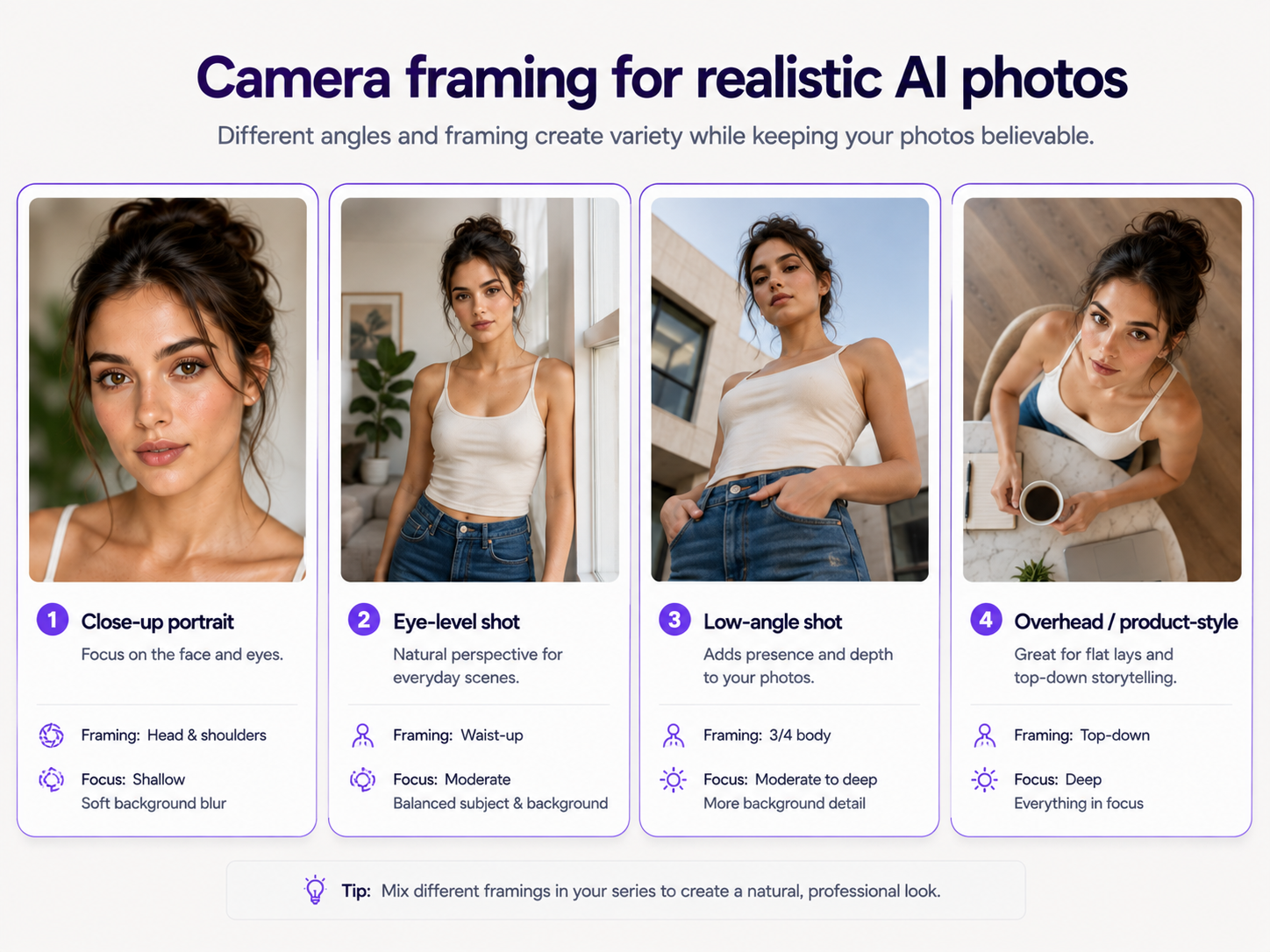
3. Use Camera Language With a Purpose
Useful instructions include close-up or waist-up portrait, full-body shot, eye-level or low-angle view, overhead product shot, shallow depth of field, deep focus, documentary photography, smartphone photo, or studio product photography.
Lens language such as a natural 50mm perspective, compressed telephoto portrait, wide environmental photograph, or macro product shot can help when you understand what it implies. Random camera specs alone do not guarantee realism.
4. Keep Natural Skin and Small Imperfections
Perfect skin is one of the fastest ways to make an AI portrait look artificial. Prefer realistic skin texture, visible pores, subtle complexion variation, fine facial hairs, natural highlights, and restrained retouching.
The same idea applies beyond portraits. Clothes wrinkle. Hair has flyaways. Glass collects fingerprints. Food is irregular. Fabric folds with gravity. Images where everything is pristine, centered, and perfectly illuminated often look suspicious.
5. Make Materials, Focus, and Perspective Behave Physically
Describe materials, not only objects. Glass reflects and refracts. Matte plastic softens highlights. Brushed metal has directional texture. Cotton absorbs light differently from satin. Skin has subsurface scattering and fine texture.
Use believable depth of field: blur should increase gradually with distance. Watch for cutout-like edges around hair or objects at the same distance that suddenly go soft. Keep perspective consistent so tables, products, furniture, and architecture share one camera viewpoint.
6. Use Reference Images When Realism Matters
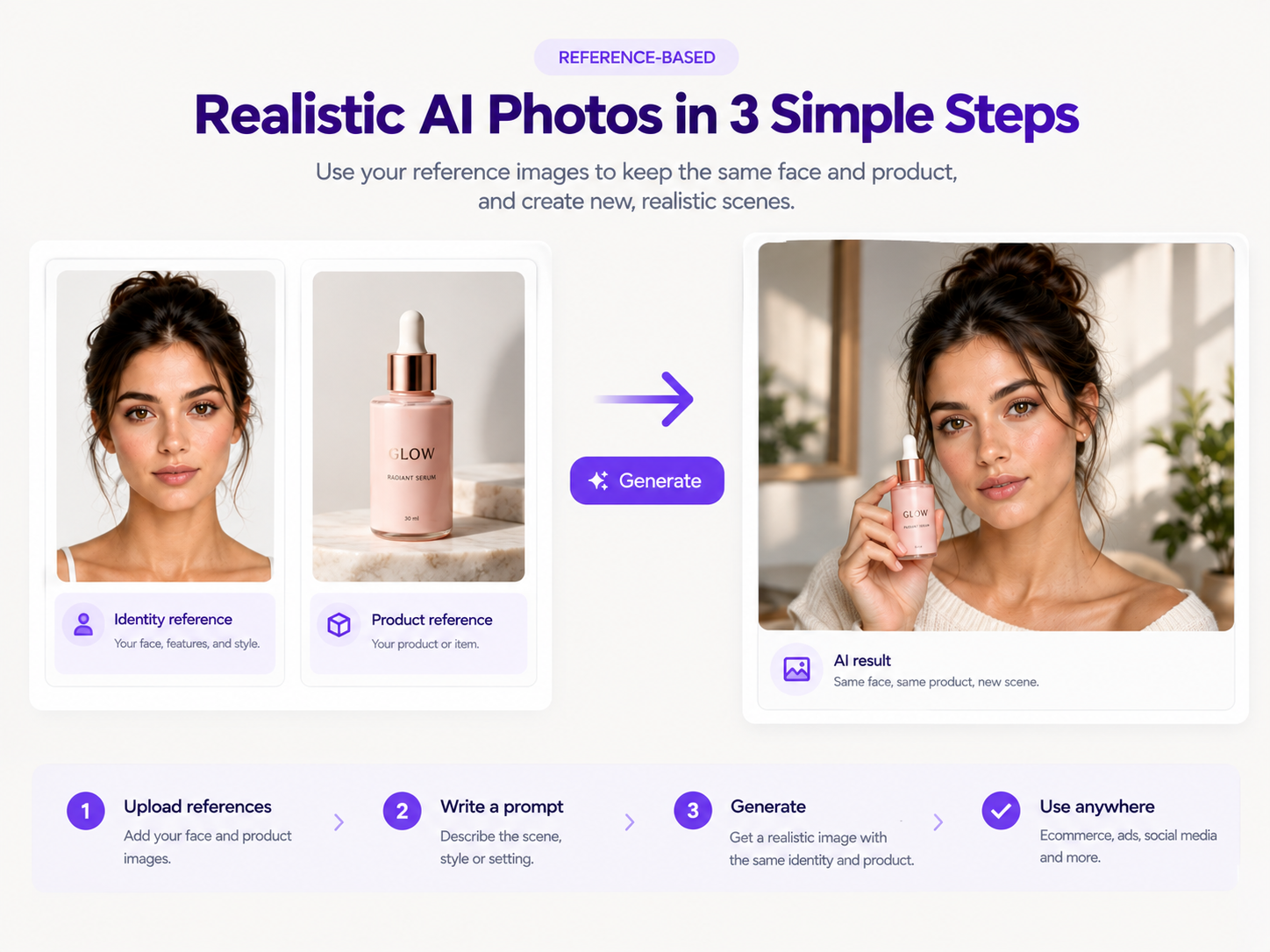
A reference image gives the generator visual information that is hard to communicate with words. Use a clear portrait when identity matters, or a sharp product photo when packaging, proportions, logo placement, and materials must stay accurate.
When using several references, explain the role of each one: one for the person, one for the product, one for lighting or style. If you already have a strong source photo, image-to-image editing is often better than regenerating everything from text.
7. Match the Prompt to the Type of Photograph
A passport-style portrait, fashion campaign, restaurant photo, ecommerce packshot, and casual smartphone selfie should not share the same visual language.
Portrait
Product
Smartphone / candid
8. Prefer Restraint Over Spectacle
Constantly requesting dramatic backlight, volumetric haze, teal-orange grading, intense rim light, and glowing highlights can create the visual language associated with AI artwork. Many real photographs use soft daylight, cloudy light, fluorescent interiors, or simple studio setups.
Ask for natural color balance, restrained saturation, realistic white balance, subtle contrast, and accurate skin tones when realism matters more than spectacle.
9. Keep Composition, Backgrounds, and Detail Believable
AI tends to center subjects with perfectly balanced layouts. Real photography often uses asymmetry, negative space, partial crops, or off-center framing. Backgrounds should have a few coherent structures rather than vague busy shapes.
Avoid equal sharpness everywhere. Real cameras concentrate detail near the focus plane and let distant objects, shadows, and backgrounds hold less information. Excessive microcontrast around pores, hair, and edges can make an image look digitally processed.
10. Check Reflections, Shadows, Anatomy, and Product Geometry
Mirrors, glass, metal, water, and glossy packaging should reflect nearby objects in a way that makes geometric sense. Objects touching a surface usually need a contact shadow. Inspect hands, teeth, eyes, earrings, and glasses closely before using an image professionally.
For ecommerce and advertising, preserve product dimensions, packaging shape, cap design, label position, branding, materials, and colors. Ask the AI to transform the environment and photography rather than redesign the object.
11. Change Less, and Describe What You Want Positively
The larger the requested transformation, the more the generator invents. Preserve what already works, then change background, clothing, or lighting in controlled steps instead of rewriting the entire scene at once.
Prefer specific outcomes over long negative lists. Instead of 'no plastic skin, no fake lighting,' ask for 'realistic skin texture with visible pores, soft natural window light, subtle facial shadows, and restrained portrait retouching.'
Before and After: Improving an AI-Looking Prompt
Before
After
How to Apply This by Image Type
Portraits: preserve facial structure, realistic skin, natural eye detail, believable hair, and lighting that follows the face. Avoid porcelain skin, identical catchlights, and aggressive beauty filtering. Use a real photo as an identity reference when likeness matters.
Product photos: keep geometry accurate, use one coherent lighting setup, add contact shadows, and pay attention to labels, edges, transparent materials, reflections, and scale. The product should look like it has weight.
Fashion: preserve garment shape, seams, fabric texture, logos, and pattern scale. Clothing should respond to pose and gravity. Food: keep ingredients irregular, let sauces and melted elements follow gravity, and mix matte, moist, crisp, and glossy surfaces. Interiors: establish architecture and perspective first, then add material realism without overcrowding the room.
A Realism Checklist Before You Use an AI Image

Check lighting direction and matching shadows; hands, eyes, teeth, and clothing contact; whether materials respond differently to light; shared perspective across objects; reflections and contact shadows; enough natural texture; gradual focus falloff; and background details such as signs, people, furniture, and repeated objects.
Higher resolution and film grain can finish a good image, but they do not fix unrealistic anatomy, lighting, materials, or perspective. Solve structural realism first.
The Most Important Rule: Describe a Photograph That Could Exist
Ask where the photographer is standing, what light reaches the subject, which surfaces reflect that light, what is in focus, what becomes soft, and which imperfections would naturally exist. You do not need every answer in every prompt, but those relationships explain why an image looks synthetic and what to change.
FAQ
How do I make AI-generated images look more realistic?
Describe a believable scene with a clear subject, environment, camera viewpoint, lighting, texture, and materials. Avoid excessive perfection, keep natural imperfections, and use reference images when a real person, product, or style must stay accurate.
Why do my AI images look fake?
Common causes include overly smooth skin, excessive sharpness, unrealistic lighting, inconsistent shadows, incorrect reflections, weak material texture, strange anatomy, impossible perspective, extreme background blur, and compositions that are too perfect.
What should I put in a prompt for realistic AI images?
Start with subject and environment, then add composition, camera perspective, lighting, focus, and important physical textures. Describe the photograph instead of stacking terms such as masterpiece, 8K, hyperrealistic, or ultra-detailed.
Does adding 'photorealistic' make an AI image realistic?
It can communicate intent, but the word alone does not guarantee realism. Lighting, anatomy, perspective, texture, materials, reflections, focus, and composition matter more.
How can I make AI skin look less fake?
Ask for realistic skin texture, visible pores, subtle complexion variation, fine facial hairs, natural highlights, and restrained retouching. Avoid prompts centered on flawless, perfect, porcelain, or completely smooth skin.
Do reference images make AI images more realistic?
Yes, especially when you need to preserve a specific person, product, object, composition, or style. A clear, well-lit reference gives visual information that is difficult to communicate through text alone.
Does higher resolution or film grain make AI images more realistic?
Not by themselves. Upscaling or adding grain cannot fix unrealistic anatomy, materials, lighting, or perspective. Establish believable structure first, then use resolution or grain as a finishing step.
Is image-to-image better for realistic AI photos?
It can be when you already have a good source photograph. Image-to-image workflows let the existing image provide real facial features, product geometry, or composition while the AI changes only the requested parts.
Why do AI product images sometimes look like 3D renders?
Common causes include surfaces that are too smooth, perfectly controlled reflections, excessive edge sharpness, uniform materials, floating objects, and lighting that lacks normal imperfections or contact shadows.
Should I use negative prompts to make an image more realistic?
When possible, describe the desired result positively and specifically. Instead of listing 'no plastic skin,' ask for visible natural skin texture, diffused window light, realistic shadow falloff, and restrained retouching.