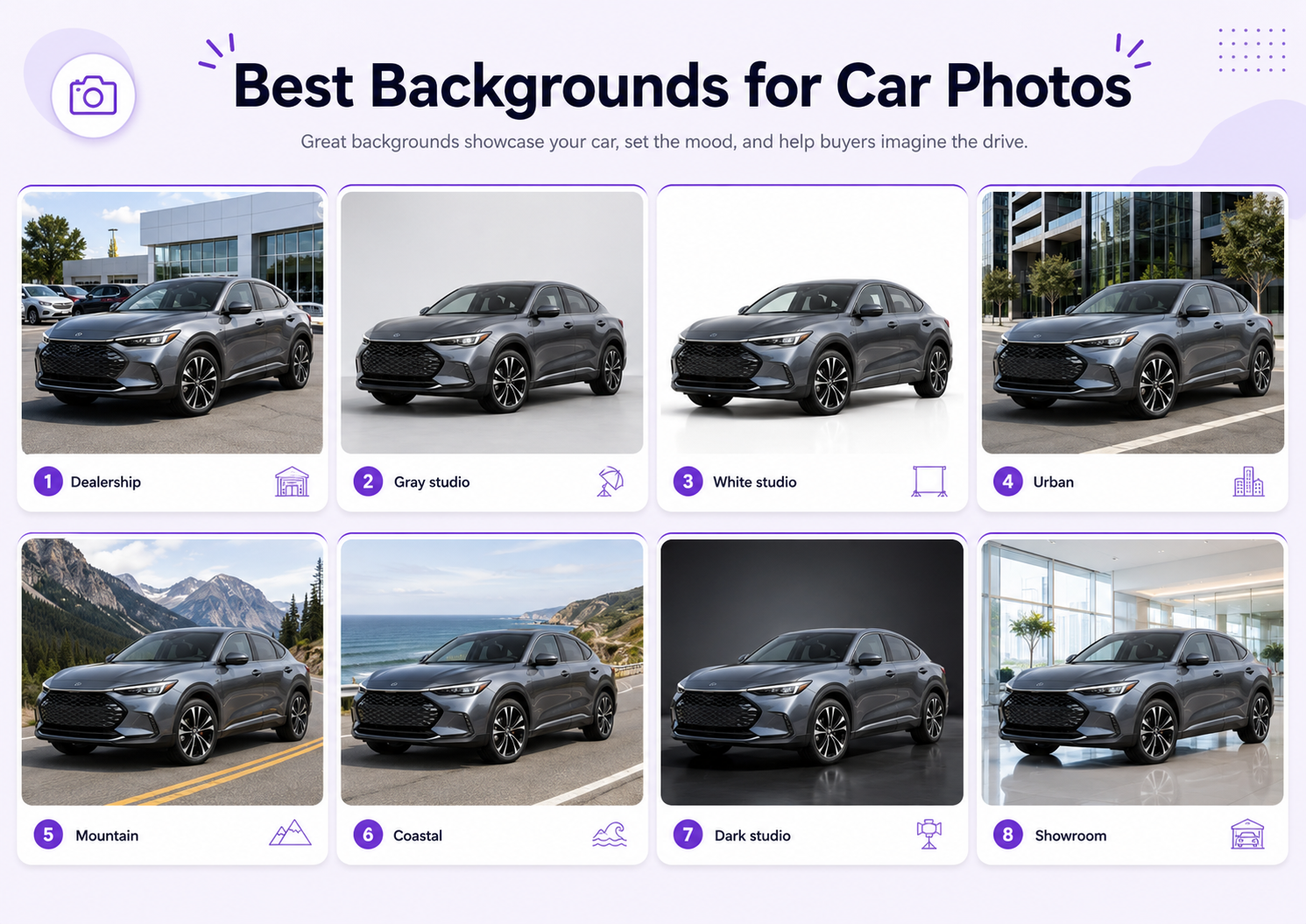
The background of a car photo can make the vehicle look clean, premium, practical, sporty, or difficult to inspect. A strong background supports the car without competing with its body shape, paint, wheels, lights, glass, and trim.
For listings, clarity usually matters more than drama. For dealership campaigns, social media, and brand advertising, the background can carry more atmosphere as long as the real vehicle remains accurate.
The right choice depends on the car type, paint color, audience, platform, lighting, and final use. A family hatchback, luxury sedan, sports car, SUV, classic car, and commercial van do not need the same visual environment.
This guide covers the best backgrounds for car photos, when to use each one, which scenes to avoid, and how GenImagePro can create consistent automotive backgrounds from a real vehicle photo.
What Makes a Good Car Photography Background?
A good automotive background creates clear separation around the roofline, mirrors, windows, wheels, and body panels.
It should match the direction and softness of the light on the vehicle. A car photographed under soft cloudy light should not be placed into a harsh sunset scene unless the car is also relit.
The ground must look believable. Tire contact, reflections, shadow direction, surface texture, and perspective should all support the car.
Most importantly, the background should not change the real vehicle. The make, model, paint, trim, wheels, badges, lights, windows, proportions, and condition must remain accurate.
Best Backgrounds for Car Listing Photos
1. Clean Dealership Lot
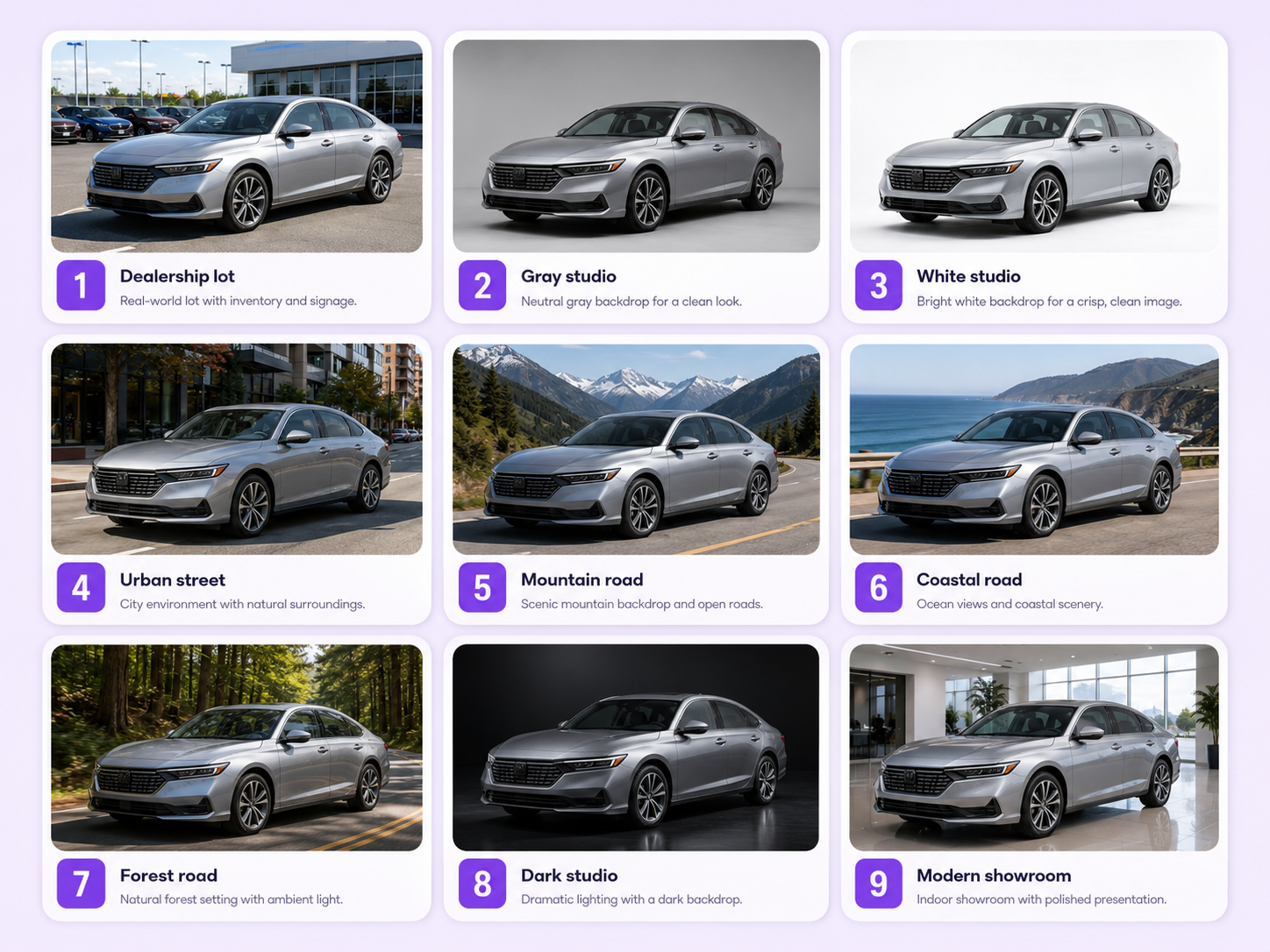
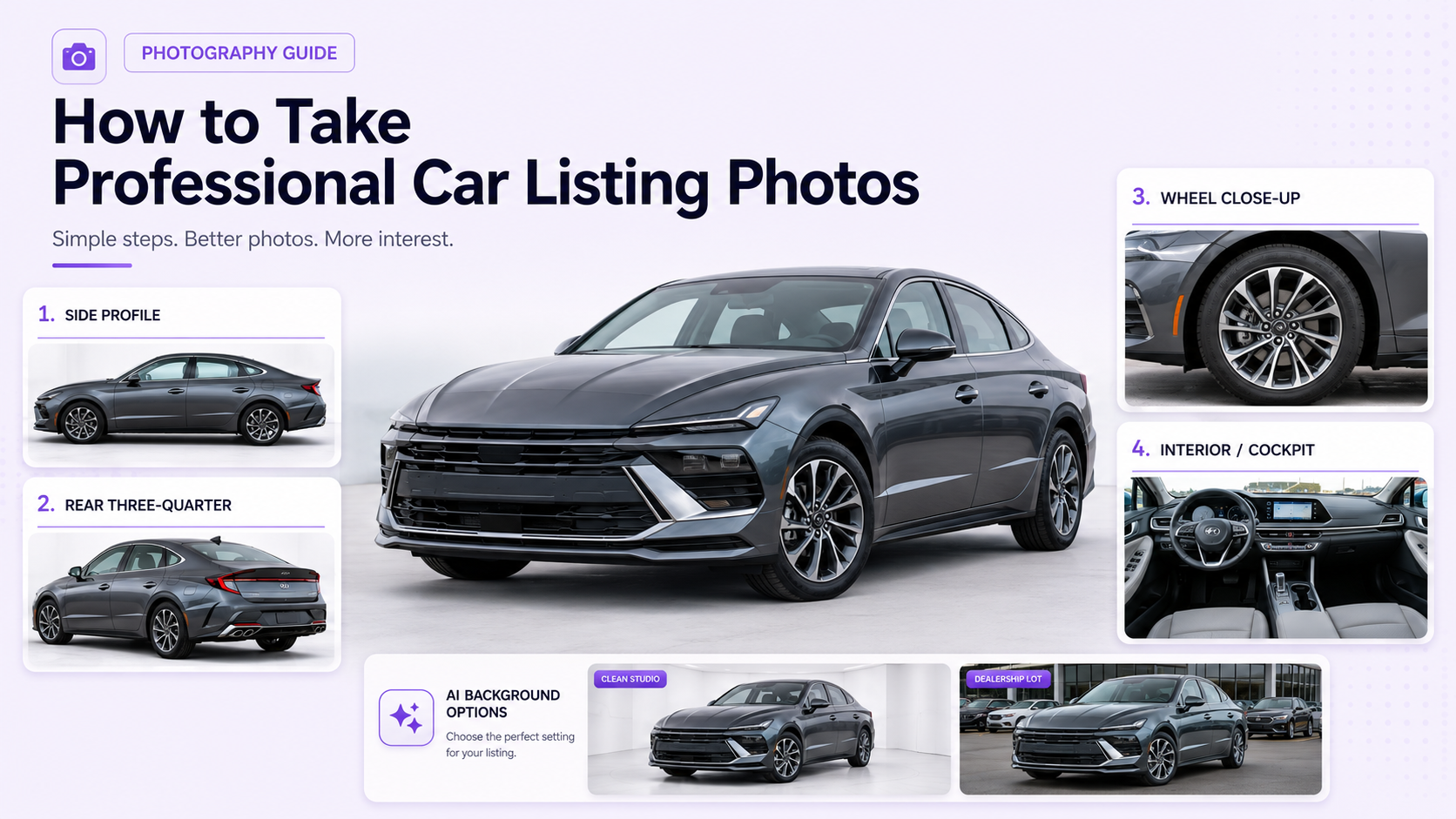
A tidy dealership exterior is one of the most practical backgrounds for inventory photos. Use neutral paving, limited signage, consistent spacing, and soft light. Keep other vehicles from overlapping the subject.
2. Neutral Paved Area
A quiet asphalt or concrete area creates a simple listing image without looking like a studio. This works well for private sellers and dealerships that want a natural but controlled result.
3. Light Gray Automotive Studio
A light gray studio is clean, modern, and easy to use across many vehicle colors. It creates more edge definition than pure white and works well for dealership websites and marketplaces.
4. White Studio Background
A white automotive studio creates a high-key catalog look. Use realistic floor shadows and careful edge lighting so white or silver vehicles do not disappear.
5. Soft Gradient Studio
A subtle white-to-gray or gray-to-dark gradient adds depth while remaining neutral. It suits inventory, configurator-style visuals, and premium listing pages.
6. Parking Structure
A clean parking structure can create a modern urban setting with controlled architecture and predictable light. Avoid visible signs, damaged walls, strong color casts, and distracting parked cars.
7. Modern Showroom
A bright showroom with glass, polished flooring, and minimal architecture supports premium dealership content. Reflections should remain controlled and physically believable.
8. Simple Industrial Wall
A concrete, brick, or metal wall can create a strong background for SUVs, pickups, sports cars, commercial vehicles, and darker automotive styling. Keep the surface restrained.
9. Quiet Urban Street
A clean city street can make the car feel realistic and in use. Choose a location with limited traffic, simple architecture, and no distracting pedestrians or signage.
10. Contemporary Architecture
Modern buildings, glass facades, clean concrete, and geometric lines can complement luxury sedans, electric vehicles, and premium SUVs.
11. Open Country Road
A quiet road with natural scenery works for touring cars, SUVs, convertibles, motorcycles, and lifestyle campaigns. Keep the road perspective aligned with the car.
12. Mountain Road
Mountain scenery communicates adventure, performance, and capability. It works especially well for SUVs, crossovers, off-road vehicles, and sports cars.
13. Coastal Road
A coastal setting with pale sky, sea, and clean road surfaces creates a bright lifestyle image for convertibles, premium vehicles, travel-focused campaigns, and summer content.
14. Forest Road
A restrained forest or tree-lined road supports outdoor, eco, hybrid, SUV, and adventure positioning. Avoid heavy green reflections that change the paint color.
15. Desert or Open Landscape
A minimal desert, dry landscape, or wide open road can create a premium campaign look for SUVs, off-road vehicles, performance cars, and luxury models.
16. Dark Automotive Studio
A dark charcoal or black studio creates a premium, dramatic image. Use rim light and controlled reflections so dark paint, tires, and glass remain visible.
A subtle floor reflection can make the car feel polished and high-end. Keep the reflection soft and aligned with the actual vehicle.
18. Night City Background
A night urban scene can support performance, luxury, electric, and technology-focused vehicles. The car lighting must match street lights, signs, and ambient color.
19. Minimal Brand-Color Background
A solid or gradient brand color is useful for social media, dealership promotions, launches, and advertising. Use enough contrast around the car.
20. Wide Website Hero Background
A wide studio, road, or architectural scene with the car positioned to one side creates space for headlines, pricing, and calls to action.
Best Backgrounds by Vehicle Type
Luxury Sedans
Use modern architecture, premium showrooms, dark studios, reflective floors, clean city scenes, or minimal gradients.
Sports Cars
Use dark studios, mountain roads, night city scenes, industrial architecture, coastal roads, or clean track-inspired environments.
SUVs and Crossovers
Use mountain roads, forests, open landscapes, modern suburbs, neutral dealerships, or practical outdoor settings.
Electric Vehicles
Use clean architecture, pale gray studios, modern showrooms, city backgrounds, minimal gradients, and environmentally restrained outdoor scenes.
Family Cars
Use bright dealerships, neutral paved areas, suburban streets, open roads, and clean realistic environments.
Classic Cars
Use heritage architecture, restrained countryside, period-appropriate streets, dark studios, or elegant neutral settings.
Commercial Vehicles
Use clean industrial locations, warehouses, business parks, neutral yards, or simple paved areas that support practical inspection.
Best Backgrounds by Platform
Marketplace Listings
Use clean, simple backgrounds that make the full vehicle easy to inspect. Avoid dramatic scenes that hide condition or body details.
Dealership Websites
Use a consistent studio, showroom, dealership, or neutral outdoor background across the inventory.
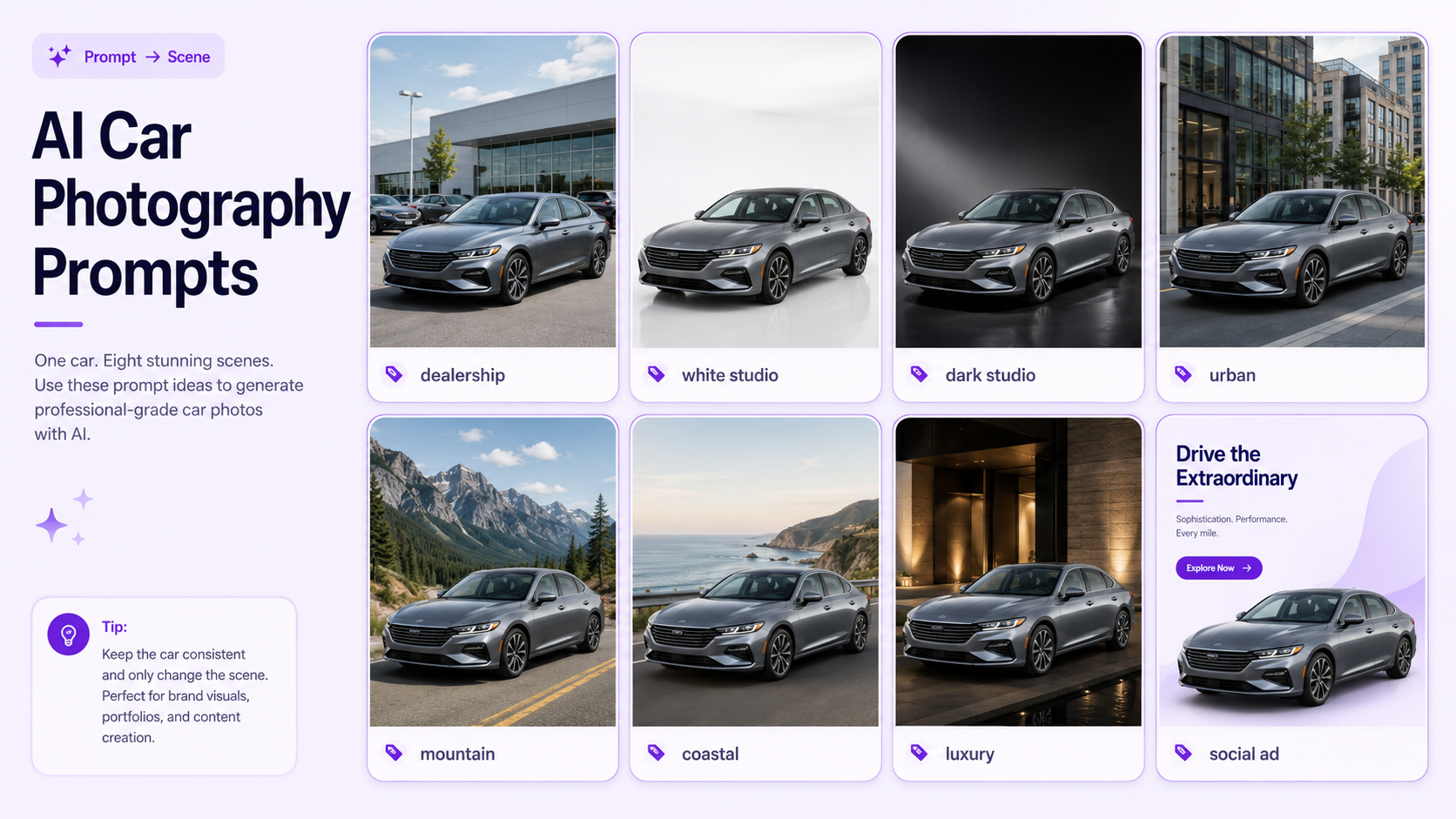
Use stronger color, urban scenes, lifestyle roads, seasonal environments, and vertical compositions while preserving the exact car.
Paid Advertisements
Choose a background with clear hierarchy and negative space for price, finance details, headline, logo, and call to action.
Use a wide composition with the car placed left or right and the environment extending into clean text space.
Luxury Campaigns
Use dark studios, premium architecture, subtle reflections, cinematic roads, or restrained night scenes.
How to Match the Car Color and Background
White Cars
Use light gray, medium gray, darker architecture, forest roads, urban environments, or soft gradients. Pure white backgrounds need visible shadows and edge separation.
Black Cars
Use light gray, white, bright architecture, pale outdoor scenes, or controlled dark studios with strong rim light.
Silver and Gray Cars
Use dark charcoal, blue-gray, forest, urban, warm architecture, or contrasting studio gradients.
Red Cars
Use gray, black, white, concrete, mountain, coastal, or simple urban backgrounds. Avoid strong competing reds and oranges.
Blue Cars
Use warm neutral architecture, gray studios, desert tones, concrete, or restrained natural scenes.
Green Cars
Use neutral studios, warm stone, city architecture, desert, or pale roads. Forest backgrounds may reduce separation.
Match the Lighting to the Background
The car and background must share the same visual light source.
If the original car was photographed under soft overcast light, a gray studio, clean dealership, or cloudy outdoor scene is usually easier to match.
Golden hour, night city, dark studio, and harsh sunlight backgrounds require stronger relighting and more careful reflections.
Check the hood, roof, side panels, windows, mirrors, wheels, and ground shadow. Lighting inconsistencies are especially visible on glossy paint.
Use Realistic Ground Contact
The tires must sit correctly on the surface. Missing contact shadows make the car float.
The ground plane should align with the camera angle and wheel position. A vehicle photographed on level asphalt should not appear tilted on a new surface.
Reflections should follow the car’s shape, lighting, and distance from the ground. Avoid perfect mirror reflections unless the environment supports them.
Backgrounds to Avoid
Crowded Parking Lots
Other cars, people, signs, and poles can overlap the vehicle and make condition harder to inspect.
Strongly Colored Environments
Bright green, red, blue, or neon surroundings can reflect onto the paint and change the apparent color.
Uneven or Sloped Ground
Slopes can make ride height, wheel alignment, and body proportions appear unusual.
Busy Residential Streets
Bins, cables, homes, license plates, pedestrians, and parked cars create privacy and visual problems.
Artificial Luxury Scenes
A basic listing car placed in an unrealistic mansion, racetrack, or exotic location may reduce trust.
Backgrounds That Hide Condition
Dark scenes, heavy shadows, fog, reflections, or dramatic color grading can conceal scratches, dents, and body details.
How GenImagePro Can Create Car Backgrounds
AI car photo generators can turn a clear vehicle photo into several automotive background variations without requiring a new physical shoot.
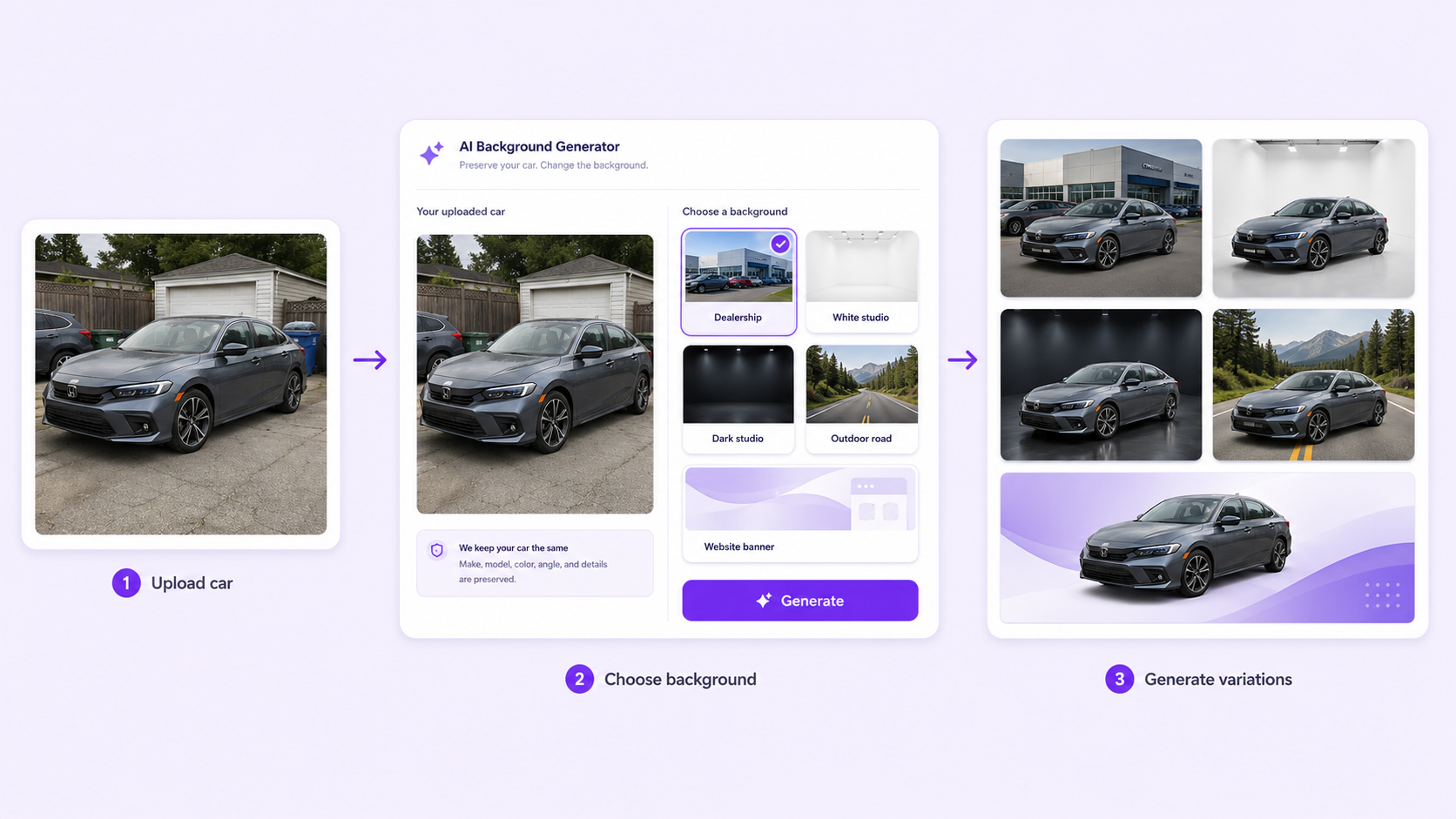
A seller can create a clean marketplace image, dealership-style background, white or gray studio, dark premium studio, outdoor road scene, social post, and website banner from the same source car.
This is especially useful when inventory is photographed at different locations or under inconsistent conditions. A shared template can create more uniform crop, scale, lighting, and background treatment across the catalog.
The source vehicle should remain the exact reference. Every result must be checked against the original before publication.
GenImagePro Car Background Workflow
Start with a high-resolution image where the full car is visible, sharp, and not blocked by people or other vehicles.
Choose a GenImagePro automotive background template based on the final channel: listing, dealership, studio, outdoor, luxury, social, or banner.
Generate several versions and inspect the paint, wheels, lights, windows, mirrors, badges, trim, plate area, body lines, and proportions.
Export separate aspect ratios for marketplaces, dealership websites, social media, and advertising.
Car Background Prompt Formula
Clean Listing Background Prompt
Replace only the background with a clean neutral paved area and simple dealership architecture under soft overcast daylight. Add realistic tire contact shadows and preserve every vehicle detail.
White Studio Prompt
Replace only the background with a white-to-light-gray automotive studio using broad diffused lighting, clean floor, subtle realistic shadow, and centered listing composition. Keep the exact car unchanged.
Dark Studio Prompt
Replace only the background with a deep charcoal automotive studio using controlled rim lighting, subtle floor reflection, realistic tire contact, and premium contrast. Preserve the exact paint, body, wheels, glass, trim, lights, badges, and proportions.
Outdoor Road Prompt
Replace only the background with a clean open road and restrained natural scenery using soft daylight, realistic perspective, and accurate ground contact. Keep the real vehicle and all condition details unchanged.
What AI Must Preserve
Make, model, generation, body style, and trim.
Paint color, finish, body panels, proportions, and ride height.
Wheel design, tire size, brake details, and stance.
Headlights, taillights, grille, mirrors, windows, badges, and plate area.
Interior color and visible cabin details.
Existing scratches, dents, wheel damage, and other relevant condition details.
Camera angle and vehicle scale.
Common AI Background Errors
Changed Wheels
AI may alter spoke design, wheel size, tire profile, or brake details. Compare every wheel with the original.
Incorrect Paint
Background color and relighting can shift the real paint tone or metallic finish.
Warped Body Lines
Doors, bumpers, lights, glass, and panel gaps may change during generation.
Unrealistic Tire Contact
The car may float, sink into the ground, or cast shadows in the wrong direction.
Changed Badges or Text
Manufacturer marks, model badges, trim labels, and plate areas may become distorted.
Mismatched Reflections
The vehicle may reflect objects or colors that do not exist in the new scene.
Car Background Quality Checklist
Confirm that the background suits the platform and vehicle type.
Check contrast around the roof, mirrors, windows, wheels, and body edges.
Review light direction, shadow softness, ground perspective, and reflections.
Compare paint color, body shape, trim, wheels, lights, windows, badges, and proportions with the original.
Check the scene for warped architecture, duplicated objects, fake text, and inconsistent scale.
Preview the image at listing size, social size, and banner size before publishing.
Final Recommendation
For listings, use clean dealership, neutral paved, gray studio, white studio, showroom, or simple outdoor backgrounds that make the car easy to inspect.
For campaigns, use modern architecture, mountain roads, coastal roads, dark studios, night city scenes, or minimal brand-color environments.
GenImagePro helps sellers and dealerships create several car background variations from one real vehicle photo. Upload the car, choose an automotive template, and create consistent listing, studio, outdoor, social, and banner images while preserving the exact vehicle.
FAQ
What is the best background for car listing photos?
Clean dealership lots, neutral paved areas, light gray studios, white studios, parking structures, and simple outdoor locations work well.
What background is best for a black car?
Use light gray, white, bright architecture, pale outdoor scenes, or a dark studio with controlled rim lighting.
What background is best for a white car?
Use gray, darker architecture, forest roads, urban scenes, or soft gradients with clear shadows and edge separation.
Can I use an outdoor background for a car listing?
Yes. Choose a clean paved area, quiet road, modern architecture, or restrained natural setting that keeps the vehicle easy to inspect.
Can GenImagePro replace a car photo background?
Yes. GenImagePro can create dealership, studio, showroom, outdoor, luxury, social, and website-banner backgrounds from a real car photo.
How do I keep the car accurate when changing the background?
Preserve the make, model, body, paint, trim, wheels, lights, windows, mirrors, badges, plate area, proportions, and condition.
Why does an AI car background look fake?
The ground perspective, tire contact, shadows, reflections, lighting direction, scale, or vehicle details may not match.
Does GenImagePro require a car background prompt?
Not always. GenImagePro provides ready-made automotive background templates, allowing users to upload a vehicle photo and choose a visual direction.
Social Media