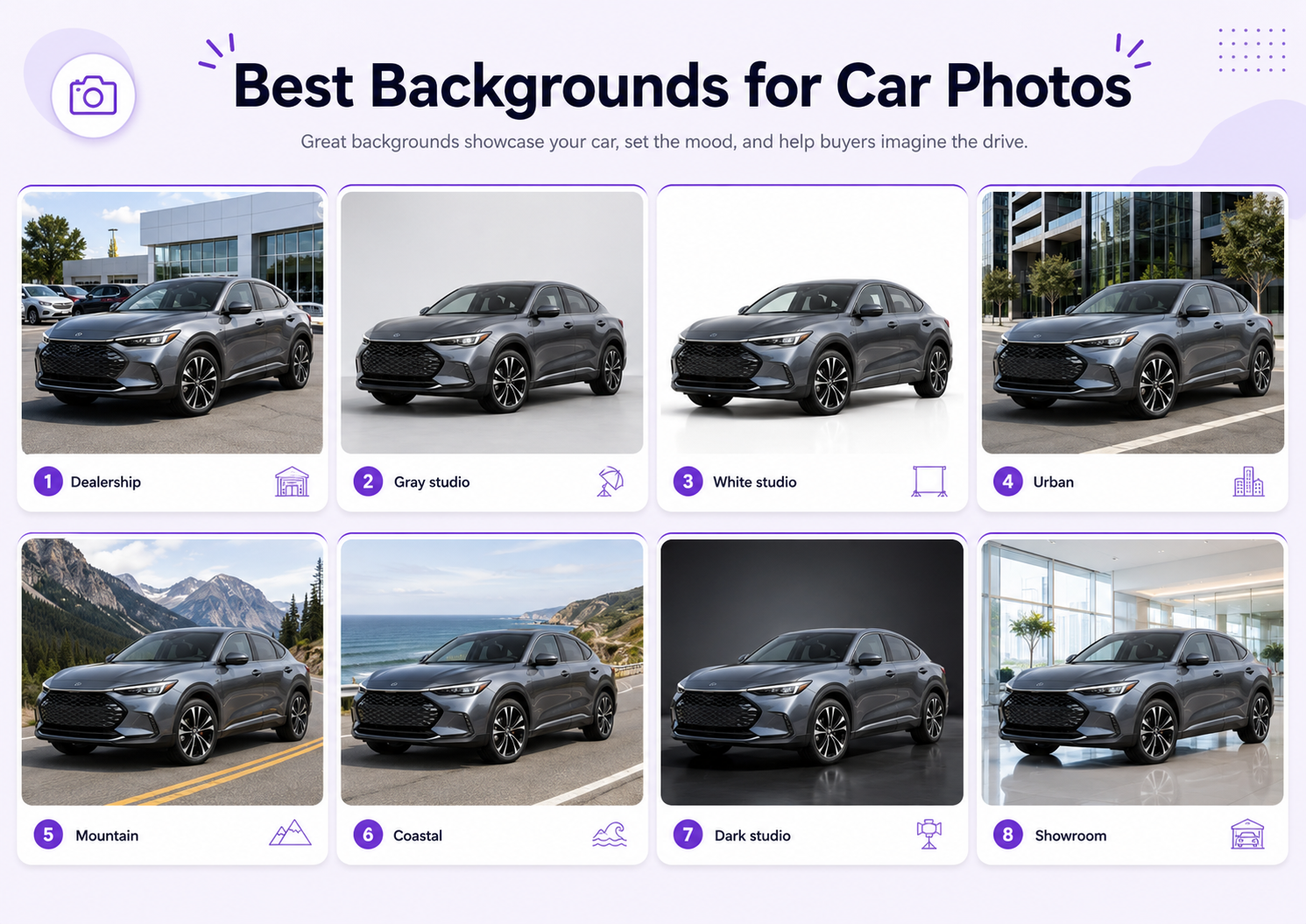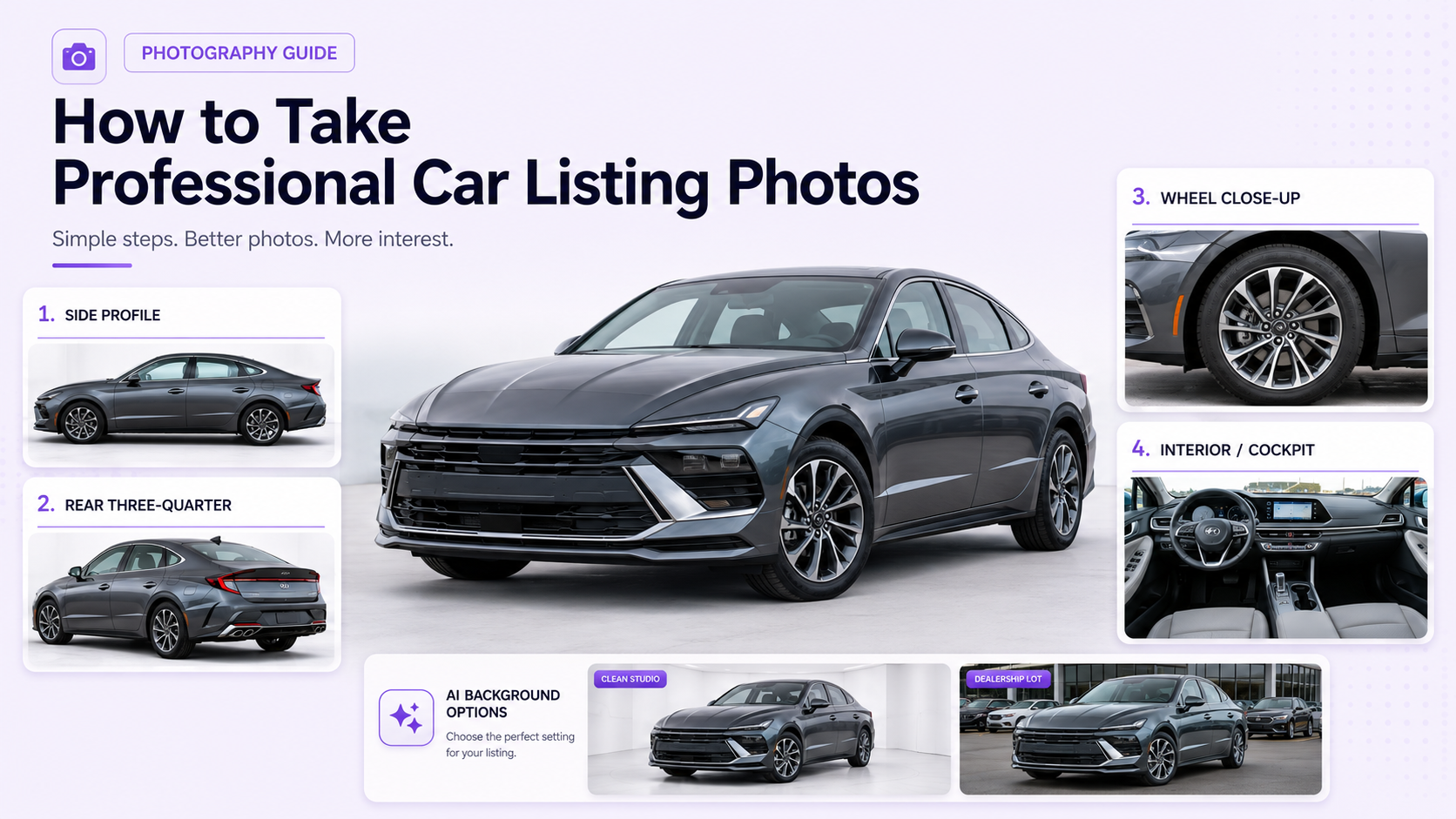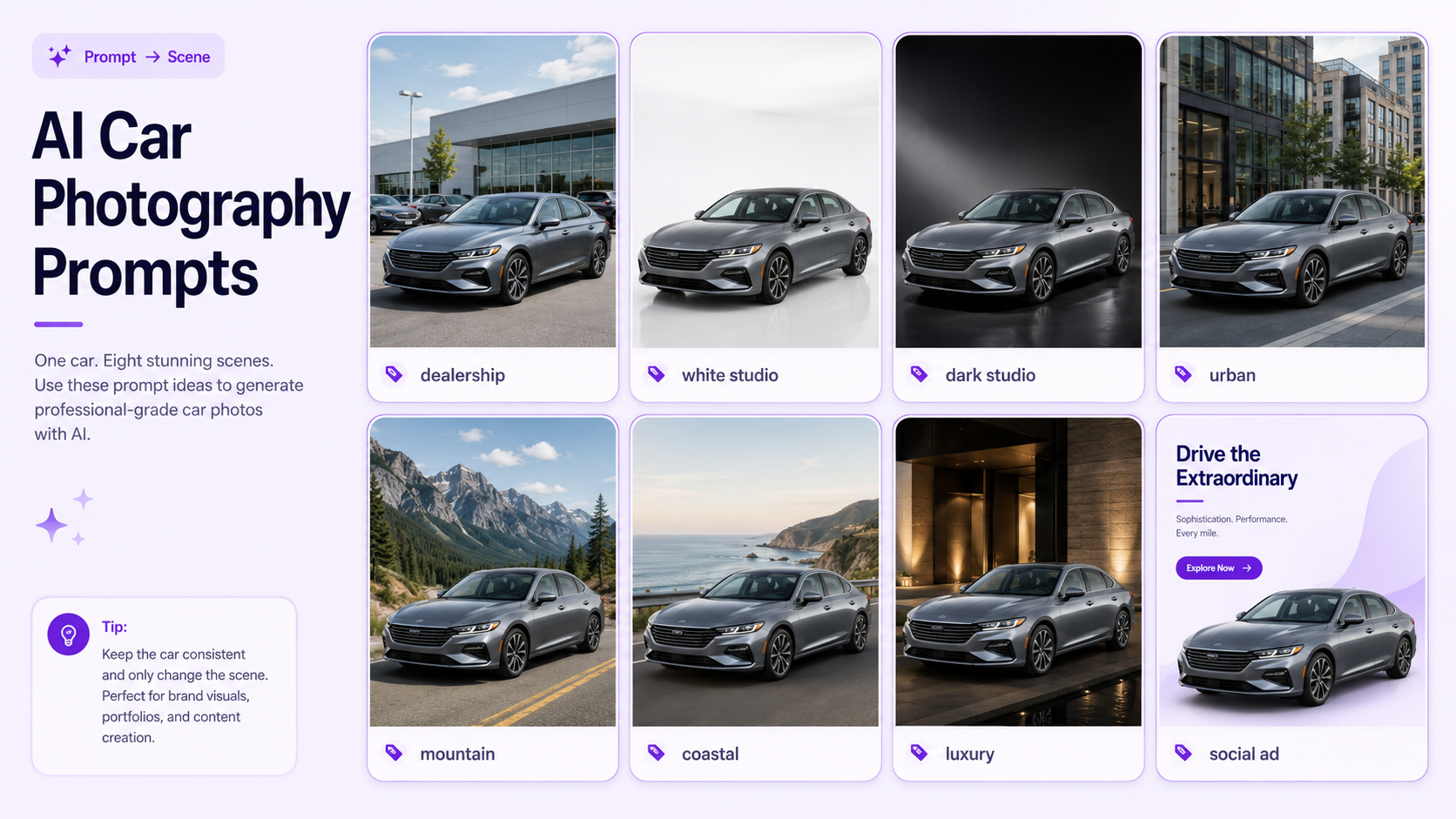
AI car photography prompts can turn one clean vehicle photo into dealership listings, automotive studio images, premium outdoor scenes, social advertisements, website banners, and campaign visuals.
In GenImagePro, upload a clean vehicle photo and use these prompts (or a car template) to create dealership, studio, and campaign car images without redesigning the car.
The prompt should control the environment without redesigning the car. The make, model, generation, body shape, paint color, trim, wheels, lights, windows, mirrors, badges, plate area, interior, proportions, and visible condition must remain accurate.
AI car photography tools use a template-first image-to-image workflow. You can upload a real vehicle, choose an automotive style, and create visual variations without writing every prompt from scratch. Detailed prompts remain useful when you need a specific location, lighting style, composition, or final format.
This guide includes a reusable prompt formula, vehicle-preservation instructions, 30 AI car photography prompts, and a review checklist for realistic automotive results.
How to Write an AI Car Photography Prompt
A useful prompt describes the source vehicle, intended use, background, ground surface, lighting, camera angle, composition, atmosphere, and details that must remain unchanged.
Begin with the final purpose. Car listing photos need clarity and accurate condition. A dealership banner needs consistent branding and text space. A luxury campaign can use stronger lighting and atmosphere.
Then describe the scene and camera. Include terms such as front three-quarter view, side profile, eye-level camera, moderate focal length, centered composition, or wide hero layout.
Finish with a preservation instruction. This is essential when the uploaded vehicle is the real product being advertised.
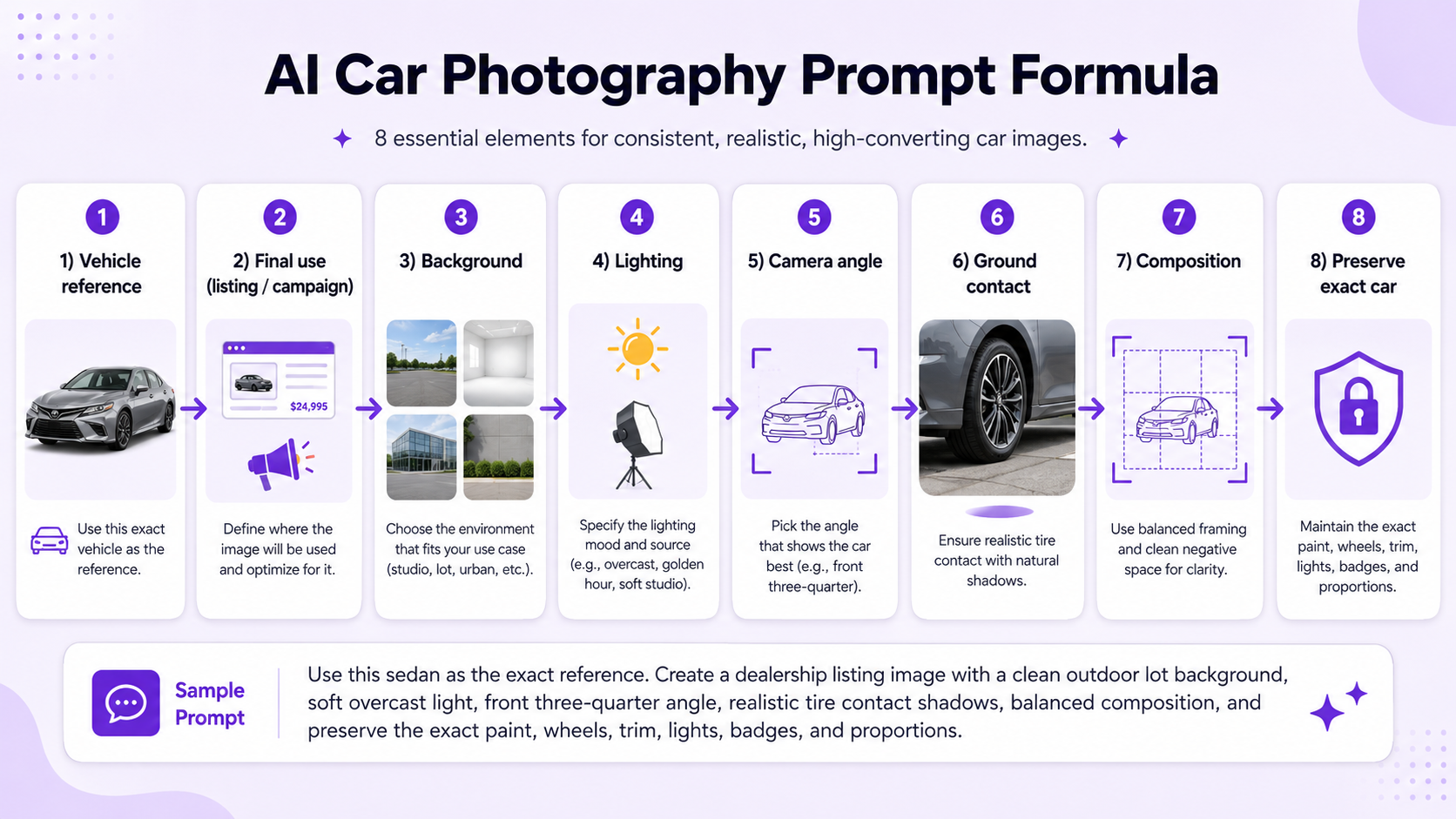
Car Prompt Formula
Vehicle reference + final use + background + lighting + camera angle + ground contact + composition + atmosphere + exact details to preserve.
For example: Use the uploaded vehicle as the exact reference. Create a clean dealership listing image with neutral architecture, soft overcast daylight, a front three-quarter view, realistic tire contact shadows, and balanced negative space. Preserve every vehicle detail.
What AI Must Preserve
- Make, model, generation, body type, and trim level.
- Paint color, finish, panel shape, proportions, and ride height.
- Wheel design, tire size, brake details, and vehicle stance.
- Headlights, taillights, grille, mirrors, windows, badges, and plate area.
- Visible interior color, dashboard, seats, and cabin details.
- Existing scratches, dents, wheel damage, or other relevant condition details.
- Camera angle and scale of the uploaded vehicle.
Car Listing and Marketplace Prompts
1. Clean Marketplace Listing
Use the uploaded vehicle as the exact reference. Create a clean marketplace listing image on neutral paving with a simple light-gray background, soft overcast daylight, a front three-quarter view, realistic tire contact shadows, and no distracting objects. Preserve the exact car and visible condition.
2. Private Seller Outdoor Listing
Place the uploaded car in a quiet open paved area with soft natural daylight, minimal background detail, accurate paint color, and a clear front three-quarter composition. Keep the make, model, body, wheels, lights, trim, badges, windows, and condition unchanged.
3. Side Profile Listing
Create a professional side-profile listing image with the vehicle centered on clean asphalt, a neutral background, level camera height, straight wheels, soft light, and complete visibility from bumper to bumper. Preserve every vehicle detail.
4. Rear Three-Quarter Listing
Create a clear rear three-quarter listing image with neutral paving, soft daylight, realistic shadows, visible taillights, rear bumper, side panels, and rear wheel. Keep the exact body, paint, trim, badges, lights, wheels, and condition.
5. White Background Marketplace Image
Place the uploaded vehicle on a clean white-to-light-gray background with a realistic floor shadow, centered composition, accurate reflections, and clear edge separation. Preserve the exact vehicle without changing any body or wheel details.
6. Used-Car Inventory Standard
Create a consistent used-car inventory image with a light-gray dealership background, soft overcast lighting, standardized front three-quarter angle, equal margins, realistic tire contact, and accurate vehicle color. Keep all real condition details visible.
Dealership and Showroom Prompts
7. Modern Dealership Exterior
Place the uploaded car in front of a clean modern dealership with neutral architecture, glass details, soft daylight, restrained signage, realistic pavement, and a polished front three-quarter composition. Preserve the exact vehicle.
8. Bright Showroom
Place the uploaded vehicle inside a bright modern showroom with glass walls, clean flooring, soft diffused lighting, controlled reflections, and a centered premium composition. Keep the exact paint, body, wheels, lights, windows, badges, and proportions.
Create a premium vehicle delivery image inside a clean showroom with subtle architectural lighting, polished but realistic floor reflections, soft shadows, and space around the car for dealership branding. Preserve every vehicle detail.
10. Dealer Website Inventory Card
Create a clean dealership website image with a neutral gray studio-showroom background, even lighting, centered vehicle, consistent scale, and simple negative space. Keep the source car unchanged.
11. Dealership Finance Promotion
Place the exact uploaded vehicle in a clean dealership environment with the car positioned on the right, wide empty space on the left for finance text, soft daylight, realistic ground contact, and accurate vehicle details.
Create a square dealership social media image with a clean showroom background, premium lighting, clear vehicle separation, and restrained branded color accents in the environment. Preserve the real car exactly.
Automotive Studio Prompts
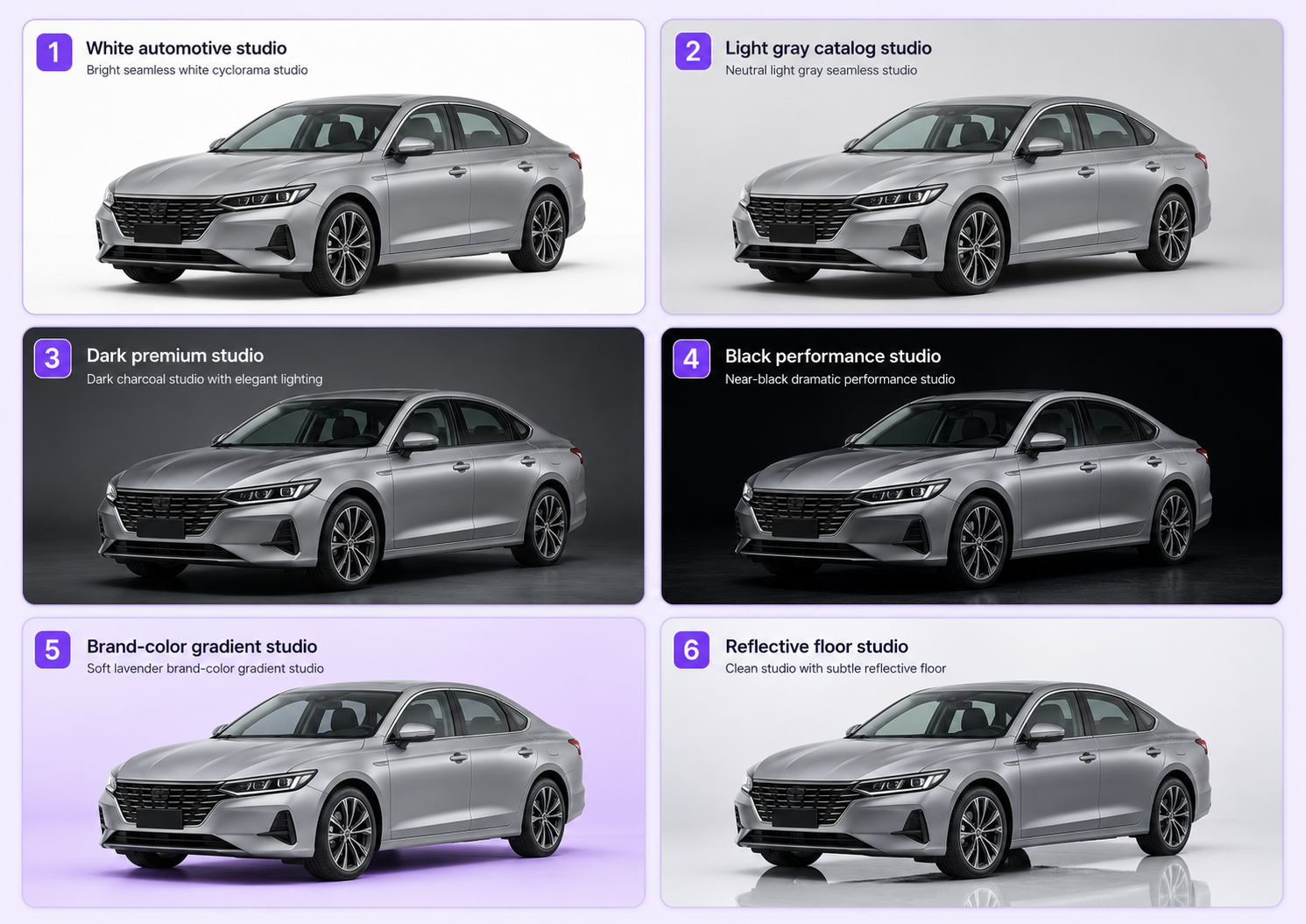
13. White Automotive Studio
Create a professional automotive studio image with a white-to-light-gray seamless background, broad diffused lighting, a soft realistic floor shadow, controlled paint reflections, and a balanced front three-quarter view. Keep the exact vehicle unchanged.
14. Light Gray Catalog Studio
Place the uploaded car in a light-gray catalog studio with even softbox lighting, accurate paint color, subtle floor gradient, clear body definition, and centered listing composition. Preserve every wheel, light, badge, window, and body detail.
Place the uploaded vehicle in a deep charcoal automotive studio with controlled rim lighting, subtle floor reflection, premium contrast, realistic tire contact, and a dramatic but accurate three-quarter view. Keep the exact car unchanged.
16. Black Background Performance Studio
Create a black studio image with focused edge lighting, visible body contours, controlled highlights on the paint, realistic glass reflections, and a low but natural camera angle. Preserve the exact proportions, wheels, lights, trim, and badges.
17. Brand-Color Gradient Studio
Place the uploaded vehicle against a subtle brand-color gradient studio background with soft diffused light, realistic ground shadow, centered composition, and clean text space. Do not alter the vehicle color or details.
18. Reflective Floor Studio
Create a premium studio with a restrained reflective floor, soft overhead lighting, clean background gradient, realistic reflection strength, and centered automotive composition. Preserve the exact source vehicle.
Outdoor and Lifestyle Prompts
19. Open Country Road
Place the uploaded vehicle on a quiet open country road with soft natural daylight, restrained scenery, accurate road perspective, realistic tire contact, and a front three-quarter composition. Keep the exact car and paint color unchanged.
20. Mountain Road
Place the uploaded SUV or performance vehicle on a clean mountain road with dramatic but realistic terrain, soft directional light, natural atmospheric depth, and accurate ground contact. Preserve the real vehicle, wheels, trim, and proportions.
21. Coastal Road
Place the uploaded vehicle on a bright coastal road with pale sky, distant sea, clean pavement, soft daylight, realistic reflections, and an elegant lifestyle composition. Keep every vehicle detail unchanged.
22. Forest Road
Place the uploaded car on a quiet tree-lined road with soft diffused light, restrained green reflections, natural road texture, and clear body separation. Preserve the exact paint, wheels, lights, windows, and proportions.
23. Desert Landscape
Place the uploaded vehicle in a minimal desert landscape with a clean paved road, warm but accurate light, long natural shadows, open negative space, and realistic tire contact. Keep the real vehicle unchanged.
24. Modern Urban Street
Place the uploaded car on a clean modern urban street with simple architecture, limited traffic, soft daylight, controlled reflections, and a premium three-quarter composition. Preserve the exact vehicle.
Luxury and Campaign Prompts
25. Luxury Architecture Campaign
Place the uploaded vehicle beside refined modern architecture with stone, glass, and clean geometric lines, premium soft lighting, realistic reflections, and generous negative space. Keep the exact car unchanged.
26. Night City Campaign
Place the uploaded vehicle in a restrained night city environment with realistic street lighting, controlled blue and warm reflections, visible body details, accurate glass, and natural tire shadows. Preserve every vehicle feature.
27. Executive Hotel Entrance
Place the uploaded luxury car at a refined hotel entrance with clean stone paving, warm architectural lighting, realistic reflections, and a premium arrival composition. Keep the exact make, body, wheels, lights, badges, and paint.
28. Performance Launch Visual
Create a high-end performance launch image with a dark architectural background, focused rim lighting, subtle atmospheric depth, clean ground, and a dynamic but undistorted three-quarter angle. Preserve the exact vehicle.
29. Wide Website Hero
Create a wide automotive website hero image with the uploaded vehicle positioned on the right, a clean premium road or studio environment, soft directional light, realistic ground contact, and large negative space on the left for headline and CTA.
Create a vertical 9:16 automotive advertisement with the exact uploaded vehicle centered in the lower half, a clean premium background, strong but realistic lighting, generous space above for copy, and accurate vehicle details.
How to Use These Prompts in GenImagePro
Upload a clear vehicle photo
Upload a sharp photo where the complete vehicle is visible and not blocked by people, poles, or other cars.
Pick a car template
Choose the closest GenImagePro car photography template first. Templates can handle common workflows such as clean listings, dealership visuals, studio images, outdoor scenes, and premium campaigns.
Add a custom prompt
Add a prompt when you need a specific location, lighting style, crop, or text-space layout. Generate several variations rather than relying on one result.
Compare with the source
Compare every output with the source image before publishing. Check the wheels, paint, lights, windows, mirrors, grille, badges, plate area, body lines, and proportions.
Export for each channel
Create separate exports for marketplace listings, dealership websites, social posts, paid advertisements, and website banners.
Common AI Car Prompt Mistakes
Using a Vague Prompt
A request such as make this car look better gives the AI too much freedom. Describe the scene, light, camera, ground, and details to preserve.
Changing Too Many Elements
Changing the background, wheels, paint, body kit, lighting, angle, and weather together increases the risk of an inaccurate vehicle.
Ignoring Ground Contact
Ask for realistic tire contact shadows and an aligned ground plane so the car does not float or sink.
Forgetting Paint Accuracy
Background light can make the real paint appear warmer, cooler, darker, or more saturated.
Using Extreme Camera Angles
Very low or wide views can distort the grille, wheels, roofline, cabin, and body length.
Hiding Real Condition
Do not ask AI to remove dents, scratches, wheel damage, warning lights, or other relevant defects from a sales listing.
AI Car Photography Review Checklist
- Compare the make, model, body shape, paint color, trim, wheels, lights, glass, mirrors, badges, and plate area with the source.
- Check tire contact, shadow direction, road perspective, floor reflection, and vehicle scale.
- Inspect body lines, panel gaps, grille, doors, bumpers, wheel arches, and glass for warping.
- Review the background for duplicated objects, impossible architecture, fake text, and inconsistent lighting.
- Confirm that visible damage and condition remain accurate for listing images.
- Export the correct aspect ratio and crop for the intended platform.
Final Recommendation
The best AI car photography prompts are specific about the intended use and conservative about the vehicle itself.
Describe the background, lighting, camera angle, ground surface, composition, and atmosphere. Then explicitly preserve every important vehicle detail.
GenImagePro makes this process faster with ready-made automotive templates for listings, dealerships, studios, outdoor scenes, social content, and premium campaigns. Upload the real car, choose a style, refine it with a prompt when needed, and review the result against the source.
Adapt Prompts to Different Vehicle Types
The same background prompt can produce very different results depending on the vehicle. Add one short sentence that explains the intended positioning without asking the AI to alter the actual car.
SUVs and Off-Road Vehicles
Use mountain roads, forests, open landscapes, industrial areas, or clean adventure settings. Keep the real ground clearance, tires, wheels, roof rails, body cladding, and stance unchanged.
Sports and Performance Cars
Use dark studios, modern architecture, coastal roads, restrained night scenes, or performance launch environments. Avoid extremely low camera angles that enlarge the grille, wheels, or front bumper.
Luxury Vehicles
Use premium architecture, refined hotel entrances, dark studios, polished showrooms, and wide editorial compositions. Keep the treatment restrained so the vehicle remains the visual focus.
Family and Economy Cars
Use bright dealerships, neutral paved areas, suburban streets, open roads, and practical marketplace scenes. Clear condition and accurate color are more important than cinematic atmosphere.
Classic Cars
Use restrained heritage architecture, countryside roads, elegant studios, or period-compatible urban settings. Do not modernize the wheels, lights, chrome, trim, body shape, or interior.
Add Negative Instructions
Negative instructions tell the generator what must not appear. They are useful when the scene repeatedly creates the same errors.
Keep negative instructions focused. A very long list can make the prompt harder to follow. Prioritize vehicle identity, sales accuracy, ground contact, and the recurring errors visible in previous generations.
FAQ
What should an AI car photography prompt include?
Include the exact vehicle reference, final use, background, lighting, camera angle, ground surface, composition, and details that must remain unchanged.
Can AI create professional car listing photos?
Yes. AI can create clean marketplace, dealership, studio, and outdoor listing variations from a real vehicle photo.
How do I stop AI from changing the car?
Tell it to preserve the exact make, model, body, paint, trim, wheels, lights, windows, mirrors, badges, plate area, proportions, and condition.
What is the best AI car prompt for dealerships?
Use a clean dealership or light-gray studio prompt with consistent camera angle, scale, lighting, margins, and realistic tire shadows.
Can AI create luxury car campaign images?
Yes. Use dark studios, premium architecture, night city scenes, hotel entrances, coastal roads, or wide hero layouts.
Can I use GenImagePro with templates and these prompts?
Yes. GenImagePro offers ready-made car photography templates, and you can paste or adapt any prompt from this guide when you need a specific location, lighting style, crop, or campaign look.
Why does my AI car image look fake?
Common causes include changed wheels, incorrect paint, warped body lines, unrealistic shadows, poor ground contact, and mismatched reflections.
Can I use AI car images in a sales listing?
Yes, provided the vehicle remains accurate and the image does not hide defects, alter specifications, or misrepresent the real car.