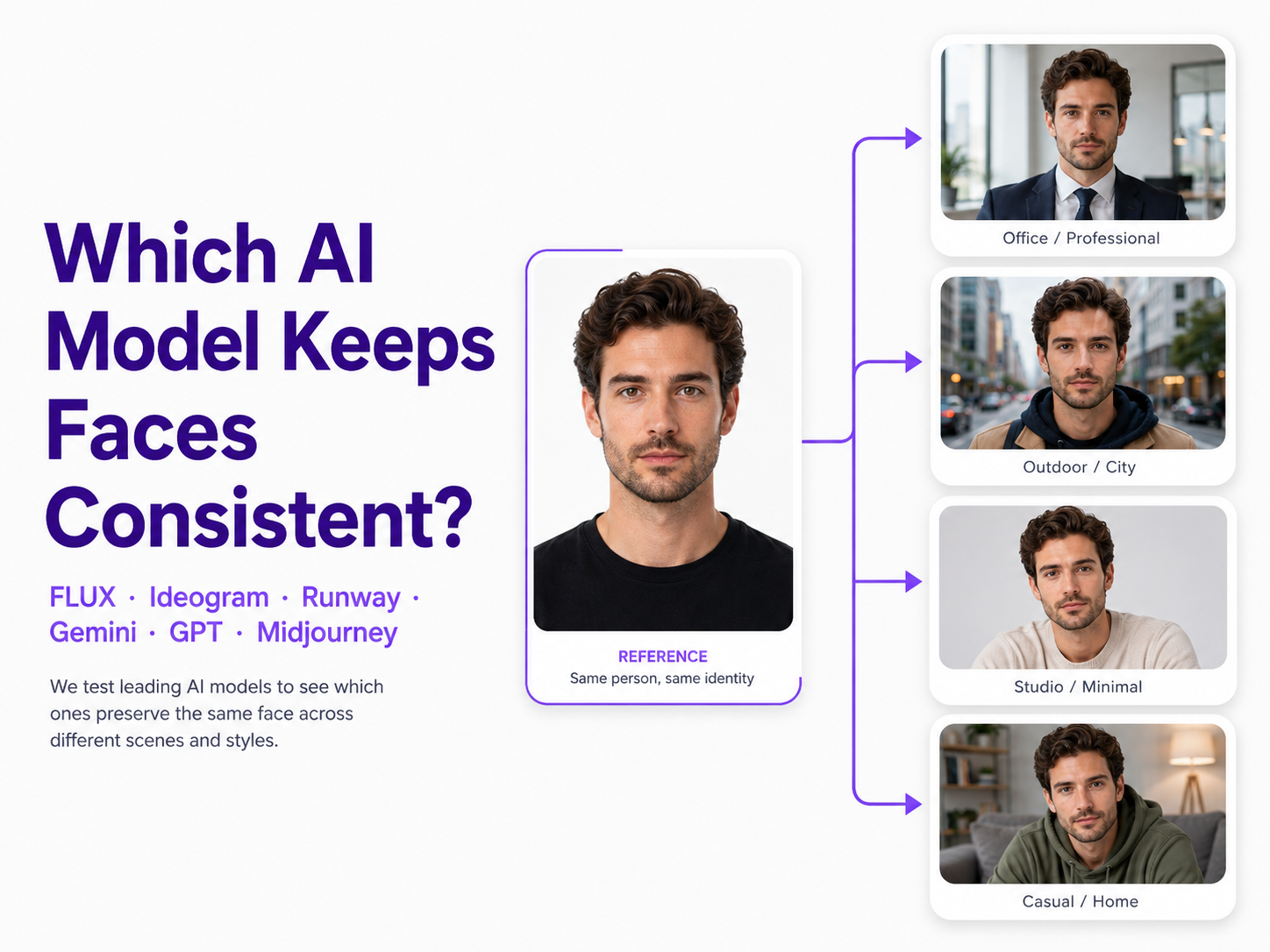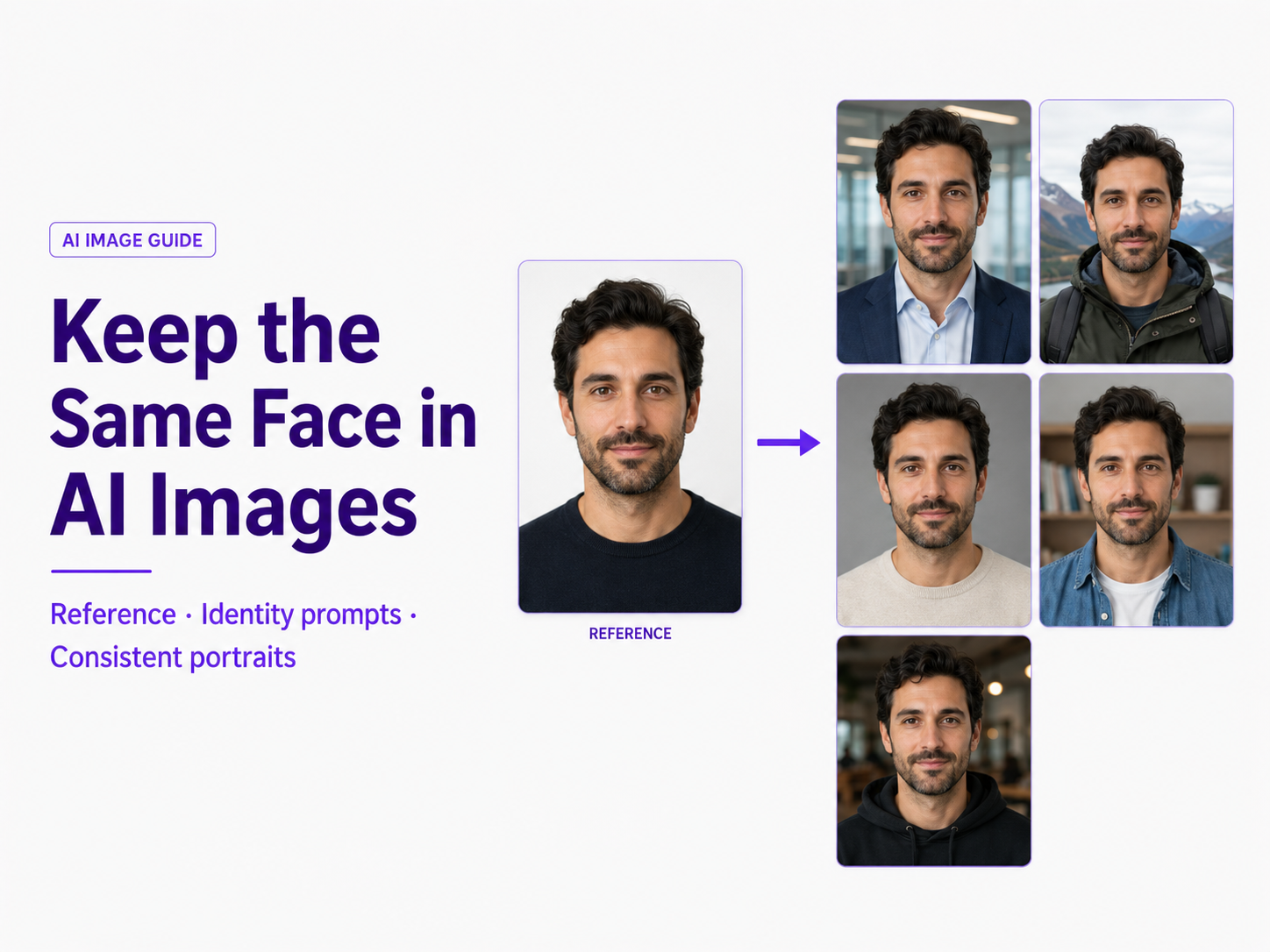
You generate one AI portrait that looks perfect. Then you ask for the same person in a different outfit, location, or pose—and suddenly the eyes change, the jaw becomes narrower, the nose looks different, or the result appears to be an entirely different person.
This is one of the most common problems in AI image generation. A text prompt can describe what a person looks like, but a description alone does not reliably define one exact facial identity. If you need the same recognizable person across multiple images, you need to give the model a stronger identity anchor.
The most reliable workflow is to start with a clear reference image, explicitly tell the AI which characteristics must remain unchanged, and vary the background, clothing, pose, lighting, or camera treatment around that identity instead of asking the model to recreate the person from scratch.
Quick Answer: How Do You Keep the Same Face in AI Images?
Use the same clear reference photo for each generation and tell the AI to preserve the exact person, facial identity, face shape, eyes, nose, lips, jawline, skin tone, age, and other recognizable characteristics. Keep this identity instruction stable while changing only the parts of the image that actually need to change.
For the strongest consistency, start with a front-facing or three-quarter portrait in even lighting, keep important facial features unobstructed, use an image-to-image or character-reference workflow when available, and avoid changing the pose, hairstyle, expression, age, lighting, camera angle, and visual style all at once.
Why Does AI Change the Face Between Images?
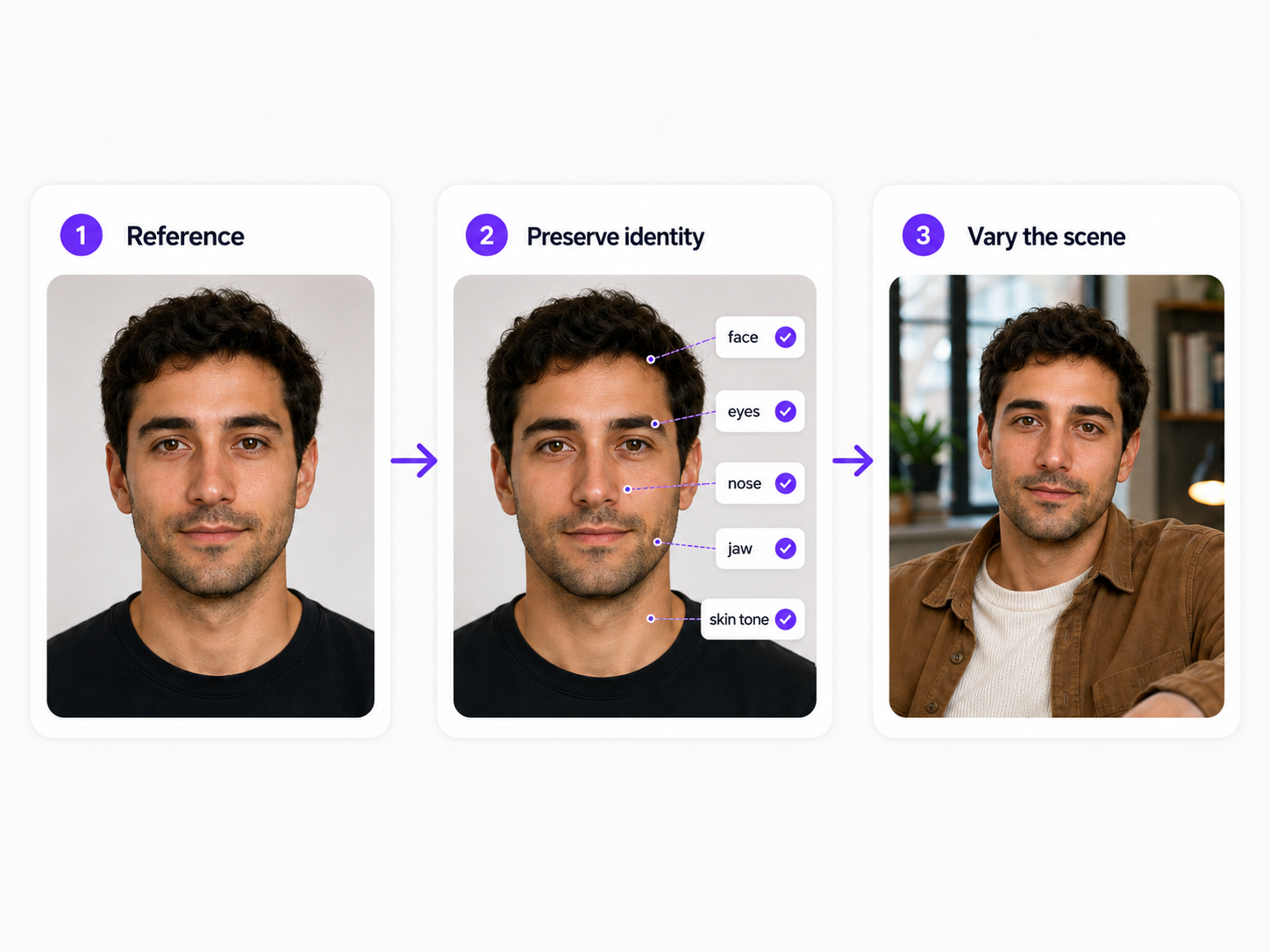
Most generative image workflows do not automatically remember the exact person from a previous generation. When you submit another text prompt, the model can create a new face that matches the same general description without reproducing the same identity.
For example, a prompt describing a woman with brown eyes, dark hair, defined cheekbones, and an oval face does not describe one unique person. Thousands of different faces could satisfy those characteristics.
This is why repeatedly pasting the same character description may keep broad characteristics consistent while details such as eye spacing, nose shape, lip proportions, cheek structure, forehead height, or jawline continue to drift.
What Is Identity Drift?
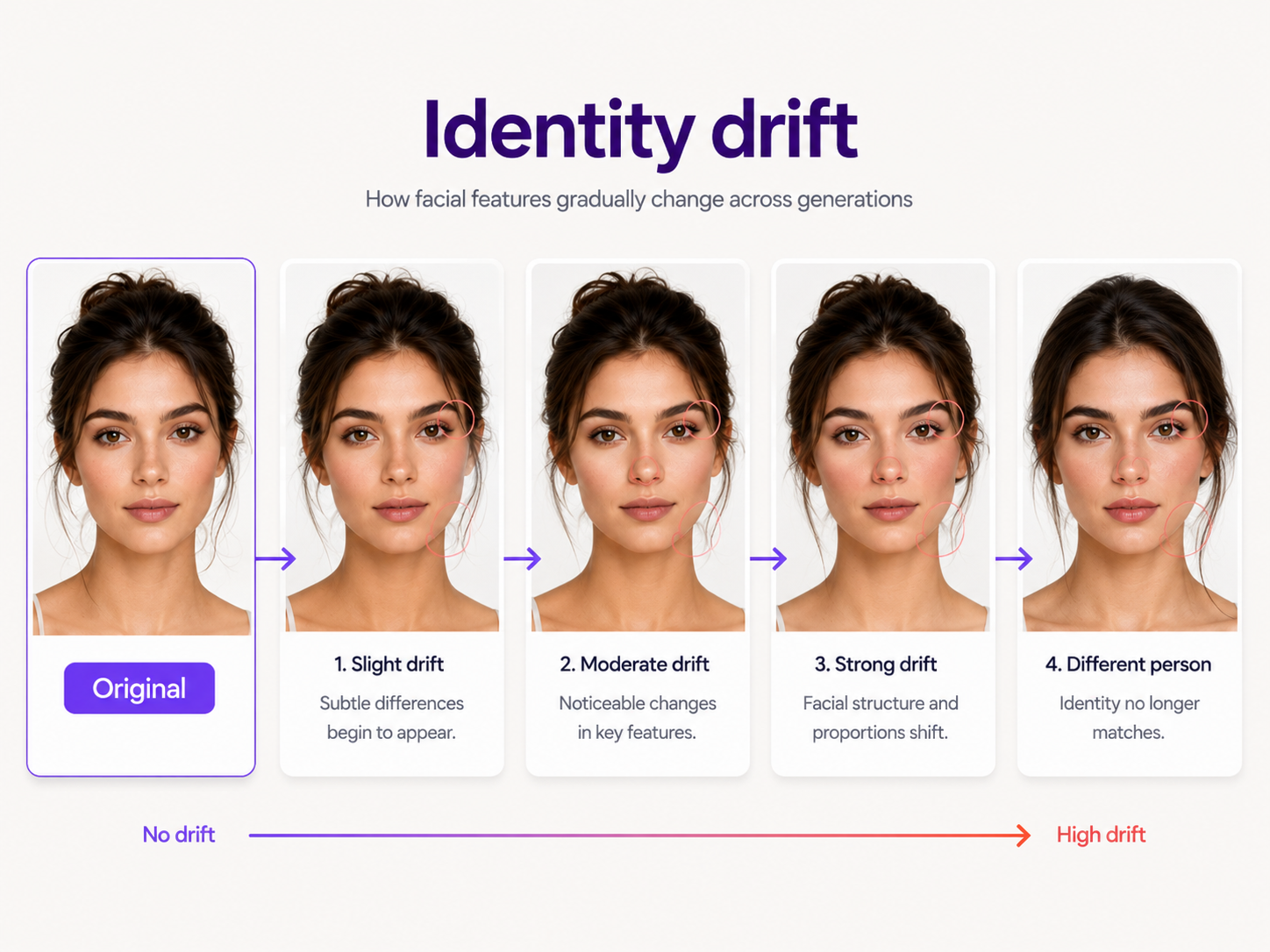
Identity drift happens when an AI-generated person gradually stops resembling the original subject. The change can be obvious, such as an entirely different face, or subtle enough that individual images look believable while the complete series no longer looks like the same person.
Common signs include changes in eye shape or spacing, nose width, lip shape, jaw structure, cheekbones, skin tone, apparent age, hairline, facial proportions, freckles, or other distinctive features.
1. Use a Reference Image Instead of Relying on Text Alone
A reference image gives the AI visual information that is difficult to communicate through words. Instead of describing a face from memory, the model can use the actual facial proportions, eyes, nose, mouth, jaw, hair, skin tone, and other visible identity cues as guidance.
Whenever the platform supports image-to-image generation, character references, identity references, or similar reference-image controls, use them when facial consistency matters.
The source image should be treated as the identity anchor. Your prompt can then explain what is allowed to change and, just as importantly, what must stay the same.
What Makes a Good Face Reference?
Choose an image where the person is clearly recognizable. A sharp portrait with balanced lighting and a visible face generally provides a stronger identity reference than a dramatic photograph with motion blur, heavy shadows, or facial obstructions.
A useful reference usually has a clearly visible face, sharp eyes, natural facial proportions, relatively even lighting, enough resolution to show facial details, and either a front-facing or moderate three-quarter camera angle.
Reference Images to Avoid
Avoid using a heavily filtered selfie, extremely low-resolution photo, strong fisheye or wide-angle portrait, severe side profile, motion-blurred image, or photo where sunglasses, hair, hands, masks, or shadows hide important facial features.
The less information the source contains about the real face, the more information the model has to invent.
2. Explicitly Tell the AI What Must Stay the Same
Do not assume that uploading a reference automatically tells the generator which parts are protected. Clearly separate the fixed identity from the requested transformation.
A simple instruction can specify that the uploaded image is the exact identity reference and that the generation should preserve the same person, facial structure, skin tone, eyes, nose, mouth, jawline, age, and other recognizable facial characteristics.
A Reusable Same-Face Prompt
You do not need to list every facial feature in every simple edit, but the more aggressively you are changing the original image, the more useful explicit preservation instructions become.
3. Separate Identity From the Scene
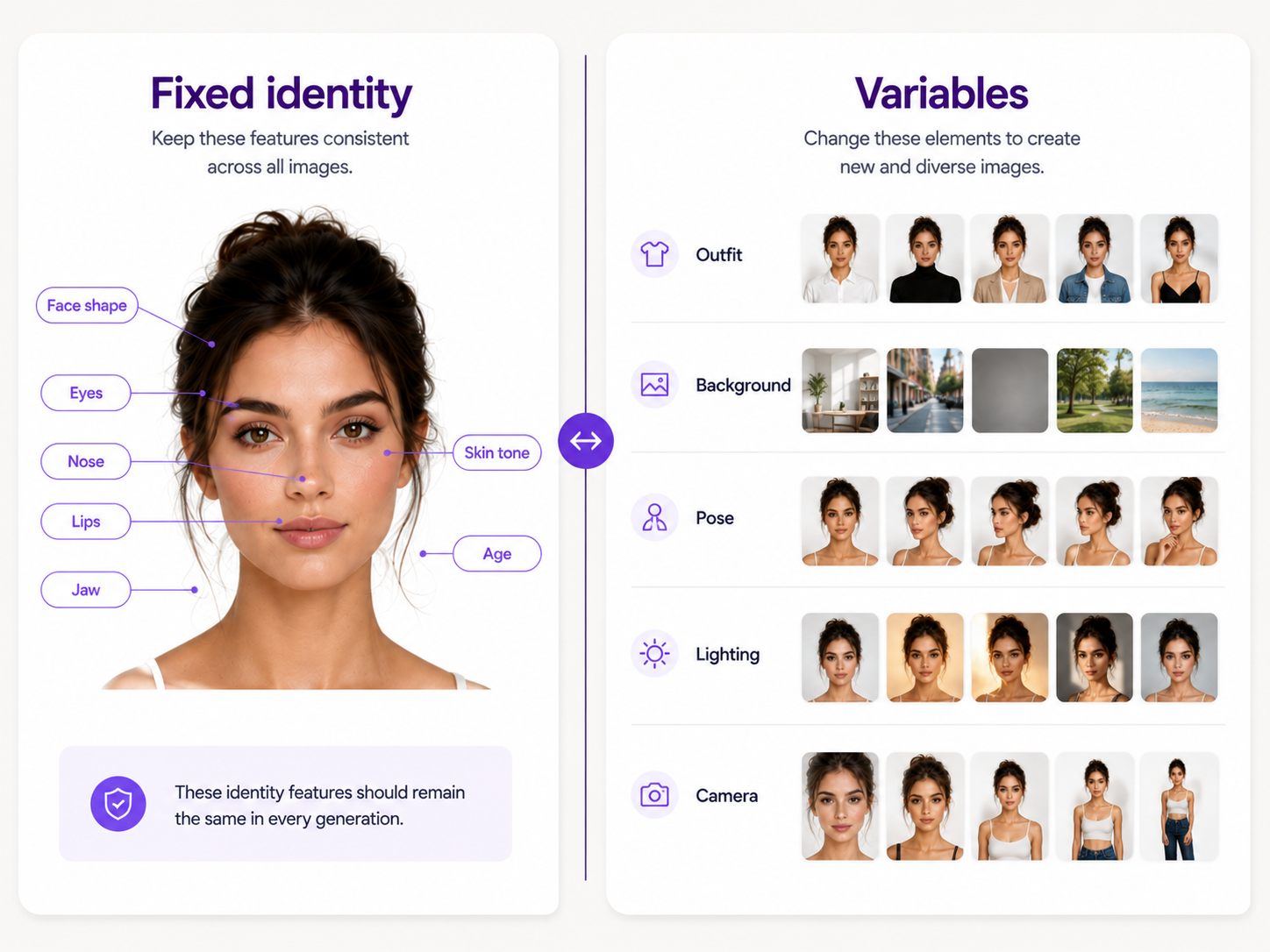
A useful prompt distinguishes between what belongs to the person and what belongs to the new image. Think of the prompt as two groups: fixed identity information and changeable scene information.
Identity can include the face, age, skin tone, hairstyle, eye color, facial proportions, and other recognizable features. Variables can include clothing, background, environment, lighting, pose, camera framing, mood, props, and visual treatment.
Example: Change the Background Without Changing the Person
Example: Change the Outfit Without Changing the Face
Example: Create a New Photoshoot With the Same Person
4. Change One Major Variable at a Time
Identity becomes harder to preserve when a prompt asks the model to reinterpret almost everything simultaneously.
Suppose one generation asks for a new hairstyle, dramatic makeup, a different expression, a low camera angle, an evening location, cinematic lighting, a new outfit, and an illustrated visual style. Each instruction pushes the image farther away from the original reference.
A more controlled workflow would change the outfit first, approve the result, then explore another background or pose. This makes it easier to identify which change caused the face to drift.
A Better Order for Creating a Consistent Image Set
Start by proving that the generator can reproduce the identity in a simple portrait. Next test modest camera-angle and expression changes. Then introduce different outfits and backgrounds. Add more dramatic lighting, poses, or visual styles only after you already have several strong images of the same character.
5. Reuse the Same Reference for Every Important Generation
Do not assume a new generation knows which previous result you are referring to when you say 'the same woman' or 'the same man.' Unless the workflow specifically retains character identity, provide the visual reference again.
For a series, use one approved anchor image consistently. This gives every new generation the same starting identity instead of creating a chain where each slightly altered output becomes the reference for the next.
Why Repeatedly Referencing the Previous Output Can Cause Drift
Imagine that generation two changes the jaw slightly. If generation two becomes the reference for generation three, that new jaw can become part of the identity. Generation three might also change the eyes slightly, and the differences can accumulate.
Returning to the strongest original identity reference helps prevent small mistakes from becoming permanent characteristics.
6. Use Multiple References When One Image Is Not Enough
Some AI generators allow multiple reference images. When supported, several photos of the same person can provide more information about facial structure from different angles.
A useful set might contain one clear front-facing portrait, one three-quarter view, and one profile or wider image when body proportions also matter.
However, more references are not automatically better. If one photo contains heavy makeup, another uses a beauty filter, another has very different hair, and another is strongly distorted by perspective, the references can give conflicting information.
When One Reference Is Better
If you already have one clean, high-quality portrait and only need moderate variations, start there. Add more reference images only when the model has difficulty understanding the identity from different angles or when the project requires a wider range of poses.
7. Keep the Base Identity Prompt Consistent
If you use an identity description alongside your reference image, keep that part of the prompt stable across the series.
Repeatedly changing identity language can introduce contradictions. For example, describing the face as angular in one prompt and soft in another gives the model permission to reinterpret facial structure.
Create one reusable identity block and separate it from the scene description. Then modify only the scene block for each new image.
Reusable Prompt Structure
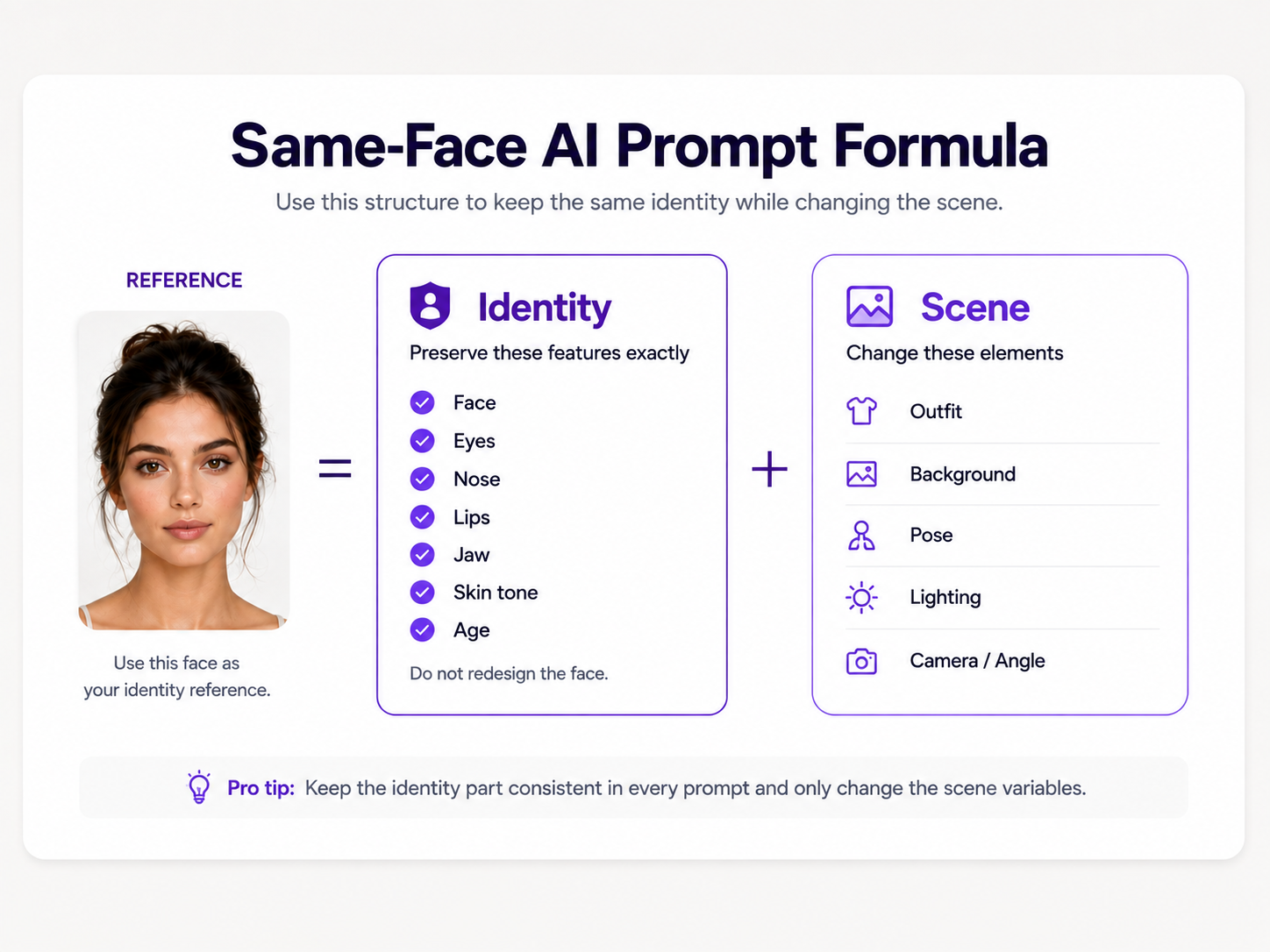
8. Do Not Overdescribe the Face When You Already Have a Reference
Detailed prompts are useful, but excessive facial descriptions can sometimes compete with the actual reference image.
If the uploaded subject already has a defined nose, eye shape, jawline, and facial proportions, you usually do not need to reinvent all those characteristics using aesthetic adjectives.
Use the reference to establish what the person looks like. Use the text prompt primarily to establish what should happen to that person.
9. Be Careful With Age, Makeup, Hair, and Expression Changes
Some changes are more closely connected to perceived identity than others. A new background is relatively independent of the face, while changing age, hairstyle, makeup, facial expression, or head angle directly affects how the person is recognized.
Changing Hairstyle
Hair frames the face and can strongly affect perceived identity. If you want a new hairstyle, explicitly preserve facial features and change only the hair.
Changing Makeup
Makeup prompts can accidentally reshape eyes, lips, cheekbones, or the jaw instead of simply applying cosmetics. State that makeup should follow the person's existing facial structure and that the eyes, nose, lips, face shape, and proportions must remain unchanged.
Changing Expression
Expressions naturally change the geometry of the face. A large smile, open mouth, squint, or dramatic emotion can therefore make consistency more difficult than a neutral expression.
Changing Age
Asking AI to make a person substantially younger or older inherently changes identity cues. If exact likeness is the priority, avoid major age transformations in the same consistency workflow.
10. Keep Camera Changes Controlled
A face seen from the front contains different visual information than the same face seen from a strong profile, overhead angle, or extreme close-up.
If your reference is front-facing and the first new image requests an extreme side angle with dramatic lighting, the AI must infer facial information that the source does not clearly show.
Build toward difficult viewpoints gradually. Start with a front-facing or three-quarter result, then experiment with stronger angles after you have established a set of trustworthy references.
11. Use Image-to-Image When You Need Stronger Preservation
Text-to-image generation asks the model to construct the complete image. Image-to-image generation gives it an existing visual starting point.
That distinction matters when the existing person is important. Starting from the actual portrait can provide direct information about facial identity, pose, composition, clothing, or other details that would otherwise need to be reconstructed.
The amount of preservation still depends on the generator, model, transformation strength, reference controls, and requested change. Image-to-image does not guarantee perfect identity, but it generally gives you a more controlled starting point than describing the person from scratch.
12. Does Using the Same Seed Keep the Same Face?
A seed can help make generation conditions more repeatable in tools that expose seed controls, but it should not be confused with an identity lock.
Keeping the same seed while changing a prompt can sometimes preserve elements of composition or visual structure, depending on the generator. However, substantial prompt, model, aspect-ratio, reference, or parameter changes can still produce a different face.
If facial identity is important, prioritize a dedicated face, character, or reference-image system. Treat seed reuse as an additional consistency control rather than the primary method.
13. Does Repeating the Exact Same Prompt Keep the Same Face?
Usually not reliably. The exact same text prompt can generate multiple people who all satisfy the same description.
A prompt such as 'photorealistic woman with shoulder-length dark hair, brown eyes, warm skin, and an oval face' defines a type of appearance, not one exact human identity.
For repeatable identity, combine stable prompt language with a visual reference or a tool specifically designed for character consistency.
14. Save Your Best Outputs as an Approved Reference Set
Once you generate several images that clearly look like the same person, save the strongest examples instead of treating every successful generation as a one-off.
A small approved reference set can include a clear front view, a three-quarter portrait, a profile, and a wider image when full-body consistency matters.
This becomes especially useful when creating larger projects such as AI photoshoots, advertising campaigns, storyboards, social content series, illustrated stories, AI influencers, or recurring brand characters.
15. Check Facial Consistency Before Approving an Image
A generated portrait can look attractive and realistic while still being the wrong person. Evaluate identity separately from image quality.
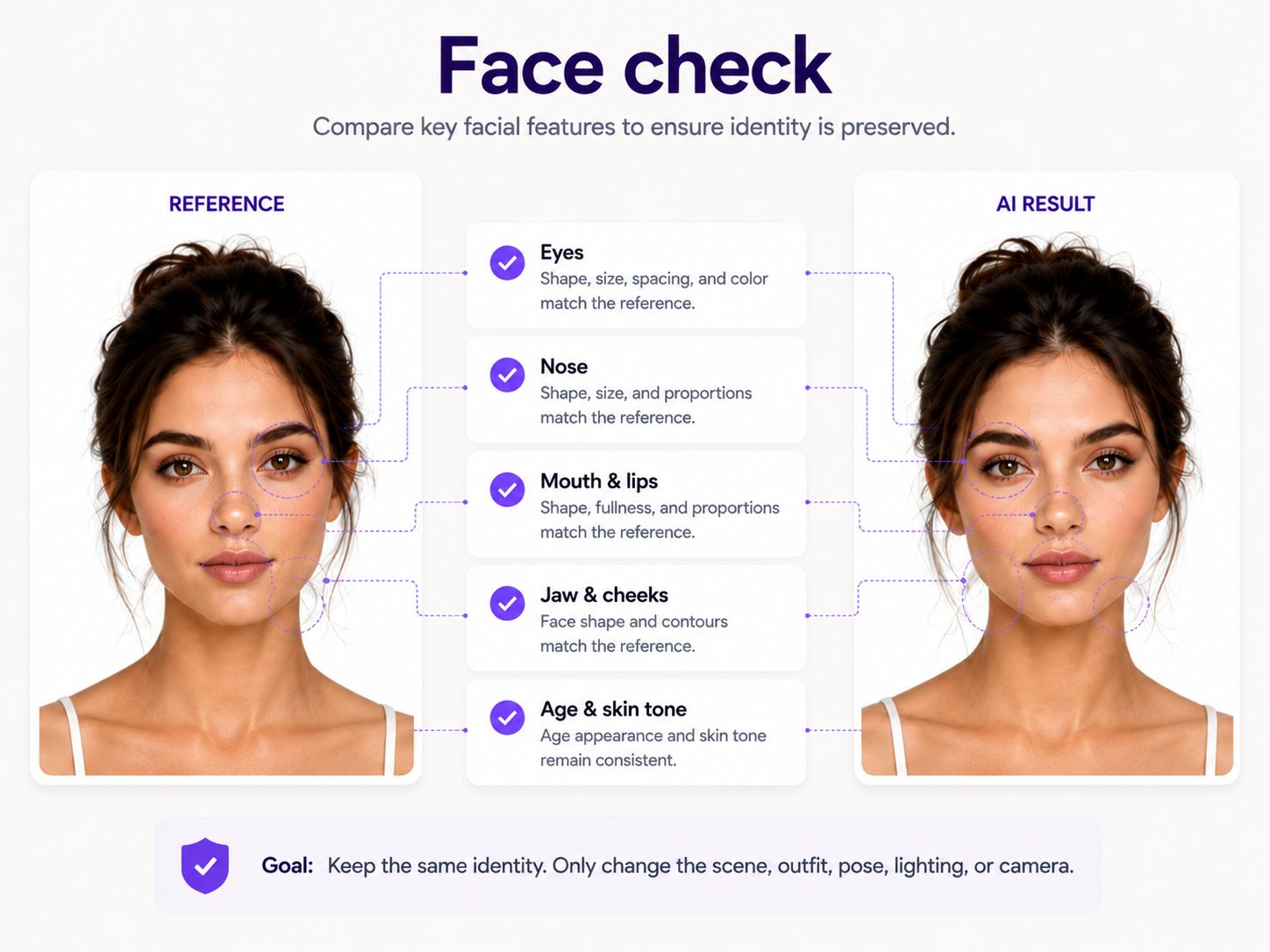
Check the Eyes
Compare eye shape, size, spacing, eyelids, eyebrows, and the relationship between the eyes and surrounding facial structure.
Check the Nose
Look at bridge width, nose length, tip shape, nostril structure, and how the nose connects visually to the rest of the face.
Check the Mouth and Lips
AI can make lips fuller, narrower, wider, or differently shaped while still producing a plausible portrait. Compare proportions rather than only color or makeup.
Check the Jaw and Cheeks
Changes to jaw width, chin length, cheekbone placement, or overall face shape are among the fastest ways to turn a familiar person into a similar-looking stranger.
Check Age and Skin Tone
Make sure the model has not unintentionally aged or de-aged the person, significantly shifted skin tone, or replaced realistic skin characteristics with a generic AI beauty treatment.
Common Reasons Your AI Face Still Changes
Your Reference Image Is Too Weak
A tiny, blurry, filtered, shadowed, or partially hidden face gives the model limited identity information. Start with the clearest portrait available.
You Changed Too Many Things at Once
Large simultaneous changes to pose, expression, hair, makeup, age, camera, outfit, lighting, and style increase the chance of identity drift.
Your Prompt Conflicts With the Reference
If the reference has soft facial features but the prompt requests a sharply sculpted angular face, the generator has to choose between the visual identity and your text instructions.
Your Style Is Too Aggressive
Strong stylization can simplify or reinterpret the facial features that make a person recognizable. Identity preservation becomes more difficult when moving between very different visual styles.
The Face Is Too Small in the Output
Wide scenes give the model fewer pixels to represent detailed facial structure. If consistency matters, create or validate closer portraits before expecting reliable identity in distant full-body scenes.
You Are Using the Wrong Workflow
A general text-to-image generator may produce excellent portraits without being optimized for preserving one exact person. When identity matters, use image-to-image generation, character references, or dedicated identity-preservation controls when available.
Same Face vs. Same Character: What Is the Difference?
Keeping the same face is one part of character consistency. A person can have the correct face but still feel inconsistent if their hairstyle, body proportions, age, wardrobe, tattoos, accessories, or defining visual characteristics change unexpectedly.
For portraits and headshots, facial identity may be enough. For comics, storyboards, AI influencers, campaigns, or recurring characters, you may need a broader character reference that defines both facial identity and persistent non-facial traits.
What Should Stay Fixed for a Consistent AI Character?
Consider preserving facial identity, age range, skin tone, eye color, hair characteristics, body proportions, distinctive marks, recurring accessories, and any wardrobe elements that are part of the character's identity.
How to Keep the Same Face Across Different Outfits
Use the same identity reference and describe the clothing change as an isolated transformation. Explicitly state that the outfit can change while the face, hair, body proportions, skin tone, and other identity details remain unchanged.
Avoid clothing instructions that unintentionally imply a different character. For example, changing age, body type, hairstyle, styling, and outfit simultaneously can push the generation beyond a simple wardrobe change.
How to Keep the Same Face Across Different Backgrounds
Background changes are among the easier consistency tasks because the environment does not inherently require the person to change. Keep the subject reference fixed and make the new environment the primary variable.
If possible, specify lighting that makes sense for the new environment without dramatically changing how the face is illuminated. Extremely colored or directional lighting can change perceived facial structure.
How to Keep the Same Face Across Different Poses
Pose changes become more difficult as the head rotates away from the angle shown in the original reference. Start with moderate pose changes and maintain clear visibility of the face.
If your tool supports multiple identity references, adding another accurate view of the same person can help when producing profiles, three-quarter views, or more varied full-body poses.
How to Keep the Same Face Across Different AI Styles
Changing a realistic portrait into an illustration, anime image, painting, 3D render, or another stylized format requires the AI to reinterpret facial features through a new visual language.
Keep the identity reference active and describe the desired visual style separately. If reference or style strength controls are available, balance them so the new aesthetic does not overpower the identity.
Judge success by recognizability rather than pixel-level similarity. A stylized portrait cannot preserve every realistic facial detail, but it should retain the proportions and distinctive features that make the person identifiable.
A Reliable Same-Face Workflow From Start to Finish
Start with one high-quality reference portrait. Define which identity characteristics must remain fixed. Generate a simple test image before attempting dramatic transformations. Compare the face against the reference. Once the identity is accurate, change one major variable at a time.
Reuse the original reference for future generations, maintain a stable identity prompt, and save successful outputs that show the person clearly from useful additional angles.
When a result looks wrong, do not simply generate dozens of random variations. Identify what changed. Was the angle too extreme? Did the prompt alter age? Did the hairstyle obscure the face? Did a dramatic style overpower the reference? Correcting the cause is more reliable than relying on luck.
When Perfect Face Consistency Is Not Possible
Reference images improve consistency, but generative AI is still generative. Even strong identity-preservation systems can introduce differences, particularly across extreme poses, major style transformations, difficult lighting, low-resolution faces, or complex scenes.
For casual creative work, small variations may be acceptable. For professional campaigns, recurring characters, ecommerce model photography, or projects where the real person's likeness is critical, inspect every final image rather than assuming that reference-based generation guarantees exact preservation.
The Most Important Rule: Give the AI an Identity Anchor
If you remember only one technique, use a reference image. Text can describe a category of face; a reference provides visual information about the specific person you want to preserve.
From there, consistency comes from discipline: keep the identity reference stable, clearly state what must remain unchanged, separate the person from the scene, introduce major changes gradually, and compare every result against the original.
That workflow can be used for professional portraits, AI photoshoots, fashion images, makeup transformations, social media content, advertising concepts, recurring characters, and almost any other project where the same recognizable person needs to appear more than once.
FAQ
How do I keep the same face in AI-generated images?
Use the same clear reference photo for each generation and explicitly tell the AI to preserve the exact person, facial identity, face shape, eyes, nose, lips, jawline, skin tone, age, and other recognizable features. Change the environment, clothing, pose, or lighting around that fixed identity.
Why does AI keep changing my face?
A text prompt usually describes an appearance rather than one exact identity. Without a strong reference image or dedicated character-consistency control, the model can generate a different person who still matches the same description.
Can AI generate the same person in different images?
Yes. Reference-image, image-to-image, and character-reference workflows can preserve a recognizable person while changing the background, clothing, pose, lighting, or visual style. Results can still vary, so important images should be checked against the original reference.
What is the best prompt to keep the same face?
A useful prompt is: 'Use the uploaded portrait as the exact identity reference. Keep the same person, facial identity, face shape, eyes, eye spacing, nose, lips, jawline, cheek structure, skin tone, age, and natural facial proportions unchanged. Change only [requested element].'
Does using the same prompt keep the same face?
Not reliably. The same text description can generate many different people who satisfy the prompt. A visual reference or dedicated character-reference feature provides a much stronger identity anchor.
Does using the same seed keep the same face?
A seed may improve repeatability in generators that expose seed controls, but it is not a reliable replacement for a reference image. Changing prompts, models, aspect ratios, styles, or other settings can still change the face.
What photo should I use as a face reference?
Use a sharp, well-lit portrait with the face clearly visible. Front-facing or moderate three-quarter views usually work well. Avoid heavy beauty filters, strong shadows, motion blur, sunglasses, hair covering the face, and extreme camera angles.
Can I keep the same face but change the outfit?
Yes. Use the original portrait as the identity reference and instruct the AI to replace only the clothing while preserving the same person, face, hairstyle, skin tone, age, and body proportions.
Can I keep the same face but change the background?
Yes. Background replacement is one of the more straightforward identity-preserving transformations because the environment can change independently of the person's facial structure.
Can I keep the same face in different poses?
Yes, although consistency becomes more difficult with extreme camera or head angles. Start with moderate pose changes and use additional reference views when the generator supports multiple references.
Can I keep the same person across different AI art styles?
Yes, but stronger stylization can reinterpret facial details. Keep the identity reference active, separate the style instruction from the character description, and judge the result by recognizable facial proportions and distinctive features.
Should I use one or multiple reference photos?
Start with one strong reference. Multiple images can help when you need different viewing angles or full-body consistency, but only use additional references that clearly show the same person without conflicting filters, hairstyles, ages, or facial distortions.
What is identity drift in AI images?
Identity drift is the gradual change of a generated person's facial characteristics across images. Eye shape, nose structure, jawline, lips, age, skin tone, or other features may shift until the subject no longer looks like the same person.
Is image-to-image better for keeping the same face?
Image-to-image generation is generally a stronger starting point when preserving an existing person because the generator receives direct visual information from the original portrait instead of reconstructing the subject from text alone.