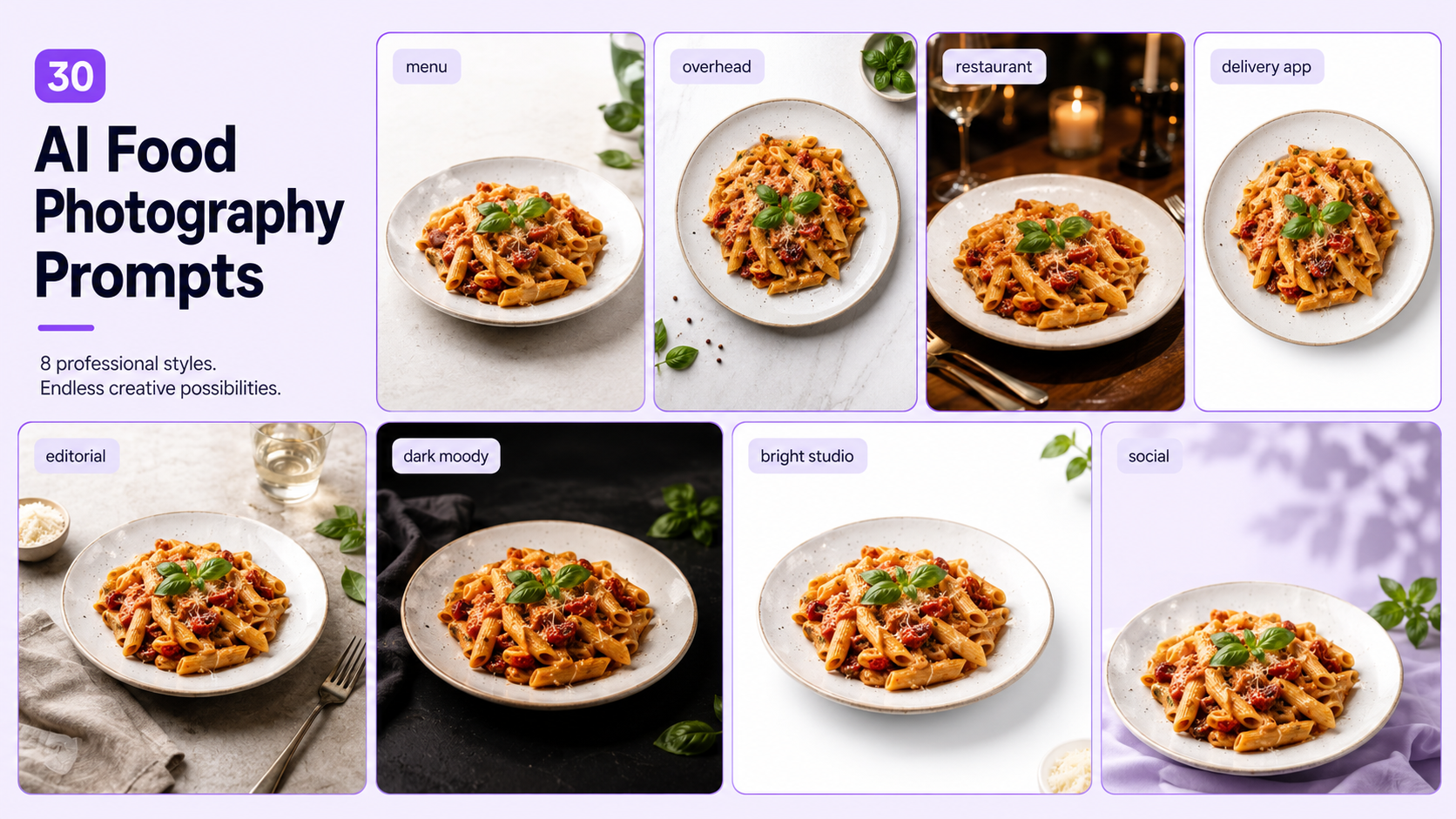
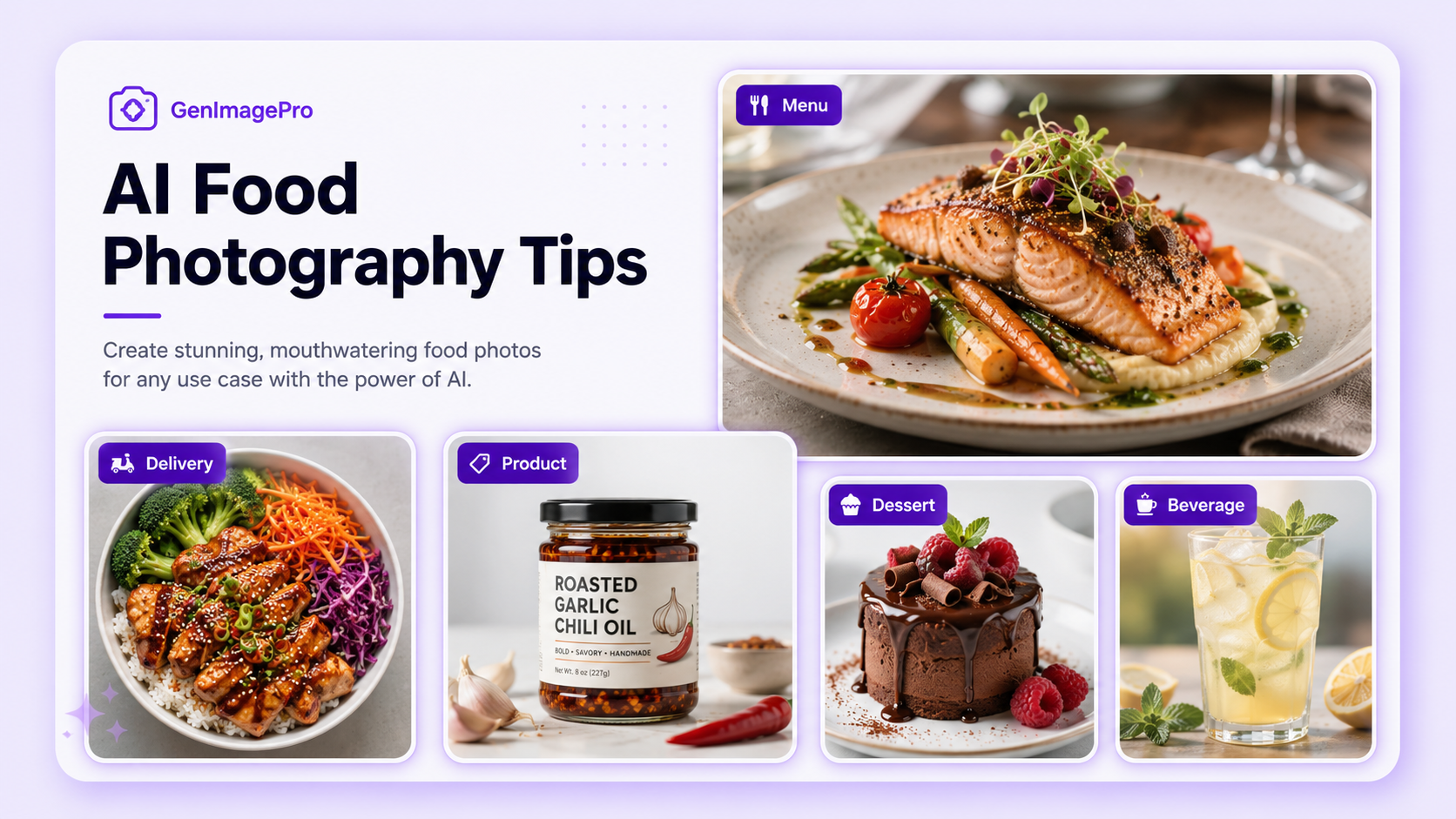
AI food photography prompts can turn one real dish photo into menu images, delivery-app visuals, restaurant advertisements, social posts, editorial scenes, and branded campaign assets.
In GenImagePro, upload a real dish photo and use these prompts (or a food template) to create menu, delivery-app, and social-ready food images while keeping the dish accurate.
The most useful prompts improve presentation without changing the food itself. The dish type, portion, ingredients, plating, garnish, color, texture, container, branding, and visible condition should remain accurate.
AI food photo enhancer tools use a template-first image-to-image workflow. You can upload a real food photo, choose a visual style, and create variations without writing every instruction manually. Prompts remain useful when you need a specific camera angle, surface, lighting setup, background, composition, or final format.
This guide includes a reusable prompt formula, 30 ready-to-use AI food photography prompts, preservation instructions, and a final review checklist for realistic results.
How to Write an AI Food Photography Prompt
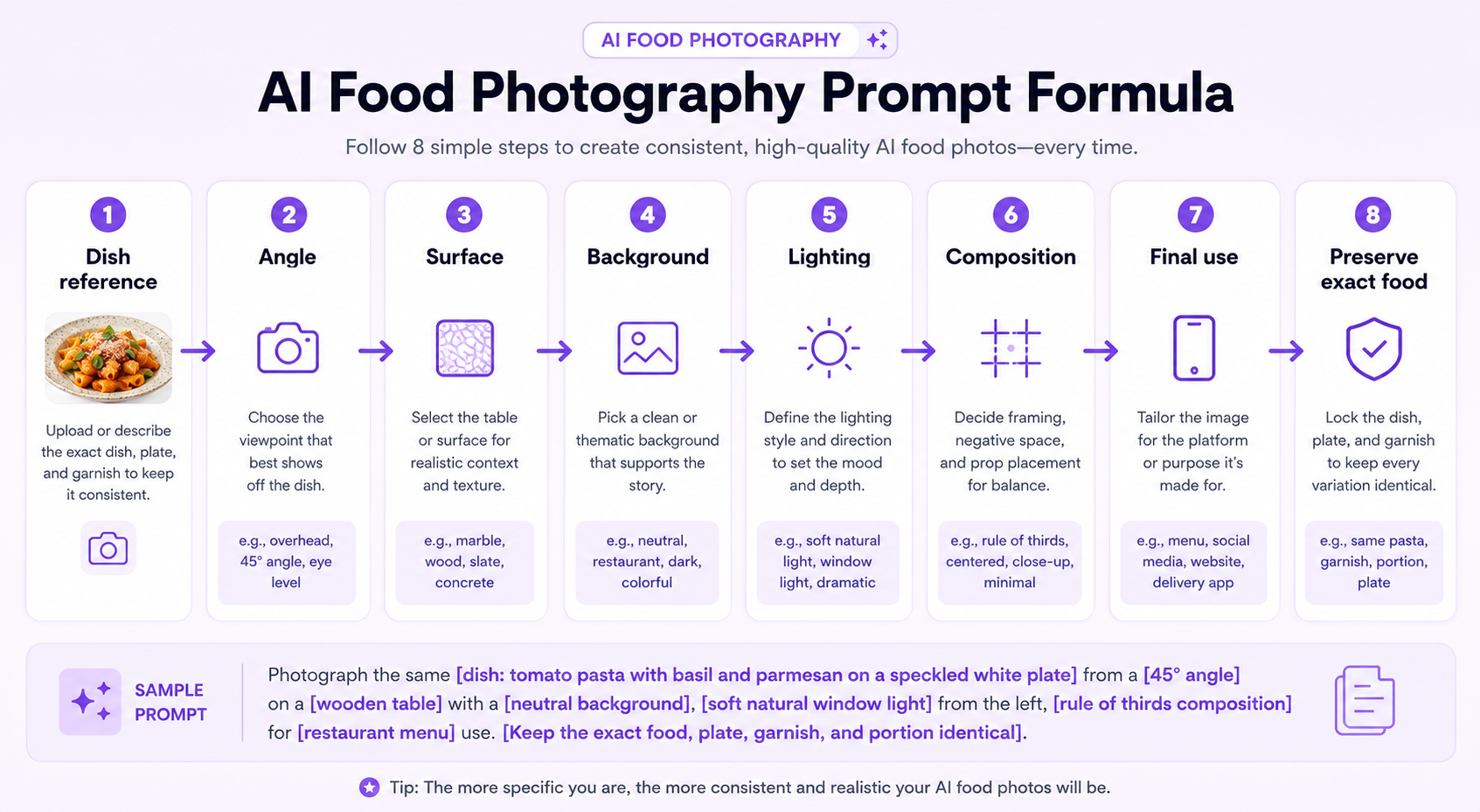
A useful food prompt describes the dish, camera angle, surface, background, lighting, composition, styling, final use, and details that must remain unchanged.
Begin with the intended channel. Restaurant menu photography needs clarity and consistency. A delivery-app image should make the food readable at small size. An editorial image can use stronger atmosphere, props, and directional light.
Then describe the camera angle. Overhead works well for bowls, pizza, flat lays, and multiple dishes. A 45-degree angle suits plated meals, burgers, pasta, and desserts. Eye-level views help show height, layers, drinks, and stacked food.
Finish with a preservation instruction. This prevents the generator from adding ingredients, changing the portion, replacing the plate, or making the food look like a different recipe.
AI Food Photography Prompt Formula
Dish reference + angle + surface + background + lighting + composition + final use + exact details to preserve.
For example: Use the uploaded pasta as the exact reference. Create a restaurant-menu image at a 45-degree angle on a light stone table, with soft side lighting, a clean neutral background, and centered composition. Preserve the exact ingredients, portion, sauce, garnish, plate, and food texture.
What AI Must Preserve
- Dish type, recipe, ingredients, toppings, sauces, and garnish.
- Portion size, number of pieces, food volume, and plate coverage.
- Plating arrangement, bowl, plate, cup, tray, wrapper, or packaging.
- Food color, doneness, texture, crust, glaze, steam, and freshness.
- Visible brand labels, logos, packaging text, and container shape.
- Any intentional imperfections or condition details in the real dish.
- Camera angle and scale of the uploaded food where requested.
Use the uploaded dish as the exact reference. Create a clean restaurant-menu image at a 45-degree angle on a light stone table, with soft diffused side lighting, a neutral background, minimal props, and centered composition. Preserve the exact ingredients, portion, plating, garnish, plate, and food texture.
Create a professional overhead menu image with the exact uploaded dish centered on a clean neutral surface, balanced natural shadows, restrained cutlery, and no distracting props. Keep the recipe, portion, toppings, garnish, and plate unchanged.
Present the uploaded plated dish in a refined fine-dining setting with a dark stone surface, controlled directional light, elegant negative space, and subtle table details. Preserve the exact plating, sauce placement, garnish, portion, and ingredients.
Create a bright casual restaurant image with the exact dish on a warm wood table, soft window light, clean background blur, and an approachable 45-degree composition. Keep the actual food and portion unchanged.
Use the uploaded cafe dish as the exact reference. Place it on a light wood or pale stone surface with soft morning light, restrained napkin and cutlery, gentle background blur, and clean menu-ready framing.
Create an overhead restaurant menu spread using the uploaded dishes as exact references, arranged with clear spacing on a neutral table, consistent lighting, natural shadows, and no added food items. Preserve every dish, plate, portion, and garnish.
Delivery-App and Marketplace Prompts
7. Delivery-App Hero Image
Create a delivery-app hero image using the uploaded dish as the exact reference, photographed at a 45-degree angle on a clean neutral background with bright even lighting, clear edge separation, and minimal props. Preserve the portion, ingredients, garnish, and container.
8. White Background Food Listing
Place the uploaded dish on a clean white-to-light-gray background with a soft realistic shadow, centered composition, accurate food color, and no added ingredients. Keep the exact plate, packaging, portion, and food texture unchanged.
9. Dark Background Delivery Image
Create a high-contrast delivery-app image with the exact dish on a deep charcoal background, soft edge lighting, visible texture, restrained shadow, and centered crop. Preserve the real ingredients, portion, toppings, and container.
10. Packaging-First Delivery Photo
Use the uploaded packaged meal as the exact reference. Create a clean delivery listing image showing the full container, food contents, label, and portion on a neutral surface with bright diffused light. Preserve all packaging and branding details.
11. Square Food Marketplace Image
Create a square 1:1 food listing image with the uploaded dish centered, soft even light, a simple background, clear plate edges, and enough margin for marketplace cropping. Keep the exact food and serving vessel unchanged.
12. Combo Meal Listing
Create a clean delivery-app image using the uploaded combo meal as the exact reference, with all items arranged clearly, consistent scale, neutral background, soft shadows, and no extra food. Preserve the exact number of items, drinks, sides, sauces, and packaging.
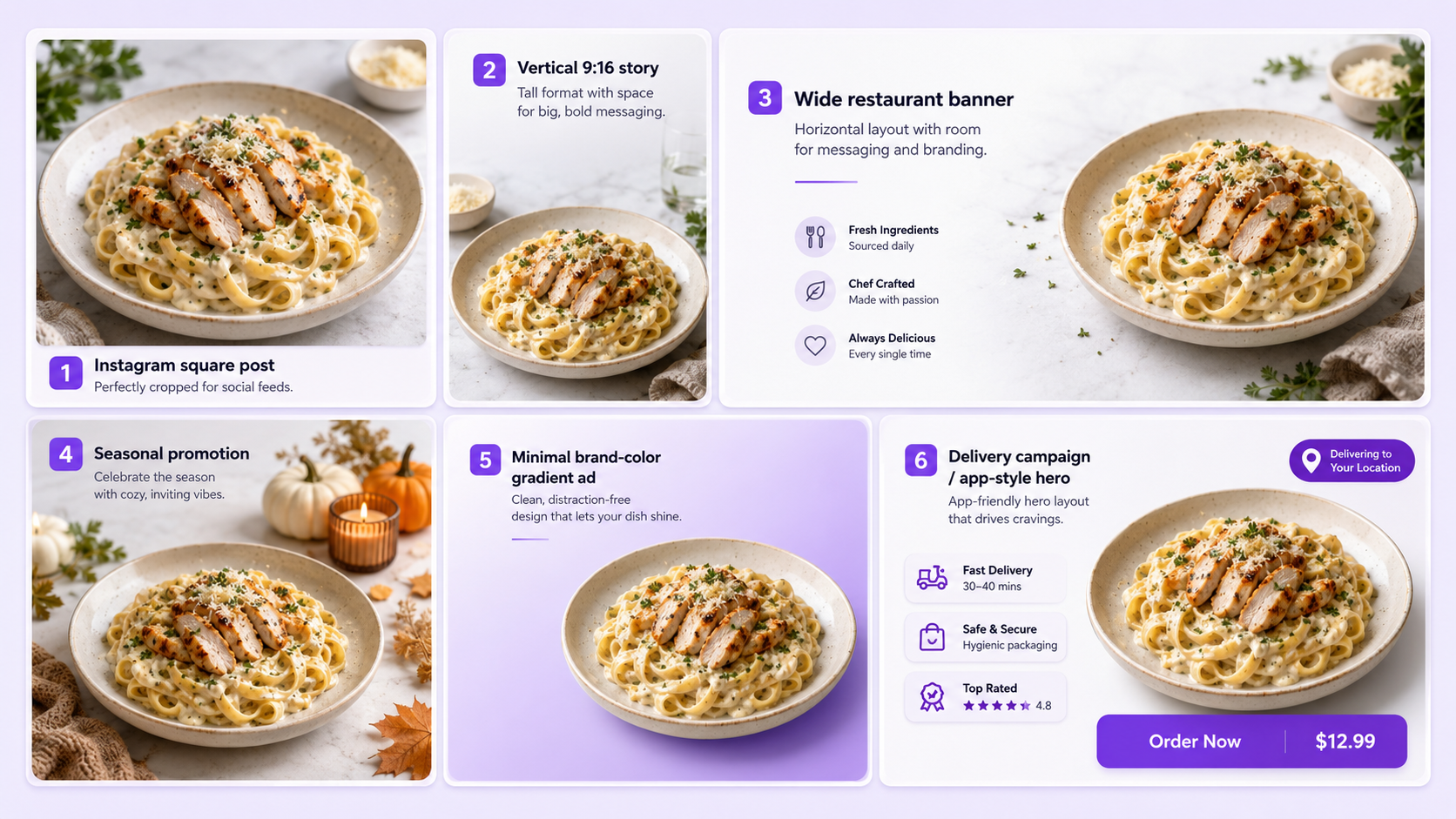
13. Instagram Food Post
Create a square social media image with the exact uploaded dish at a 45-degree angle, warm natural light, clean table styling, restrained props, and a premium but realistic restaurant feel. Preserve the actual food and plating.
14. Vertical Food Story
Create a vertical 9:16 food advertisement with the uploaded dish positioned in the lower half, generous negative space above for text, soft directional light, realistic shadows, and a clean branded environment. Keep the exact dish unchanged.
Create a wide restaurant campaign image with the exact uploaded dish placed on the right, clean negative space on the left for headline and offer text, soft side lighting, and a restrained premium background.
16. Limited-Time Offer Visual
Use the uploaded dish as the exact reference. Create a bold promotional image with a simple brand-color background, strong but realistic light, clear food separation, and empty space for offer text. Do not change the portion, garnish, ingredients, or plate.
17. Seasonal Food Campaign
Create a seasonal restaurant campaign using the exact uploaded dish with restrained seasonal props, warm atmospheric light, clean composition, and no changes to the food. Keep decorations secondary to the dish.
18. Minimal Brand Ad
Create a minimal food advertisement with the exact dish on a smooth brand-color gradient, soft floor shadow, clean centered composition, and ample text space. Preserve the real plate, food color, ingredients, garnish, and portion.
Editorial and Lifestyle Food Prompts
19. Bright Editorial Food Photo
Create a bright editorial image using the uploaded dish as the exact reference, with soft daylight, a pale stone surface, minimal styling, gentle shadows, and a clean magazine composition. Preserve the recipe, plating, portion, and texture.
20. Dark Moody Food Photography
Create a dark moody food image with the exact dish on a charcoal stone surface, controlled side lighting, deep but readable shadows, subtle atmospheric background, and accurate food color. Keep all ingredients and plating unchanged.
21. Rustic Table Scene
Place the uploaded dish on a restrained rustic wood table with soft window light, natural textiles, minimal utensils, and warm but accurate color. Preserve the exact dish, plate, garnish, and portion.
22. Modern Kitchen Lifestyle
Create a lifestyle food image with the exact dish in a softly blurred modern kitchen, clean counter surface, natural daylight, realistic depth, and a 45-degree composition. Do not add ingredients or change the plating.
23. Outdoor Dining Scene
Place the uploaded dish in a clean outdoor dining setting with soft daylight, restrained tableware, natural background blur, and realistic color. Preserve the exact food, container, and portion.
24. Chef’s Table Presentation
Create a premium chef’s-table image using the uploaded dish as the exact reference, with refined table styling, controlled directional light, subtle background detail, and strong focus on the plating. Keep every ingredient, sauce, garnish, and portion unchanged.
Dessert, Beverage, and Product Prompts
25. Dessert Close-Up
Create a detailed dessert close-up using the uploaded item as the exact reference, with a 45-degree or eye-level angle, soft side lighting, visible layers and texture, a clean neutral background, and restrained props. Preserve the exact decoration, portion, and plate.
26. Cake Product Photo
Create a professional cake image with the exact uploaded cake centered on a clean studio surface, soft diffused lighting, visible frosting texture, realistic shadow, and no added decoration. Keep the exact shape, layers, writing, toppings, and size.
27. Beverage Hero Image
Use the uploaded drink as the exact reference. Create an eye-level beverage hero image with controlled backlighting, visible condensation where already present, realistic glass reflections, a simple background, and clear separation. Preserve the exact drink color, glass, garnish, ice, and volume.
28. Coffee Shop Drink
Create a bright cafe-style image using the uploaded coffee or drink as the exact reference, with soft morning light, a warm neutral table, gentle background blur, and minimal props. Keep the cup, logo, foam, garnish, and drink volume unchanged.
29. Packaged Food Product Photo
Create a clean ecommerce-style image using the uploaded packaged food as the exact reference, with a light studio background, soft shadow, clear label visibility, accurate packaging color, and centered composition. Preserve the exact logo, text, shape, and product.
30. Food and Packaging Lifestyle Scene
Create a lifestyle product image showing the uploaded packaged food beside the prepared dish, using both as exact references, with a clean kitchen or dining background, soft daylight, realistic scale, and clear branding. Do not alter the package, label, food, ingredients, or serving size.
How to Use These Prompts in GenImagePro
Upload your food photo
Upload a clear food photo with accurate color, visible texture, and enough resolution to inspect the dish.
Pick a food template
Choose the closest GenImagePro food photography template first. Templates can handle common workflows such as restaurant menus, delivery apps, overhead scenes, dark editorial images, bright studio photos, beverages, desserts, and packaged-food visuals.
Add a custom prompt
Add a custom prompt when you need a specific surface, camera angle, lighting direction, background, crop, or text-space layout.
Compare variations
Generate several variations and compare each one with the original. Check ingredients, number of pieces, portion, garnish, sauce placement, plate, package, labels, and texture.
Export for each channel
Export separate aspect ratios for menus, delivery platforms, websites, social posts, advertisements, and printed materials.
Adapt Prompts to Different Food Types
Burgers and Sandwiches
Use eye-level or low 45-degree views to show layers and height. Preserve the number of patties, fillings, sauce, bread, and toppings.
Pizza and Flatbreads
Use overhead or low side angles depending on whether the goal is full shape or crust texture. Keep slice count, toppings, crust, and cheese coverage unchanged.
Pasta and Rice Dishes
Use 45-degree views with soft directional light. Preserve sauce consistency, garnish, portion, and plate arrangement.
Soups and Bowls
Use overhead or high 45-degree angles. Keep the liquid level, ingredients, toppings, bowl shape, and serving size accurate.
Desserts
Use close-up or eye-level views for layers, glaze, frosting, crumbs, and texture. Avoid adding fruit, sauce, or decoration that is not present.
Drinks
Use eye-level images with controlled reflections and backlighting. Preserve the real glass, liquid color, ice, garnish, foam, logo, and volume.
Add Negative Instructions
Negative instructions tell the AI what must not change or appear. They are useful when the same errors repeat across several generations.
Keep negative instructions focused. Prioritize food identity, portion accuracy, packaging, color, and the recurring errors visible in previous outputs.
Common AI Food Prompt Mistakes
Using a Vague Prompt
A request such as make this food look better gives the AI too much freedom. Describe the angle, surface, lighting, background, composition, and preservation rules.
Changing the Portion
AI may make the serving larger, add extra pieces, or fill the plate. This can misrepresent menu or delivery items.
Adding Ingredients
The generator may add garnish, sauce, cheese, herbs, fruit, or toppings that are not part of the real dish.
Changing Food Color
Warm lighting, saturation, and dramatic grading can make meat, sauces, vegetables, bread, and drinks look inaccurate.
Making Texture Unrealistic
Excessive shine, steam, glaze, condensation, or perfect symmetry can make the food look synthetic.
Changing Packaging
Labels, logos, containers, wrappers, cups, and printed text may become distorted during generation.
AI Food Photography Review Checklist
- Compare the dish type, ingredients, portion, number of pieces, garnish, sauce, and plating with the source.
- Check food color, texture, doneness, crust, glaze, steam, condensation, and freshness.
- Inspect plates, bowls, cups, trays, wrappers, packages, labels, and logos for changes.
- Review shadows, reflections, perspective, surface contact, and camera angle.
- Check the background for duplicate props, impossible utensils, fake text, or distracting objects.
- Confirm that the crop and aspect ratio match the intended menu, delivery app, website, social, or advertising format.
Final Recommendation
The best AI food photography prompts are specific about the final use and conservative about the real dish.
Describe the angle, surface, background, lighting, composition, and atmosphere, then explicitly preserve the ingredients, portion, plating, garnish, container, color, and texture.
GenImagePro makes this process faster with ready-made food photography templates for menus, delivery apps, social media, editorial scenes, beverages, desserts, and packaged products. Upload the real food photo, choose a style, refine it with a prompt when needed, and review every result against the source.
FAQ
What should an AI food photography prompt include?
Include the exact dish reference, camera angle, surface, background, lighting, composition, final use, and details that must remain unchanged.
Can AI create restaurant menu photos?
Yes. AI can create clean overhead, 45-degree, fine-dining, casual restaurant, cafe, and multi-dish menu variations from a real food photo.
Can AI create delivery-app food images?
Yes. Use clear, bright, centered compositions with simple backgrounds and accurate portions, containers, ingredients, and packaging.
How do I stop AI from changing the food?
Tell it to preserve the exact ingredients, portion, number of pieces, plating, garnish, sauce, container, color, texture, and visible condition.
What camera angle is best for food photography?
Overhead works well for flat lays and bowls, 45 degrees suits most plated dishes, and eye level is useful for burgers, layered desserts, and drinks.
Can I use GenImagePro with templates and these prompts?
Yes. GenImagePro offers ready-made food photography templates for common workflows, and you can paste or adapt any prompt from this guide when you need a specific angle, surface, lighting, or layout.
Why does AI food photography look fake?
Common causes include added ingredients, changed portions, excessive shine, unrealistic steam, distorted plates, incorrect packaging, and mismatched shadows.
Can I use AI food images in a menu?
Yes, provided the final image accurately represents the real dish, portion, ingredients, presentation, and packaging offered to customers.


Social Media and Advertising Prompts