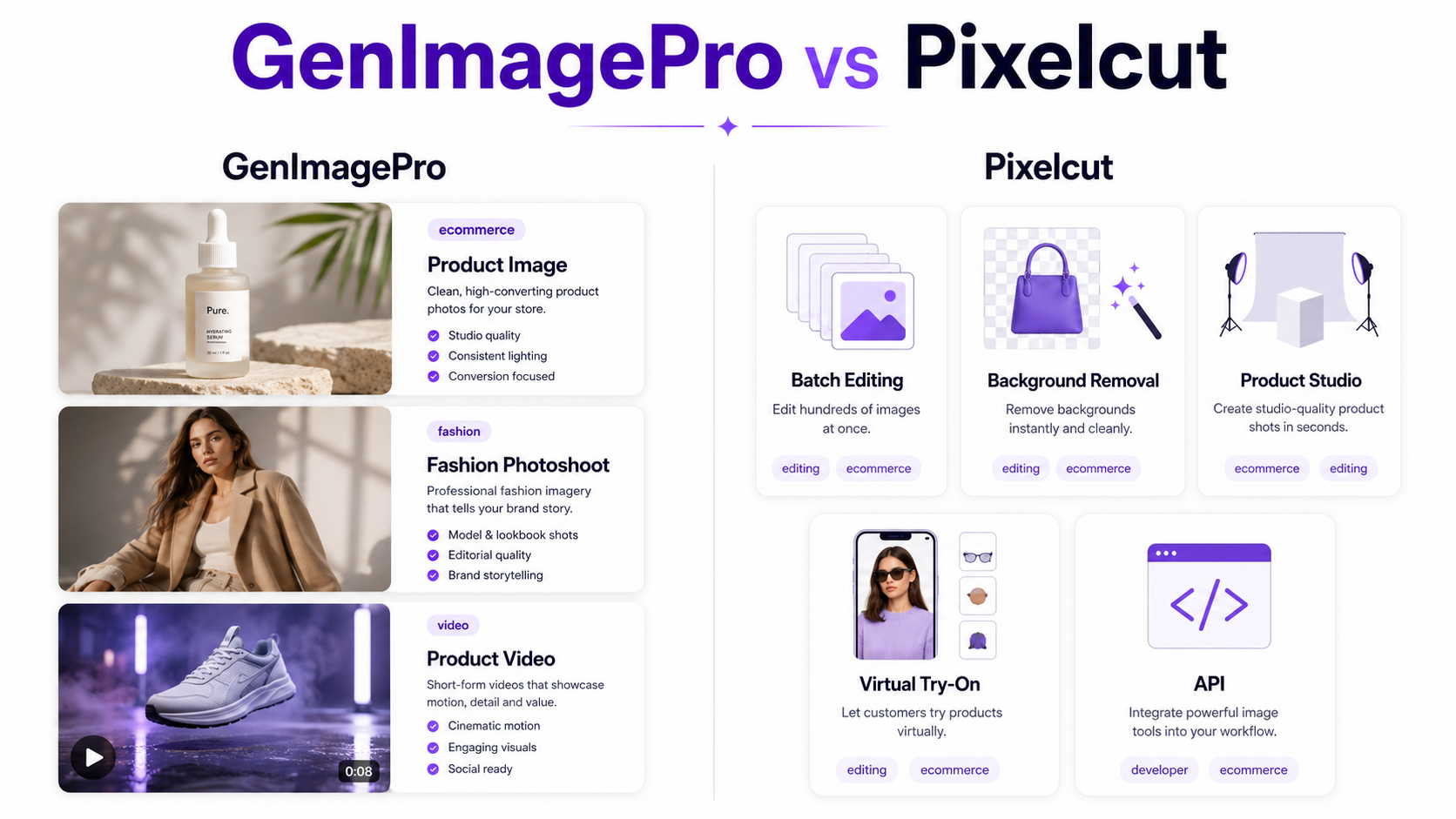
GenImagePro and Pixelcut overlap in several important areas. Both can turn ordinary photos into polished commercial visuals, create product photography, replace backgrounds, perform AI-powered edits, and generate content for ecommerce, advertising, and social media.
The difference becomes clearer when you look at how each product expects you to work. Pixelcut has developed into a broad AI creative workspace with editing tools, an AI creative agent, Product Studio, batch processing, virtual try-on, image and video generation, mobile apps, team features, and developer tooling.
GenImagePro takes a more guided, image-first approach. You generally begin with an existing product, garment, portrait, food photo, room, or other source image, choose a ready-made workflow or template, and generate new professional variations without having to build the entire creative direction from scratch.
So GenImagePro vs Pixelcut is not simply a question of which platform has more features. The better choice depends on whether you want a broad editing and production ecosystem or a more focused template-driven workflow built around transforming the image you already have.
GenImagePro vs Pixelcut: Quick Verdict
Choose GenImagePro if you want to upload an existing image, choose a visual direction, and quickly create product photos, fashion images, portraits, food visuals, campaign concepts, edits, and short videos through guided workflows.
Choose Pixelcut if you need a broader ecommerce production environment with strong background editing, high-volume batch processing, product photography, virtual try-on, AI video, mobile apps, team functionality, API access, and workflow automation.
What Is GenImagePro?
GenImagePro is an AI image and video platform built around transforming existing photos into new professional visuals. The uploaded image remains the visual reference while the user changes the background, scene, lighting, styling, composition, or motion.
The platform includes workflows for product photography, fashion and clothing, portraits and headshots, beauty, food photography, room design and staging, ecommerce content, image editing, image enhancement, and image-to-video generation.
A major part of the GenImagePro workflow is its ready-made templates. Instead of requiring the user to describe an entire commercial photoshoot in a long prompt, a template can already define much of the scene, lighting, composition, and creative direction.
Custom instructions can still be added when more control is needed, but the platform is designed so that prompt writing does not have to be the starting point.
What Is Pixelcut?
Pixelcut is an AI-powered visual creation and editing platform aimed heavily at creators, sellers, brands, and ecommerce teams. Its current product combines traditional AI editing utilities with newer generative image and video workflows.
Pixelcut includes background removal, image upscaling, generative expansion, retouching, shadows, Product Studio, batch editing, virtual try-on, personas, product imagery, video generation, and an AI creative agent that can interpret natural-language creative requests.
Pixelcut also offers iOS and Android apps, API access, MCP support, and batch workflows, giving it a broader operational footprint for businesses that need visual generation and editing across many products.
You can visit the official Pixelcut website to verify its latest tools and plans. If you are already looking for a Pixelcut alternative, see our Pixelcut alternatives page for a broader overview of options.
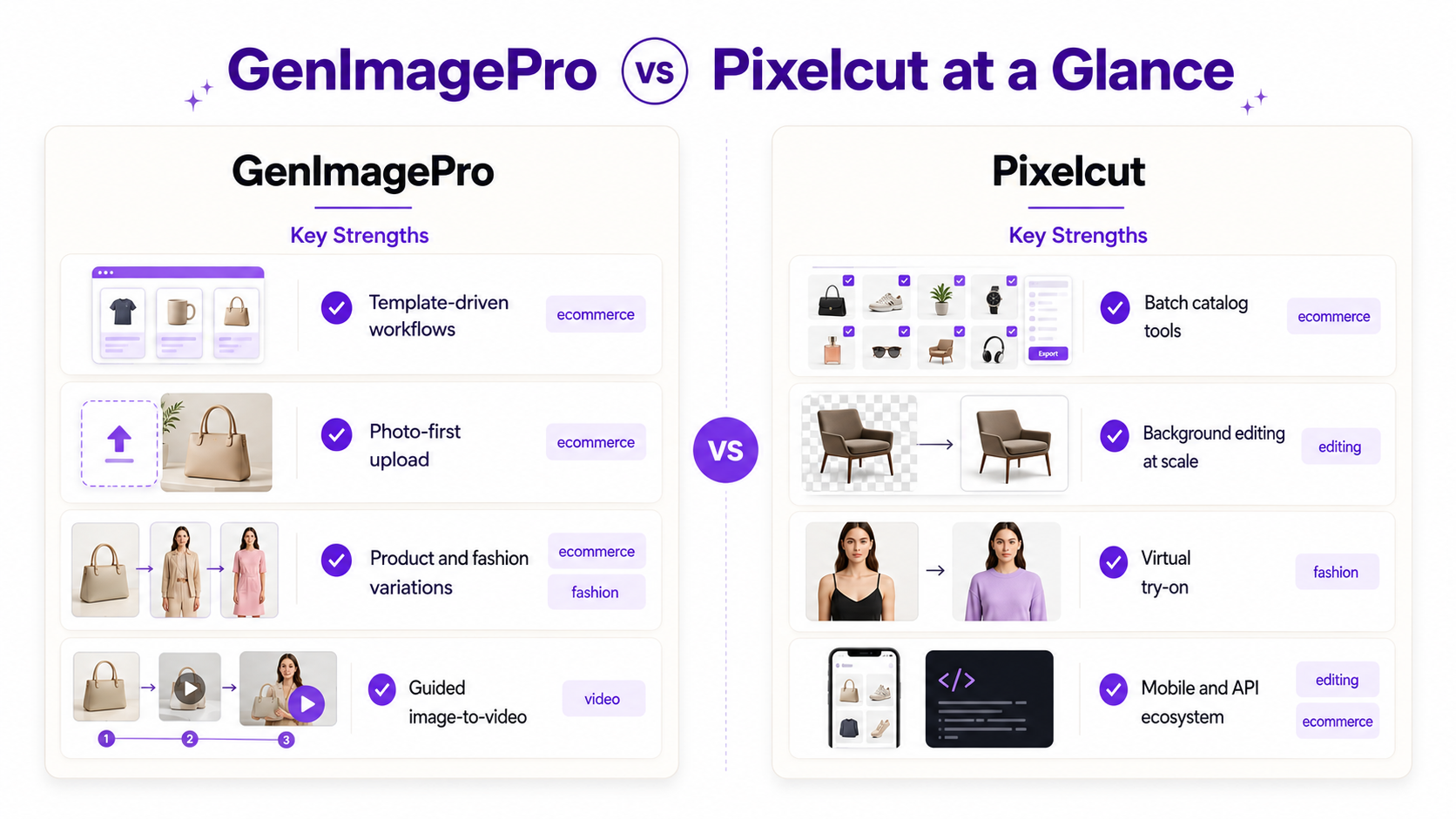
GenImagePro vs Pixelcut at a Glance
Workflow: GenImagePro is primarily photo-first and template-driven. Pixelcut combines guided tools, ready-made scenes, natural-language instructions, and a broader editing workspace.
Product photography: Both platforms support AI product photography from existing product images.
Background editing: Both support background workflows, but Pixelcut has especially mature background removal and high-volume batch tooling.
Fashion: Both can support fashion-oriented visual creation. Pixelcut has a dedicated virtual try-on workflow, while GenImagePro provides broader fashion photoshoot controls and garment-focused visual workflows.
Video: Both now support AI video workflows. GenImagePro focuses on turning source images into short product, fashion, and campaign videos, while Pixelcut offers a wider video environment including product videos and AI UGC-style workflows.
Batch processing: Pixelcut has the stronger current offering for large catalog operations.
Developer tools: Pixelcut provides established API and MCP tooling. GenImagePro is primarily positioned as an end-user creative platform.
Ease of starting: GenImagePro emphasizes choosing a ready-made visual workflow and uploading an image. Pixelcut offers more tools and control, but consequently exposes a larger creative workspace.
1. Product Photography
Product photography is one of the strongest areas of overlap between GenImagePro and Pixelcut.
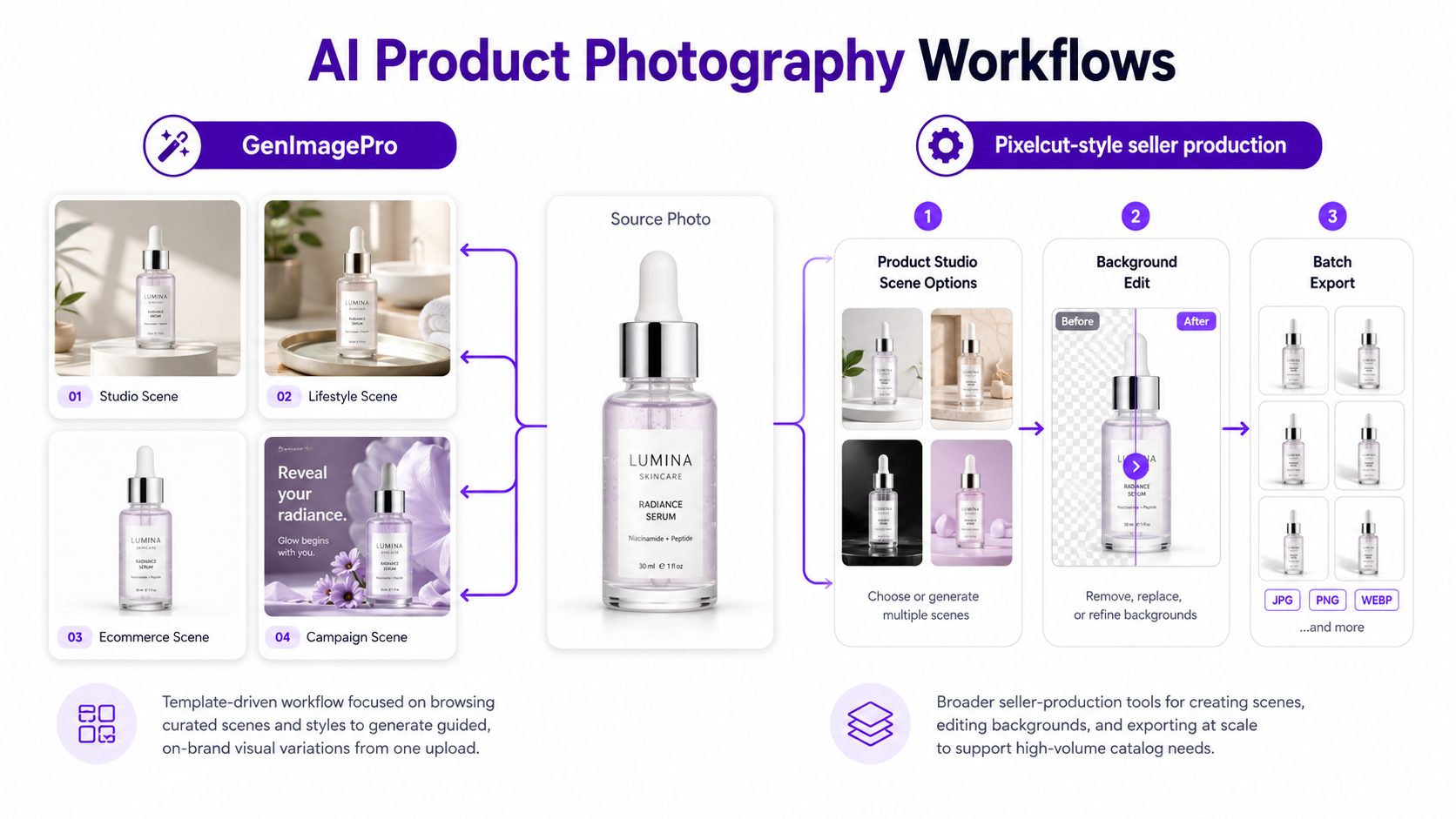
Pixelcut's Product Studio lets users upload a product, choose studio or lifestyle formats, select backgrounds and angles, use ready-made scenes, and optionally add custom text instructions. It can also generate multiple variations and high-resolution outputs.
GenImagePro's AI product photography workflow also starts with the real product image but places more emphasis on template selection. Users can move the same product into studio, lifestyle, ecommerce, social, editorial, and campaign-style scenes without having to write a long description first.
Both approaches are useful. Pixelcut gives sellers a mix of predefined formats and custom scene control. GenImagePro is particularly convenient when you want to browse visual directions first and generate from a ready-made commercial style.
Which Is Better for Product Photography?
Choose Pixelcut when product photography is part of a larger seller workflow that also requires bulk editing, marketplace preparation, backgrounds, resizing, team collaboration, and automation.
Choose GenImagePro when you want to take one product image and quickly explore multiple polished visual directions through a guided template library.
2. Templates vs AI Creative Control
The difference between these products is smaller than simply saying GenImagePro uses templates and Pixelcut uses prompts.
Pixelcut Product Studio includes ready-made scenes and lets users describe custom environments when they want more specific control. Its Creative Agent also accepts natural-language creative instructions and can select different AI tools or models to complete a task.
GenImagePro puts ready-made workflows much closer to the center of the experience. The typical process is to choose what you want to create, select a visual style, upload the source image, and generate.
This makes GenImagePro useful for people who know what kind of result they want visually but do not want to learn how to phrase that result as an AI prompt.
3. Background Removal and Background Editing
Pixelcut has deep roots in fast background editing. Its current platform includes background removal for images and video, AI background generation, background replacement, expansion, shadow creation, and large batch workflows.
GenImagePro also offers an AI background remover and AI background replacer, alongside templates that move products and subjects directly into new studio, lifestyle, branded, and creative environments.
For sellers processing thousands of cutouts or applying the same background treatment across a large catalog, Pixelcut currently has the stronger batch-oriented workflow.
For users who see background replacement as one part of a larger visual transformation rather than an isolated editing task, GenImagePro's template workflow may feel more direct.
4. Batch Editing and Large Ecommerce Catalogs
This is one of Pixelcut's clearest advantages.
Pixelcut advertises batch workflows capable of processing large groups of product images. Its bulk tools include operations such as background removal, resizing, upscaling, cropping, watermarking, adding logos, shadows, expansion, and background changes.
For a retailer with hundreds or thousands of SKUs that need standardized marketplace assets, this kind of batch infrastructure can matter more than creative template variety.
GenImagePro is better understood as a visual-generation workflow rather than a large-scale catalog-processing system. If bulk production is the main requirement, Pixelcut is the more established choice today.
5. Fashion and Virtual Try-On
Both platforms extend beyond traditional product packshots into fashion.
Pixelcut provides a dedicated Virtual Try-On tool that can place garments on models, including models from its library or an uploaded custom model. Pixelcut also extends virtual try-on concepts into video.
GenImagePro approaches fashion through AI fashion photoshoots, where clothing can be developed into different model, pose, scene, styling, shot, catalog, street, lifestyle, and editorial concepts.
The distinction is useful: Pixelcut's dedicated try-on workflow is attractive when transferring a garment onto a particular person or virtual model is the primary task. GenImagePro is attractive when the broader objective is creating an entire fashion photoshoot or campaign direction from the garment reference.
6. AI Video
Both GenImagePro and Pixelcut now extend beyond static AI images.
Pixelcut supports video through its broader creative workspace, including product video generation and AI UGC-style content. Its pricing system also provides access to multiple third-party video models depending on the plan and available credits.
GenImagePro includes image-to-video as part of its current plans and focuses on turning an existing still into short product, fashion, walking, advertising, and campaign clips.
For example, a GenImagePro workflow can begin with a product photo, generate a new commercial still, and then take that visual direction into a short product video.
If your main requirement is broad access to different video-generation models and creative formats, Pixelcut currently offers the larger ecosystem. If your goal is to extend an image-first workflow naturally into short motion content, GenImagePro keeps that process closely connected to the original source visual.
7. Photo Editing and Everyday AI Tools
Pixelcut provides a substantial collection of focused utilities including background removal, upscaling, expansion, retouching, generative fill, erasing, shadows, and resizing.
GenImagePro also includes editing and enhancement workflows, including background replacement, retouching, portrait editing, photo enhancement, creative transformations, and category-specific edits.
Pixelcut is better suited to users who frequently move between individual editing operations. GenImagePro is better suited to users who think in terms of outcomes such as create a skincare campaign image, restyle this room, create a fashion shoot, improve this food photo, or turn this image into a video.
8. AI Models and Creative Agent
Pixelcut increasingly acts as a front end to a wider AI model ecosystem. Its current platform promotes a Creative Agent that can interpret a request and use different creative tools and models to produce the requested result.
That makes Pixelcut attractive to users who want model choice and broad generative experimentation without managing each model separately.
GenImagePro abstracts more of this complexity behind the workflow itself. The user typically chooses the desired outcome or template rather than beginning by deciding which underlying AI model should perform the job.
Neither approach is inherently better. Advanced users may appreciate seeing more model and generation options, while other users simply want to choose the desired visual result and generate.
9. Mobile Apps, API, and Developer Workflows
Pixelcut has the stronger current ecosystem outside the core web editor.
It provides dedicated mobile apps, developer APIs, documentation, and MCP support. These capabilities are important for businesses that want to integrate image operations into catalog systems, internal applications, AI agents, or automated pipelines.
GenImagePro is currently more focused on the end-user creation experience itself. For a developer building automated image infrastructure, Pixelcut is likely the better fit. For a seller, creator, or marketer working directly inside a visual application, the difference may be less important.
10. GenImagePro vs Pixelcut Pricing
Pricing changes frequently in AI products, so always check the live pricing pages before subscribing.
At the time of this comparison, GenImagePro's Basic Monthly plan is $9.99 per month. It includes approximately 800 chatbot generations, around 400 template images, around 20 videos, custom instructions, full-resolution downloads, and watermark-free output.
GenImagePro also offers a $3.99 weekly option with a smaller generation allowance for users who do not want a monthly commitment.
Pixelcut currently offers Free, Pro, and Business tiers. Its pricing page lists Pro at $8 per month when billed yearly, with a $10 regular monthly figure shown. The Pro tier includes 600 monthly AI credits, access to its AI models, unlimited background removal and upscaling, a three-person team, batch exports, and commercial licensing.
Because the two platforms meter AI usage differently, comparing headline prices alone is misleading. Pixelcut primarily presents usage through AI credits and plan capabilities, while GenImagePro shows approximate generation counts for its chatbot, templates, and video workflows.
The better question is how many of your actual product photos, campaign concepts, edits, or videos you can complete within each plan.
When GenImagePro Is the Better Choice
GenImagePro makes the most sense when your workflow usually begins with a real image and your goal is to quickly create several new visual directions from it.
It is especially suited to users who prefer browsing ready-made commercial styles rather than designing every result manually.
Choose GenImagePro if you frequently create product photography, fashion photoshoots, portraits, beauty images, food photography, room visuals, ecommerce content, and short videos from existing photos.
It is also a good fit when you want the visual workflow to hide much of the complexity of model selection and prompt engineering.
When Pixelcut Is the Better Choice
Pixelcut is the stronger choice when visual generation is only one part of a larger ecommerce content-production system.
Choose Pixelcut when batch processing, background removal at scale, team access, API integration, mobile workflows, model choice, virtual try-on, or automated catalog editing are major requirements.
It also makes sense for businesses that want image editing, product photography, generative AI, and video tools consolidated into one broader production environment.
GenImagePro vs Pixelcut for Ecommerce Sellers
For a seller with a small or medium product range who mainly needs fresh listing images, lifestyle scenes, advertisements, campaign images, and social content, GenImagePro's template-first workflow can reduce the amount of setup required for each new creative direction.
For a seller managing a very large catalog where thousands of images need the same cutout, crop, background, size, or enhancement treatment, Pixelcut's batch tooling becomes a major advantage.
This means catalog size can be just as important as image quality when deciding between the two.
GenImagePro vs Pixelcut for Small Businesses
Small businesses often need several types of creative content but do not have a dedicated photographer, designer, retoucher, and video editor.
GenImagePro is useful when the business wants guided workflows for different visual categories without learning a large professional editing environment.
Pixelcut is useful when the business has a more repetitive product-production workflow and expects to benefit from batch operations, mobile editing, collaboration, or integrations.
Can GenImagePro Replace Pixelcut?
For some workflows, yes. If you primarily use Pixelcut to create new product scenes, campaign images, fashion concepts, ecommerce visuals, or AI-generated variations from an existing photo, GenImagePro can cover many of the same outcomes through a different workflow.
It is not a complete one-to-one replacement for every Pixelcut feature. Businesses relying heavily on Pixelcut's large batch tools, API integrations, mobile apps, or team-oriented production features should evaluate those requirements separately. For a wider shortlist beyond this head-to-head, see our Pixelcut alternatives guide.
Final Verdict: GenImagePro or Pixelcut?
Pixelcut is currently the more extensive platform in terms of production infrastructure. It combines AI generation with mature editing utilities, large batch workflows, product photography, virtual try-on, video, teams, APIs, MCP, and mobile applications.
GenImagePro takes a different approach. Its strength is reducing the distance between an ordinary source image and a finished creative result. Choose a workflow, select a visual direction, upload your image, and generate new product, fashion, food, portrait, room, campaign, or video content without starting from an empty canvas.
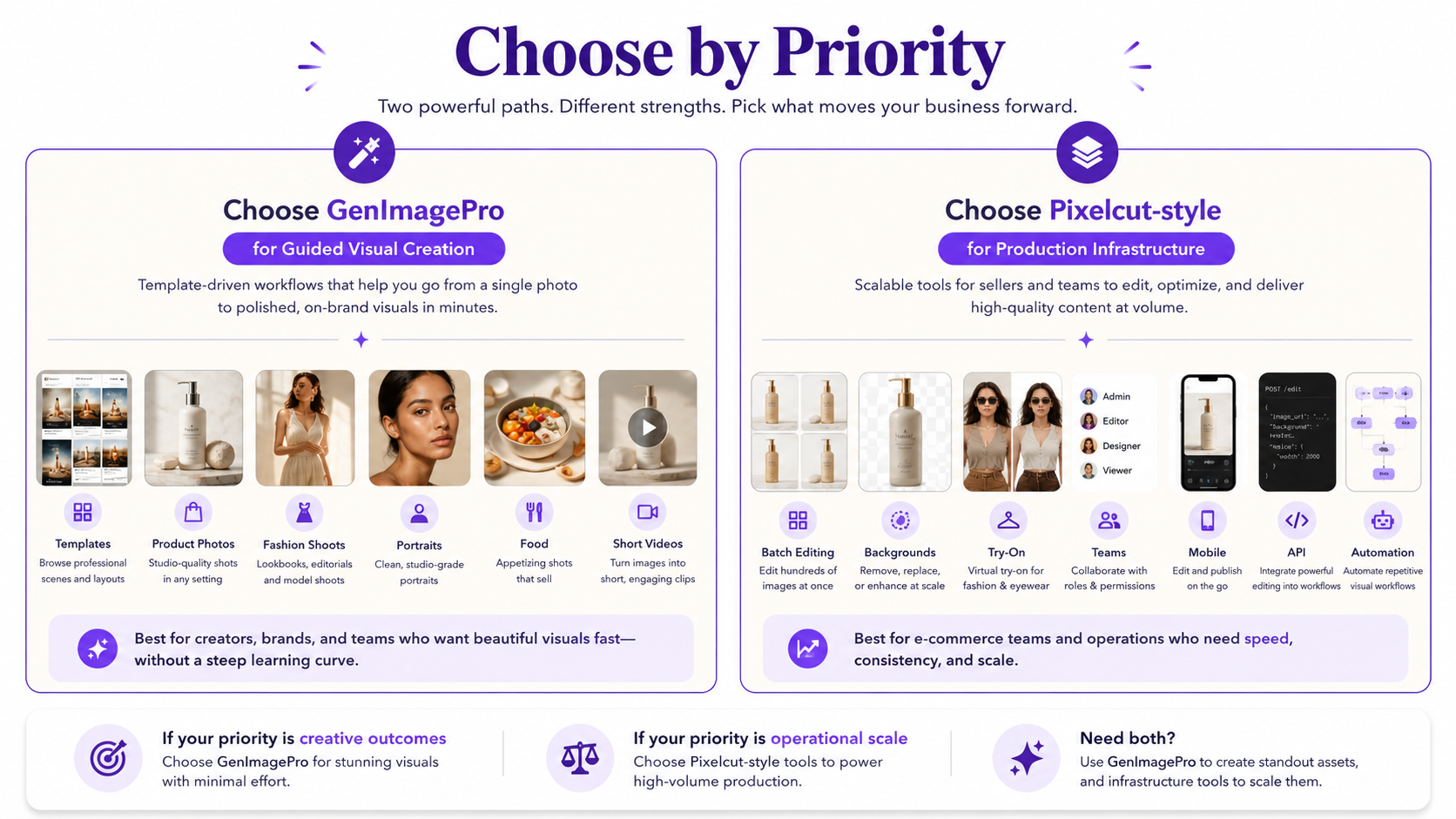
If scale, automation, and editing infrastructure are the priority, Pixelcut is the stronger choice. If guided image transformation and fast creative variation from your existing photos are the priority, GenImagePro is the more focused alternative.
FAQ
Is GenImagePro better than Pixelcut?
It depends on the workflow. GenImagePro is a strong choice for template-driven transformations from existing images across products, fashion, food, portraits, rooms, and short videos. Pixelcut is stronger for broad editing, large batch workflows, teams, mobile apps, APIs, and automation.
Is Pixelcut better than GenImagePro for product photography?
Both support AI product photography. Pixelcut is particularly strong when product photography is connected to batch editing, catalog operations, and broader ecommerce production. GenImagePro is well suited to users who want to upload a product and quickly explore ready-made studio, lifestyle, ecommerce, and campaign styles.
Which is easier to use, GenImagePro or Pixelcut?
GenImagePro is designed around a guided workflow where users choose a visual template or workflow before generating. Pixelcut is also accessible, but it exposes a broader range of editing, generation, batch, and creative-agent functionality.
Which is better for ecommerce sellers?
GenImagePro can be a good fit for sellers who need creative product variations, campaign images, and social visuals from a relatively small number of source images. Pixelcut is especially useful for larger catalogs where batch editing, resizing, background removal, and standardized exports are important.
Does Pixelcut have AI product photography?
Yes. Pixelcut Product Studio can turn uploaded product images into studio and lifestyle photography, using ready-made formats or custom scene instructions.
Does GenImagePro have AI product photography?
Yes. GenImagePro provides template-driven AI product photography for studio scenes, lifestyle images, ecommerce listings, advertising, social content, jewelry, food, cars, and other product categories.
Do GenImagePro and Pixelcut support AI video?
Yes. Both platforms now support AI video workflows. GenImagePro includes image-to-video for short product, fashion, and campaign clips, while Pixelcut provides broader video-generation options including product and AI UGC-style workflows.
Which is better for batch editing?
Pixelcut currently has the stronger batch-editing system and is better suited to businesses processing large catalogs of product images.
Does Pixelcut have an API?
Yes. Pixelcut provides developer APIs as well as MCP tooling for integrating image and AI workflows into other products and agent-based systems.
Does GenImagePro require AI prompts?
No. GenImagePro is designed around ready-made workflows and visual templates, so users can generate without writing long prompts. Custom instructions are available when additional control is needed.
Is GenImagePro a Pixelcut alternative?
Yes, particularly for users looking for a photo-first alternative focused on guided product photography, fashion, portraits, food, creative transformations, and image-to-video. It is not a direct replacement for every Pixelcut batch, API, mobile, or automation feature. You can also compare GenImagePro with other options on our Pixelcut alternatives page.