Reference images give AI image generators more visual direction than a text prompt alone. Instead of describing everything from scratch, you upload one or more images that show the person, product, style, composition, room, object, or visual treatment you want the AI to follow.
This is useful when the result needs to stay connected to something real. You may want to keep the same person, preserve a product, match a brand style, reuse a composition, redesign a room, combine several visual ideas, or generate consistent campaign images from one source.
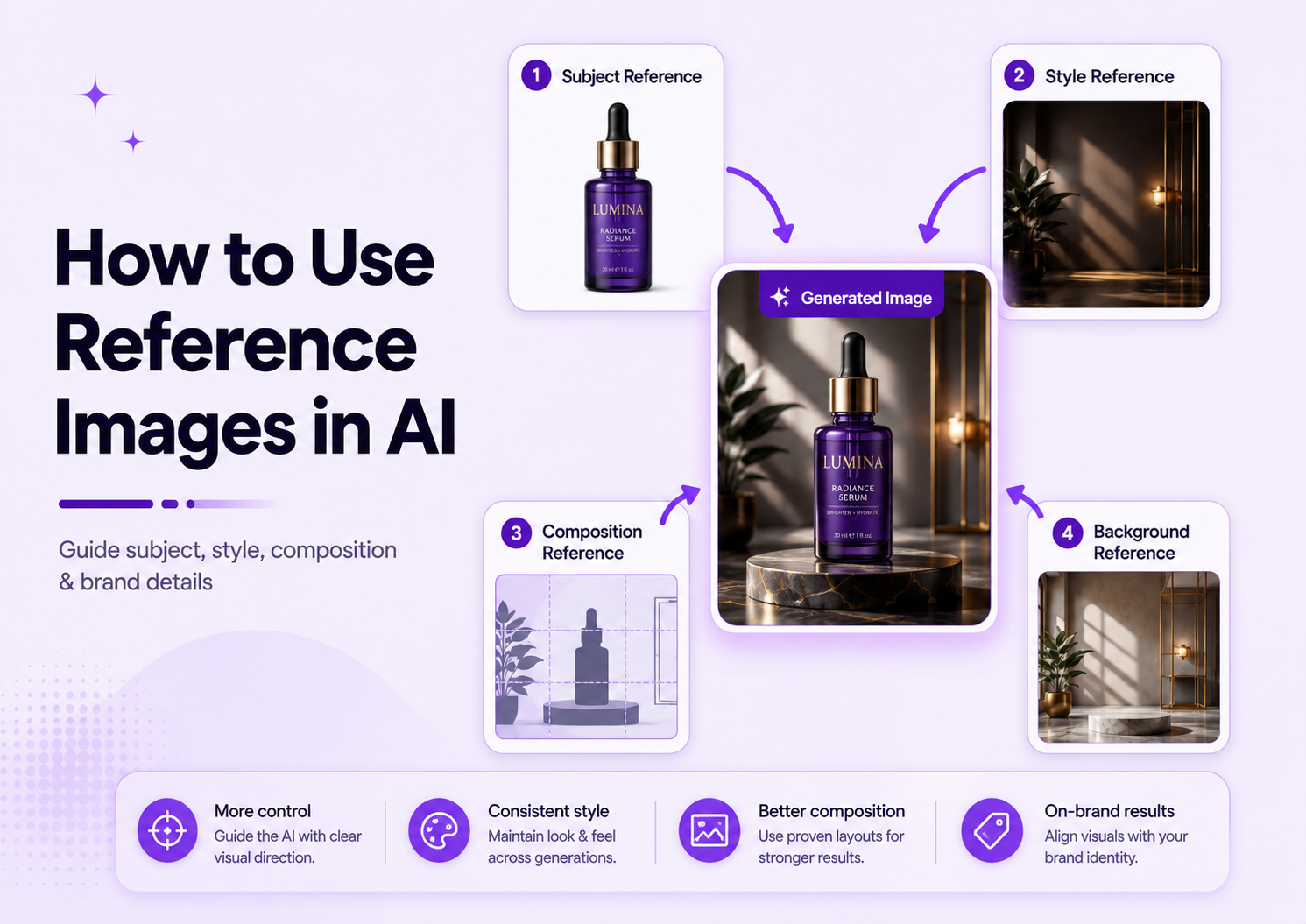
The key is to decide what role each reference image should play. One image may define the subject, another may provide the background style, and a third may guide lighting or color. Without clear instructions, the AI may combine details in ways you did not intend.
This guide explains how to use reference images in AI image generators, the main types of references, how to write better prompts, how to work with multiple images, and how to preserve important details in products, portraits, and branded visuals.
What Is an AI Reference Image?
An AI reference image is an uploaded visual that guides a new generation. It can influence the subject, style, structure, composition, colors, materials, lighting, pose, or environment of the output.
For example, a product reference may help the model understand the shape and packaging. A portrait reference may guide facial identity and hairstyle. A style reference may provide color, texture, lighting, or mood. A composition reference may guide where elements appear in the frame.
Reference Image vs. Source Image
The terms reference image and source image are often used interchangeably, but they can describe slightly different roles.
A source image is usually the main image being transformed. A reference image may be an additional visual used to guide style, composition, identity, clothing, color, or another specific feature. In some tools, one image performs both roles.
Why Use Reference Images?
Text prompts can describe an idea, but they do not always communicate exact visual details. A reference image can show the AI what a person looks like, how a product is shaped, where objects should appear, how a room is arranged, or what visual style the result should follow.
Types of AI Reference Images
Subject Reference
A subject reference shows the person, product, object, character, animal, or main item that should appear in the result. The goal is to preserve identity or recognizable features while changing the environment, pose, lighting, or style.
Subject references are useful for portraits, product photography, fashion, characters, vehicles, furniture, jewelry, and other cases where the main subject must remain recognizable.
Style Reference
A style reference guides the visual treatment rather than the exact subject. It may influence color, lighting, texture, contrast, materials, mood, camera treatment, or artistic direction.
For example, you can use a luxury skincare campaign as a style reference while keeping your own product as the subject. The AI should borrow the refined lighting and neutral stone environment without copying the reference product.
Composition Reference
A composition reference guides framing, layout, perspective, object placement, spacing, and visual hierarchy. It is useful when you want a similar arrangement but different content.
A composition reference may show a centered product with empty space on the left, a portrait cropped at the shoulders, or a room photographed from a specific corner. The new output can follow that structure while using a different subject.
Background Reference
A background reference shows the environment you want behind the subject. It can guide architecture, landscape, materials, color, depth, and atmosphere.
This is useful when you want the same person or product placed in a beach, studio, kitchen, office, luxury bathroom, city street, or other setting.
Character or Identity Reference
A character or identity reference focuses on keeping the same face, person, or fictional character across multiple generations.
Product Reference
A product reference is used when the real item must remain recognizable. The AI should preserve its shape, label, logo, color, material, packaging, and proportions while changing the surrounding scene.
Product references are especially useful for ecommerce, advertising, social campaigns, lifestyle photography, and seasonal visual production.
How to Use Reference Images in AI
1. Choose a Clear Reference Image
Start with a reference that clearly shows the detail you want the AI to follow. If the reference is for a product, show the product fully and avoid heavy obstruction. If it is for a person, use a sharp portrait where the face is visible. If it is for composition, choose an image with a clear layout.
A blurry, dark, heavily compressed, or confusing reference gives the model less reliable information.
2. Decide What the Reference Controls
Before uploading the image, define its role. Is it the exact subject, the style, the background, the composition, the clothing, the lighting, or the color palette?
This decision should appear in the prompt. Do not assume the AI will understand why you uploaded the image.
3. Upload the Reference Image
Upload the image to a generator that supports image guidance, image-to-image generation, or reference-image controls. The interface may describe this feature as image reference, style reference, composition reference, character reference, image guidance, or edit with image.
GenImagePro simplifies this process by combining uploaded images with ready-made templates. The template already defines much of the visual direction.
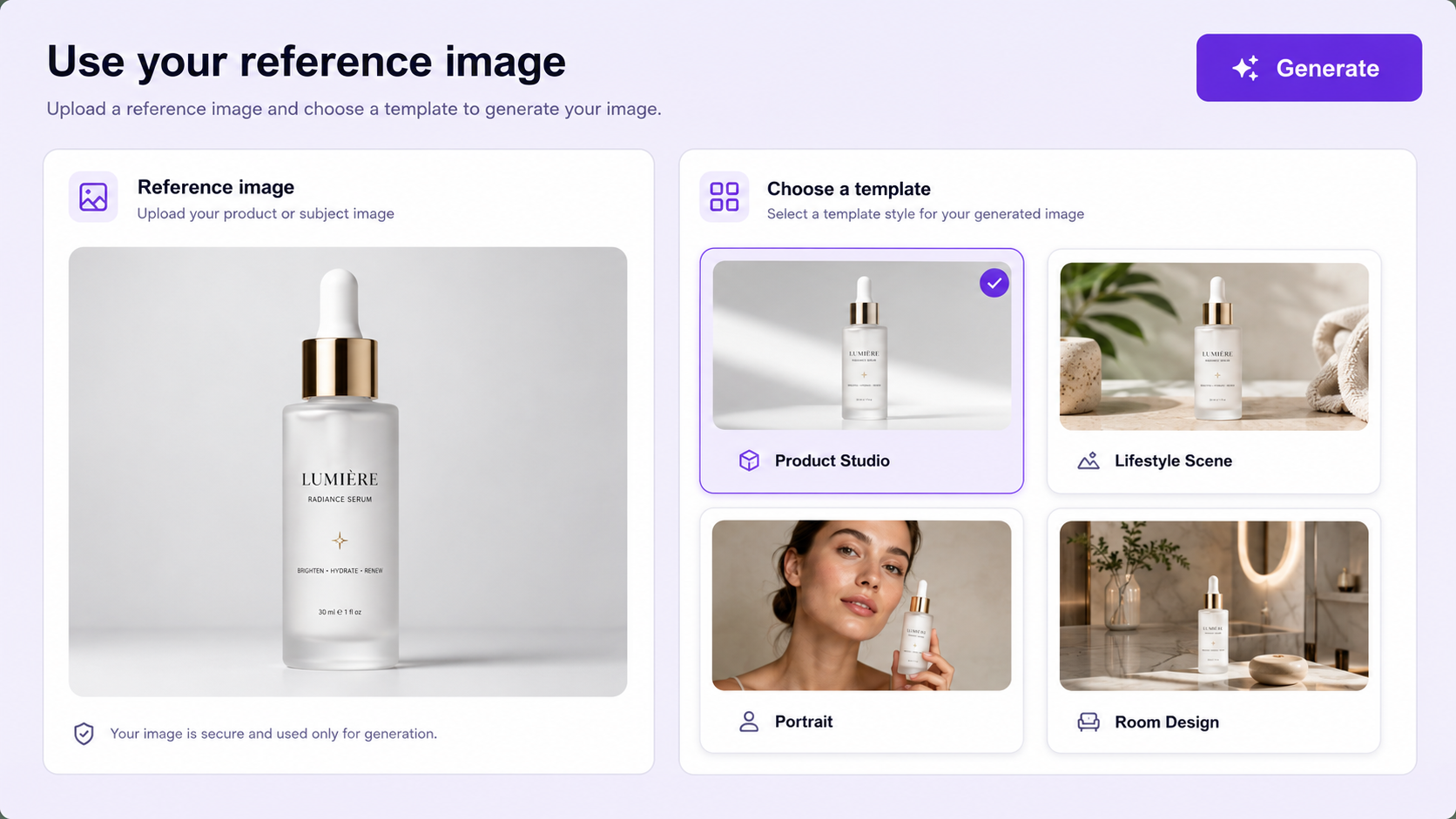
4. Write a Role-Based Prompt
A role-based prompt explains how the AI should use each image. State what the reference controls, what should change, and what must remain unchanged.
For example: Use the uploaded image as the exact product reference. Create a premium studio scene on light stone with soft side lighting. Keep the bottle, label, cap, color, proportions, and camera angle unchanged. Change only the environment and lighting.
5. Adjust Reference Strength When Available
Some tools provide a strength or influence control. A higher value usually makes the result follow the reference more closely, while a lower value allows more creative variation.
Begin with a middle setting. Increase the strength when the subject, composition, or style drifts too far. Reduce it when the result is too similar to the reference and the requested transformation is not visible.
6. Generate Several Variations
Generate multiple results from the same prompt and reference. Each generation may preserve different details or interpret the reference differently.
Compare the results according to your actual goal. For ecommerce, product accuracy may matter most. For campaign imagery, composition and visual impact may be more important.
7. Inspect the Final Image
Zoom in before using the result. Check faces, hands, hair, logos, labels, text, product edges, materials, reflections, jewelry, clothing, architecture, and repeated objects.
A reference image improves control, but it does not guarantee perfect preservation.
Reference Image Prompt Formula
This formula works because it separates the reference role from the transformation request. It tells the AI what to follow, what to create, and what not to alter.
Product Reference Prompt Example
Use the uploaded image as the exact product reference. Create a premium ecommerce hero image on warm travertine stone with soft morning light, realistic contact shadows, and a minimal cream background. Preserve the bottle shape, white label, black cap, logo placement, product color, proportions, and camera angle. Change only the background and lighting.
Portrait Reference Prompt Example
Use the uploaded portrait as the exact identity reference. Create a professional editorial headshot with a neutral studio background, soft directional lighting, realistic skin texture, and a clean modern finish. Preserve the same face, hairstyle, skin tone, eye color, age, and natural expression. Change only the background, clothing style, and lighting.
Style Reference Prompt Example
Use image 1 only as the visual style reference. Apply its soft beige palette, diffused lighting, natural stone materials, and minimal luxury mood to the uploaded product image. Do not copy the product, text, logo, objects, or exact composition from image 1.
Composition Reference Prompt Example
Use image 1 only as the composition reference. Match its centered subject, low camera angle, generous negative space, and balanced object placement. Use the uploaded product as the only subject and preserve its exact packaging, color, proportions, and label.
How to Use Multiple Reference Images
Multiple reference images can give the AI more information, but each image should have a clear role. Without role assignment, the generator may combine products, faces, backgrounds, styles, or objects unintentionally.
A practical multi-reference workflow may use one image for the subject, one for the environment, and one for lighting or style.
Avoid Conflicting References
Do not combine references with incompatible instructions unless contrast is intentional. A bright minimal studio, dark cinematic lighting, tropical beach, and luxury bathroom may compete with one another.
Choose references that support one visual direction. If the result becomes confused, remove one reference and generate again.
Use Fewer References First
Start with one or two images. Add another reference only when it provides information that cannot be explained clearly in the prompt.
More references do not always create better results. They can reduce control by introducing additional subjects, colors, shapes, and styles.
Reference Images for Product Photography
Product references are one of the most practical applications of image-to-image AI. A seller can use one real product photo to create multiple commercial scenes.
Useful transformations include white-background listing images, lifestyle scenes, premium studio campaigns, seasonal visuals, social advertisements, marketplace images, and website hero banners.
Reference Images for People and Portraits
Portrait references can help preserve the same person while changing the background, clothing, lighting, camera treatment, or visual style.
Use a clear image where the face is visible. Mention facial identity, face shape, eyes, skin tone, hairstyle, age, expression, and accessories when those details should remain stable.
Avoid requesting many major changes at once. Changing the pose, camera angle, expression, hairstyle, clothing, age, and environment together makes identity drift more likely.
Reference Images for Style and Composition
Style and composition references solve different problems. A style reference tells the AI how the image should feel. A composition reference tells it how the scene should be arranged.
Use style references for color palettes, lighting, materials, mood, visual texture, and camera treatment. Use composition references for framing, spacing, perspective, object placement, and negative space.
How to Create Consistent AI Images
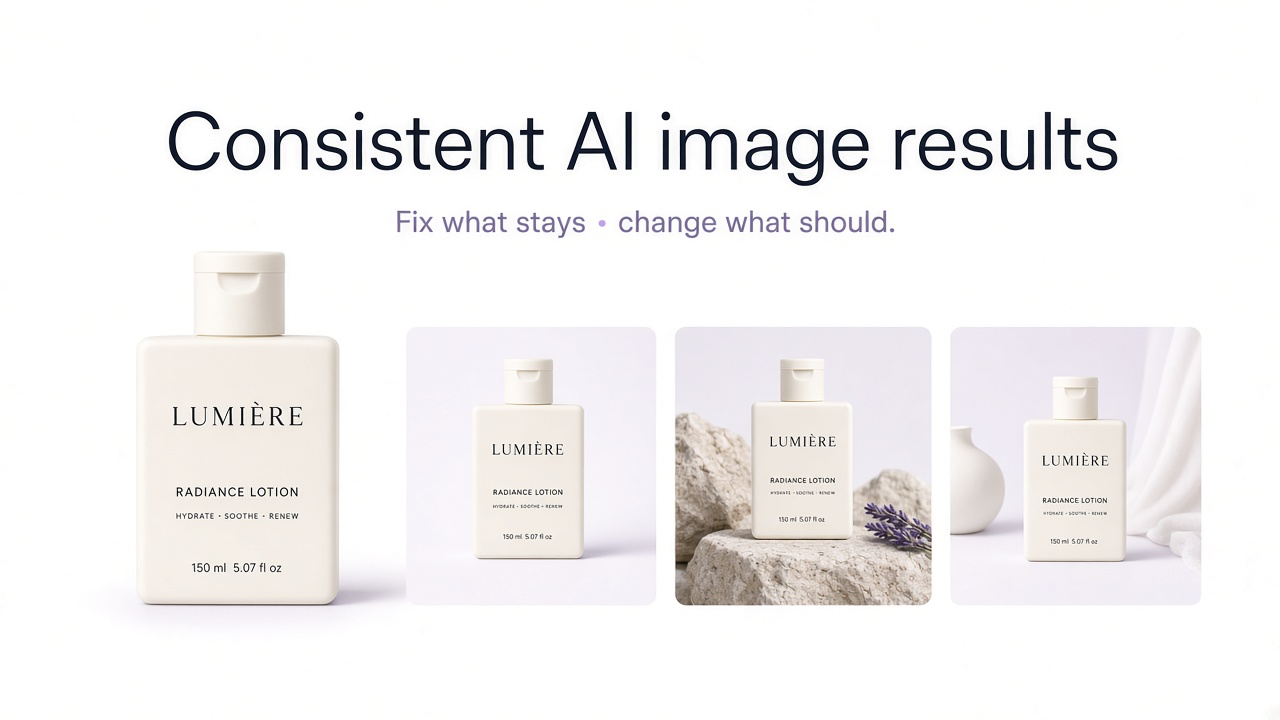
Consistency comes from repeating the same references, prompt structure, aspect ratio, lighting direction, environment, and preservation rules.
For a product catalog, use the same subject framing, background family, margin, shadow style, camera perspective, and output format. For a campaign, use the same style reference and color system across each generated visual.
Common Reference Image Mistakes
Uploading an Unclear Reference
A weak reference makes it difficult for the AI to understand which details matter. Use sharper images with clear subjects and useful visual information.
Not Explaining the Reference Role
The AI may not know whether an image is for subject identity, style, background, or composition. State the role directly.
Using Too Many References
Each additional reference introduces more visual information. Start with fewer images and add more only when necessary.
Forgetting Preservation Instructions
If a face, product, room, garment, or brand detail must remain accurate, list those protected details in the prompt.
Expecting Exact Logos and Text
Generative models may distort text, labels, and logos. Review these elements carefully and use manual correction when exact reproduction is required.
Changing Too Much at Once
Large simultaneous changes increase the risk of losing the original subject. Make the main transformation first, then refine smaller details.
Final Recommendation
The best way to use reference images is to assign each one a specific role. Decide what the image should control, explain that role in the prompt, state what must remain unchanged, and generate several variations before selecting the final result.
GenImagePro is designed for users who want a simpler reference-based workflow. You upload an image, choose a professional template, and generate variations for products, portraits, food, rooms, cars, beauty, backgrounds, and other image categories without configuring complex guidance settings.
Reference images improve control, but they do not remove the need for review. Treat each output as a draft and confirm that the final image preserves the people, products, branding, and visual details that matter.
FAQ
What is a reference image in AI?
A reference image is an uploaded visual that guides an AI-generated image. It can influence the subject, style, composition, color, lighting, background, identity, or other visual details.
How do I use a reference image in an AI generator?
Upload a clear image, decide what it should control, explain that role in the prompt, state what must remain unchanged, adjust reference strength when available, and generate several variations.
How do I keep the same person in AI images?
Use a sharp portrait and identify it as the exact identity reference. Ask the AI to preserve the face, hairstyle, skin tone, eyes, age, expression, and other important features.
How do I preserve a product with an AI reference image?
Use a clear product photo and protect the shape, label, logo, color, material, packaging, proportions, and camera angle in the prompt. Review every generated result against the original.
Can I use multiple reference images?
Yes, when the generator supports them. Assign a separate role to each image, such as subject, background, style, lighting, or composition, and avoid conflicting references.
What is the difference between a style reference and a composition reference?
A style reference guides color, lighting, texture, materials, and mood. A composition reference guides framing, perspective, spacing, and where elements appear in the image.
Do reference images guarantee exact results?
No. They improve guidance but do not guarantee perfect preservation. Faces, text, logos, labels, products, hands, clothing, and architecture should still be inspected.
Does GenImagePro require complex reference settings?
No. GenImagePro uses a template-first workflow, so users can upload an image and choose a predefined visual direction without configuring advanced reference controls.