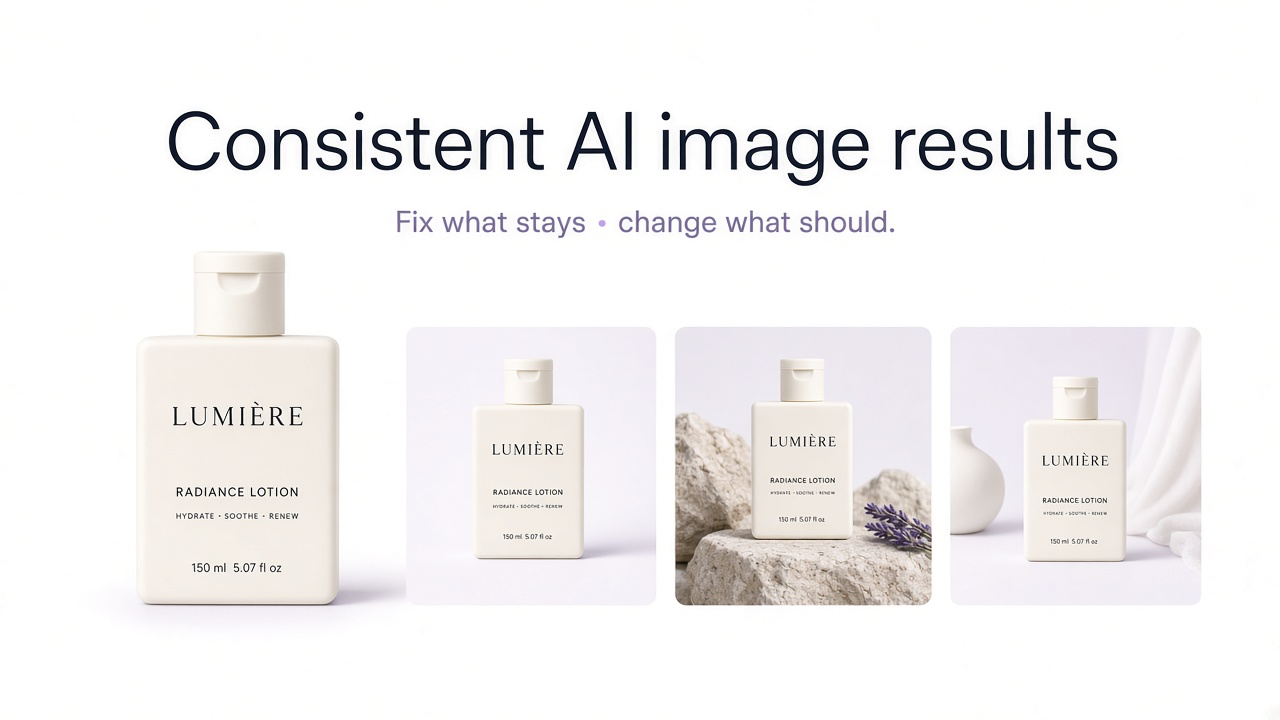
Generating one strong AI image is relatively easy. Generating ten images that clearly belong to the same project is harder.
A person's face changes slightly. A product becomes wider. The lighting moves from soft daylight to dramatic studio light. One image looks photographic while the next has a glossy AI finish. The same prompt can even produce noticeably different compositions from one generation to another.
The solution is not simply to make the prompt longer. Consistency improves when you define what must remain fixed, give the model strong visual references for those elements, reduce unnecessary variation, and review each output against the same source of truth.
Consistency does not mean making every image identical
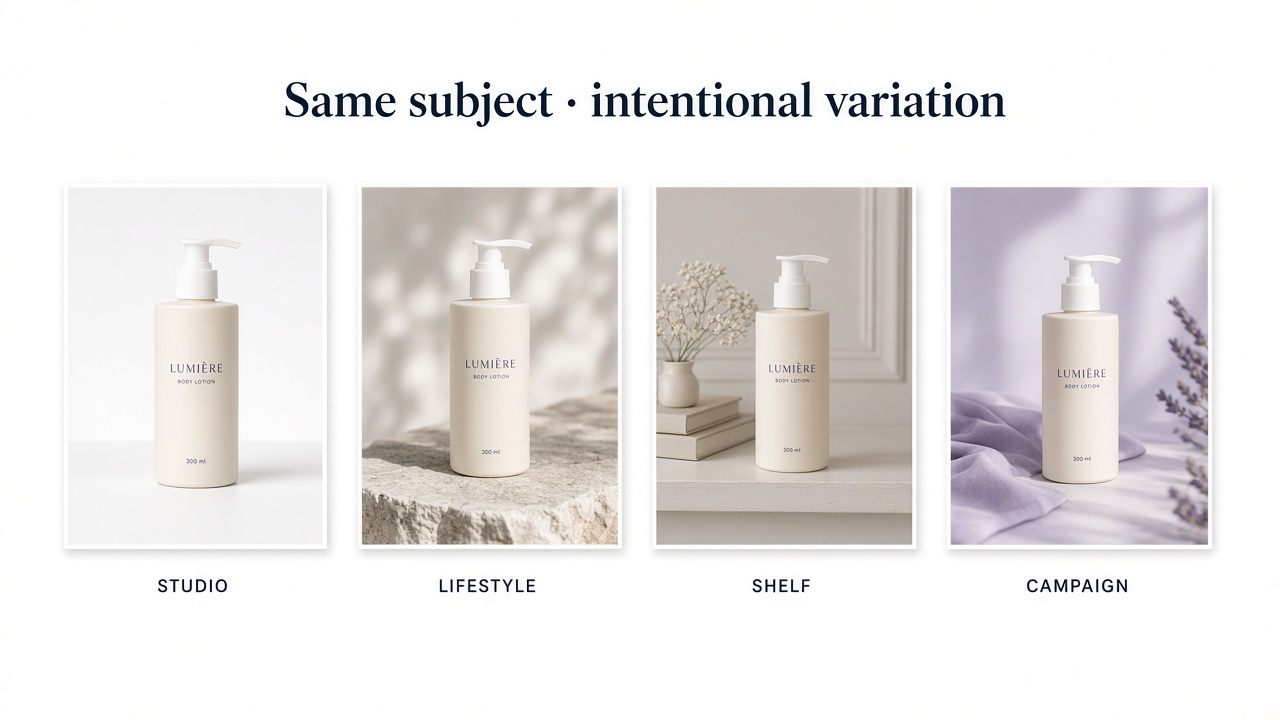
A consistent image series can still contain different scenes, camera angles, poses, backgrounds, crops, or use cases.
What matters is that the differences feel intentional. A product campaign can move from studio to lifestyle photography while preserving the product itself and maintaining the same visual language. A recurring character can appear indoors and outdoors while remaining recognizably the same person.
| Consistency type | What should remain stable |
|---|---|
| Subject consistency | Face, product design, character, object, clothing, or other defining visual features |
| Style consistency | Color palette, realism level, texture, lighting language, contrast, visual finish |
| Composition consistency | Framing, product placement, camera distance, angle, negative space, layout |
| Series consistency | The combination of subject, style, camera, lighting, and brand rules across a larger project |
Why AI images drift between generations
Image generation contains variability by design. A prompt such as "premium skincare bottle in a minimalist studio" describes a category of possible images, not one exact bottle, one exact lighting setup, or one exact composition.
Every unspecified detail creates room for interpretation. If you do not define the light direction, the model can change it. If you describe a person only as having brown hair, their face can change. If you describe a product instead of providing its image, the packaging can be reinvented.
Model updates and settings also matter. A prompt that produces one visual language in one model version may behave differently after switching models or generation modes.
Decide what must stay fixed
Before generating a series, separate fixed elements from variables.
| Keep fixed | Allowed to change |
|---|---|
| Exact product | Background environment |
| Product color | Supporting props |
| Soft daylight | Camera crop |
| Cool neutral palette | Room or surface |
| Realistic commercial finish | Specific campaign concept |
This sounds simple, but it prevents one of the most common consistency problems: asking the model to change everything while somehow preserving everything.
Use reference images for things that need to look the same
Text is good at describing categories. Images are better at communicating exact visual information.
If a particular person, product, character, room, object, or visual identity needs to remain recognizable, use a reference image whenever the workflow supports it.
For a practical reference workflow in GenImagePro, see How to Use Reference Images with AI.
Do not treat every reference image as the same kind of reference
One reference might define the subject. Another might define the lighting. A third might define composition.
Mixing those roles without thinking about them can reduce consistency rather than improve it.
| Reference type | Use it for |
|---|---|
| Identity reference | The same person, character, product, or object |
| Style reference | Color, texture, lighting, visual finish, illustration language |
| Composition reference | Framing, depth, camera position, object placement |
| Pose reference | Body position, gesture, stance, or physical arrangement |
Treat identity, styling, and layout as different problems. Control them separately wherever your tools allow.
Build one canonical reference before creating a series
Do not begin a 20-image campaign with 20 loosely related references. First choose the clearest source of truth.
For a product, that may be a clean, well-lit source photo where labels, materials, shape, hardware, and proportions are visible. For a character, it might be a neutral portrait with an unobstructed face and clear hairstyle.
A useful canonical reference is
Clear and sufficiently high resolution
Free from heavy filters that obscure real features
Visually representative of what must remain consistent
Easy to compare against later outputs
Not dependent on a dramatic pose or extreme lighting
Use multiple references only when they agree
More references are not automatically better.
Suppose one product photo shows an older package design, another has a different cap, and a third was color-graded heavily. Feeding all three into a model can create ambiguity about which details are correct.
The same problem occurs with characters. If several references show different hair colors, outfits, facial styling, or ages, the system may blend those differences rather than infer which version is canonical.
Keep a fixed prompt block for recurring rules
If the same rules matter in every image, do not rewrite them differently each time.
Create a reusable consistency block covering the subject, visual language, and constraints. Then add a smaller variable section for the new scene.
The wording does not need to be enormous. The point is to stop accidentally changing your own instructions from one generation to the next.
Separate the fixed prompt from the variable prompt
A useful prompt structure has two parts.
| Fixed block | Variable block |
|---|---|
| Subject identity | New action |
| Product fidelity | New environment |
| Lighting language | New camera crop |
| Color palette | New props |
| Realism or illustration style | New scenario |
This also makes troubleshooting easier. If one image drifts, you can identify whether the variable request introduced the problem rather than rewriting the entire prompt.
Change one major variable at a time
Consistency becomes harder when one prompt asks for a different pose, angle, lens, hairstyle, outfit, lighting setup, environment, season, and art style simultaneously.
When accuracy matters, make controlled changes. First create the new environment while keeping the subject stable. Then adjust the camera. Then create another pose if needed.
Keep the model and important settings stable during a series
Changing image models in the middle of a campaign can change prompt interpretation, realism, texture, lighting behavior, anatomy, composition, and styling even if the written prompt remains identical.
Different models and versions have different aesthetics, prompt behavior, detail handling, and reference features. If consistency matters, avoid changing the underlying generation setup casually halfway through the project.
Keep stable where relevant
Image model and version
Reference images
Reference strength
Aspect ratio
Stylization or creativity settings
Camera language
Core prompt block
Do not rely on seeds to preserve identity or style
Seeds are frequently presented as the secret to consistent AI imagery. That advice is incomplete.
A seed controls the initial random state used to begin a generation. It can be useful when testing how one prompt change affects an otherwise similar generation.
But seeds are not a reliable substitute for a subject or style reference. They are not intended to save a style, character, or appearance—use reference systems for visual consistency instead.
Edit an approved image instead of regenerating from zero
If an image already has the right person, product, composition, and styling, regenerating the entire scene creates new opportunities for drift.
For smaller changes, edit the approved image: replace the background, change one prop, extend the crop, adjust lighting, or modify a selected region.
For targeted edit ideas, see 25 Ways to Edit a Photo with AI.
Reuse approved images as new references
Once you create a successful side view, full-body shot, or product lifestyle image, it can become useful reference material for later outputs.
Including previously generated images in later prompts—when they are already accurate—gives subsequent generations more direct evidence of how the subject should appear from different angles.
Do this selectively. Only promote an image into your reference set after checking that it has not introduced a new error.
Keep camera language consistent
A series can contain the same subject and still feel inconsistent because every image appears to come from a different photographer.
Camera variables that affect visual consistency
- Camera distance
- Eye-level vs. high or low angle
- Wide vs. compressed lens feeling
- Depth of field
- Subject placement
- Amount of negative space
- Portrait, square, or landscape framing
If your campaign uses clean eye-level product photography with generous negative space, keep that language as a recurring rule rather than allowing every generation to choose a new camera style.
Define a repeatable lighting system
Lighting drift is one of the easiest ways for individually good images to stop looking like one set.
Instead of repeatedly saying "professional lighting," describe a recognizable lighting system.
That instruction gives the model much less freedom than a vague phrase such as "premium lighting."
Define a color system, not just a mood
Terms such as elegant, luxurious, dreamy, cinematic, or modern can produce very different palettes between generations.
If a brand or campaign needs consistent color, describe it concretely: white and cool gray surfaces, charcoal accents, pale blue highlights, muted natural greens, neutral skin tones, and no warm orange grading.
For brand work, a small approved style reference set can be more reliable than repeatedly describing the same color language from memory.
For products, preserve the product before the style
Product consistency has a different priority from general visual consistency. The product itself is not a styling suggestion; it is the item being sold.
Upload the actual product when possible, then let the environment, campaign direction, framing, or props change around it.
Product consistency check
Shape and proportions remain stable
Color remains the same SKU color
Packaging and label placement remain correct
Materials and surface finish remain accurate
Logos and typography do not drift
Patterns, stitching, hardware, and components remain present
For characters, lock identity before exploring scenes
For a recurring character, first create or select a clear identity reference before exploring dramatic scenes, unusual poses, or different locations.
Useful identity details include facial structure, hairstyle, hair color, skin tone, age range, body proportions, and any distinctive recurring accessories.
If the character needs to appear from many angles, additional approved views can help—feed accurate earlier views back into later generations when creating a multi-angle set.
For brand consistency, define a visual system
A brand image system needs more than a repeated style adjective.
| Variable | Approved rule |
|---|---|
| Background | White, off-white, pale stone, cool light gray |
| Lighting | Soft directional daylight |
| Contrast | Natural, restrained, no HDR |
| Composition | Clean subject hierarchy with generous negative space |
| Props | Few, physical, category-relevant objects |
| Finish | Photorealistic commercial editorial |
The exact system will differ by brand. What matters is that the system exists outside any one prompt so it can be reused and reviewed consistently.
Do not keep expanding the prompt when something drifts
When consistency fails, many users react by adding more adjectives and more negative instructions. Eventually the prompt becomes difficult to understand and contains competing priorities.
Instead, diagnose the type of failure.
| Problem | Better fix |
|---|---|
| Face changes | Strengthen or improve identity reference |
| Product changes | Use the actual product as reference and reduce transformations |
| Style changes | Use a fixed style reference or tighter visual system |
| Composition changes | Use composition reference or repeat camera/framing rules |
| Lighting changes | Define light direction and quality consistently |
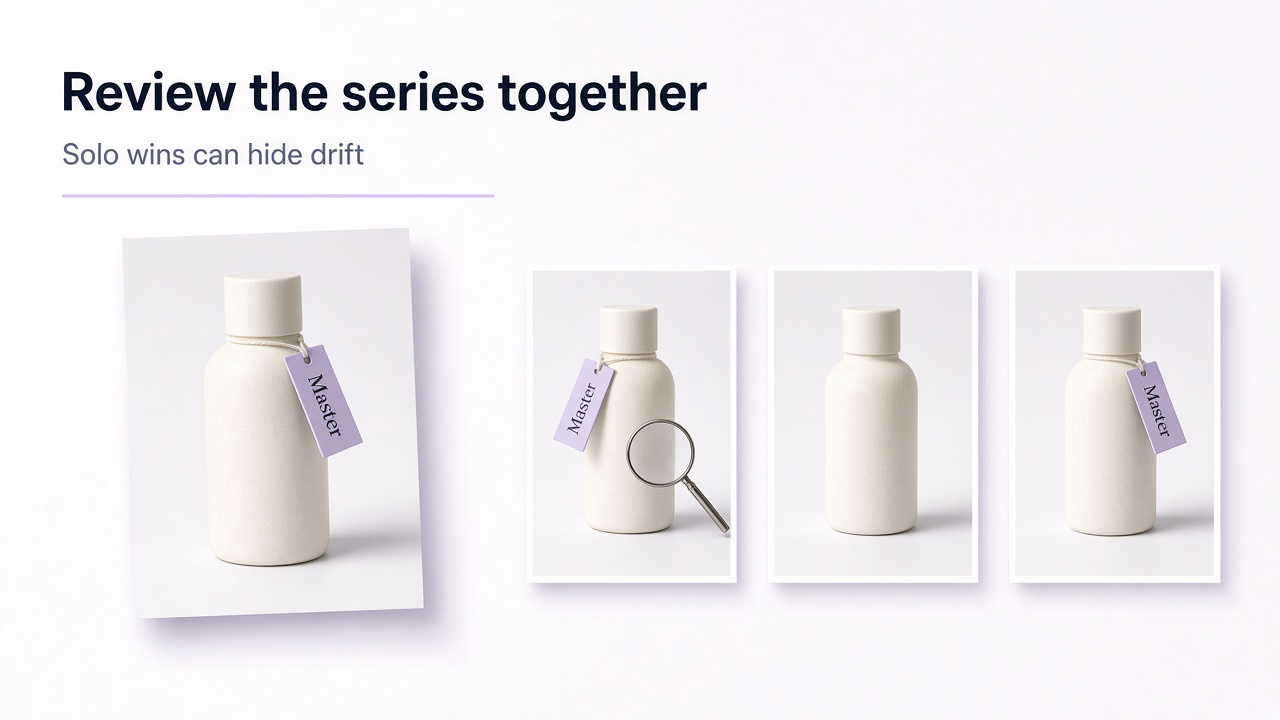
Review consistency as a set, not image by image
An image can look excellent alone and still be wrong for the project.
Place the outputs beside each other and compare them as a series. Small changes in face shape, color temperature, product size, background density, camera height, or contrast become much easier to notice.
Series consistency checklist
Same subject remains recognizable
Product or character proportions remain stable
Color palette belongs to one visual system
Lighting feels related across the set
Camera language is intentional
Realism or illustration level does not drift
Repeated materials behave similarly
Changes between images feel intentional rather than random
A practical GenImagePro consistency workflow
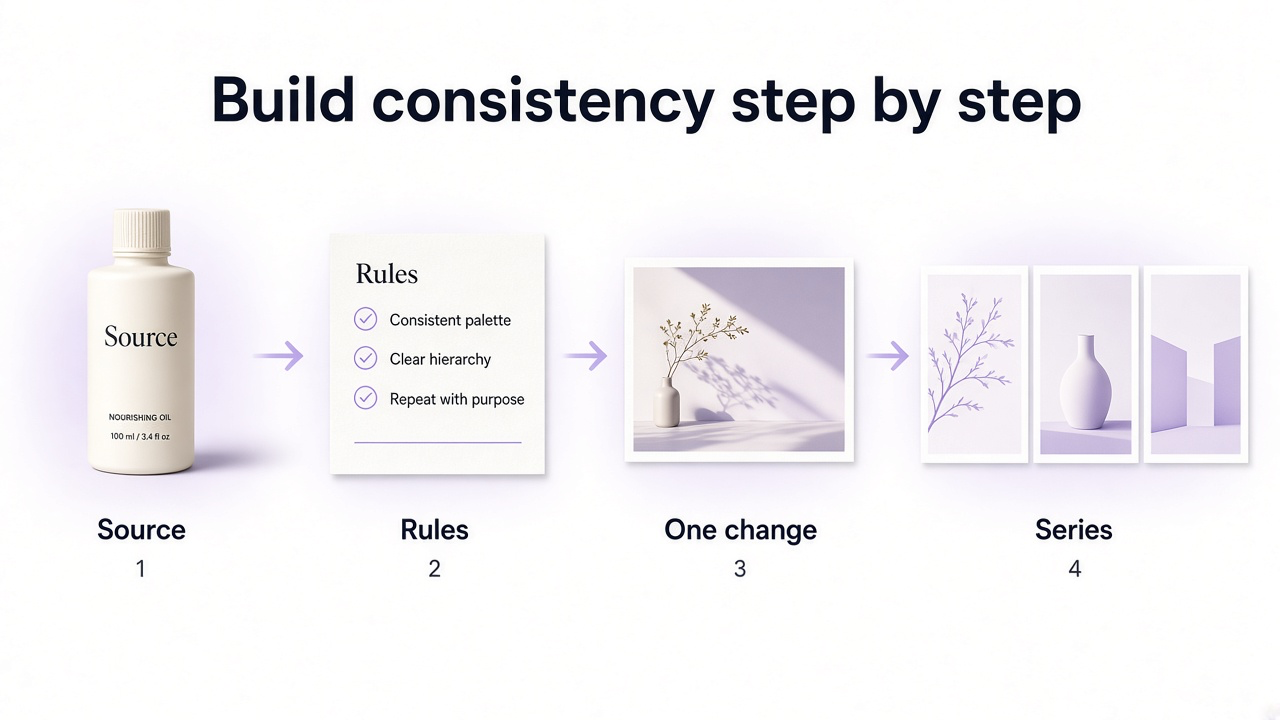
In GenImagePro, the most useful starting point for consistency is the image you already want to preserve.
Instead of repeatedly describing the same person, product, room, or object from scratch, upload it and use that visual as the reference for subsequent directions. Then keep your core art direction stable while changing only the scene, use case, crop, or other intended variable.
Choose the source of truth
Upload the clearest approved image of the person, product, or subject you need to preserve.
Write the fixed rules
Define what should not change: identity, product design, colors, materials, lighting language, or brand style.
Generate the first variation
Change one useful variable such as environment, camera crop, or commercial context.
Review against the original
Check the subject itself before judging whether the overall image looks attractive.
Keep approved directions
Use successful results as visual references for later angles or related scenes where useful.
Build the series gradually
Add new variables without abandoning the visual rules already established.
Prompt template for consistent AI images
Common consistency mistakes
- Trying to preserve a specific subject using text alone when a reference image is available
- Changing model versions halfway through a campaign
- Using conflicting reference images
- Changing too many major variables in one generation
- Rewriting the fixed visual rules differently in every prompt
- Assuming the same seed guarantees the same identity
- Regenerating an entire approved image for a small local change
- Promoting an inaccurate generated image into the reference set
- Judging images separately instead of viewing the complete series
- Confusing consistency with making every image visually identical
Frequently Asked Questions
Why do AI image results change even when I use the same prompt?
Generative image systems include randomness, and a text prompt often leaves many visual details unspecified. Different generations can therefore interpret the same prompt with different faces, compositions, lighting, or styling.
How do I make AI images more consistent?
Define what must remain fixed, use reference images for important visual details, keep a reusable core prompt, change fewer variables at once, maintain the same model and important settings, and review outputs against one approved source.
Are reference images better than prompts for consistency?
They serve different purposes. Text is useful for instructions and constraints, while reference images provide direct visual information about identity, product design, style, or composition. Strong consistency workflows often use both.
Does using the same seed make AI images consistent?
Seeds can help control the starting randomness and are useful for testing prompt changes, but they do not reliably preserve a character, product, or visual style. Dedicated reference-image workflows are generally more appropriate for those tasks.
How can I keep the same character in multiple AI images?
Start with a clear approved character reference, preserve a fixed set of identity characteristics, reuse the reference in subsequent generations, and add approved alternate views when different camera angles are needed.
How do I keep an AI product consistent across different scenes?
Upload the actual product and treat it as the fixed reference. Change the environment, lighting, crop, or campaign concept around it while checking that shape, proportions, color, labels, materials, patterns, hardware, and packaging remain unchanged.
How can I keep the same AI image style?
Define a repeatable visual system covering palette, lighting, contrast, texture, camera language, composition, and realism level. Use the same style reference where supported rather than relying only on vague adjectives such as premium or cinematic.
Should I use several reference images?
Use multiple references when they provide complementary information, such as different views of the same character or product. Avoid references that contradict each other in color, design, styling, age, or other features that need to stay consistent.
Is it better to regenerate or edit an existing AI image?
If most of the image is already correct, targeted editing is usually easier to keep consistent because it reduces the number of elements that need to be regenerated.
Can GenImagePro help create consistent image variations?
Yes. You can upload an existing product, person, or other image and use that visual as the reference while creating new edits, environments, and commercial directions. Keep the same source and recurring visual instructions when building a related series.