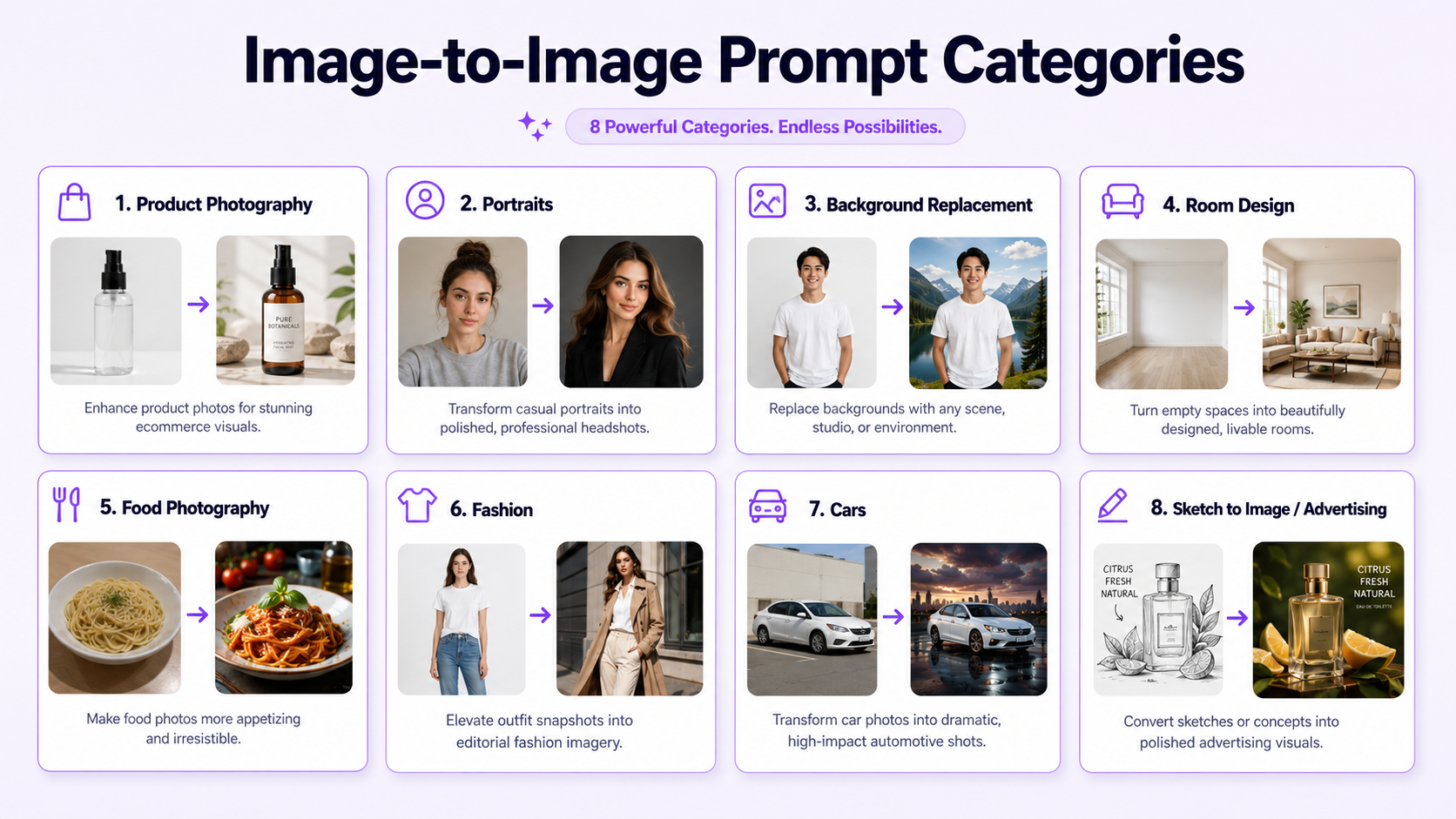
Image-to-image prompts tell an AI generator how to transform an existing photo. Instead of describing an image from scratch, you upload a source image and explain what should change, what should remain unchanged, and how the final result should look.
In GenImagePro, upload your source photo and use these image-to-image prompts—or start from a template and refine with the examples below.
The best prompts are specific without becoming overloaded. They describe the transformation, environment, lighting, composition, and visual treatment, then protect important details such as a face, product label, room layout, clothing shape, or camera angle.
How to Write an Image-to-Image Prompt
A useful image-to-image prompt has six parts: the source subject, the requested transformation, the environment, the lighting, the visual style, and the details that must remain unchanged.
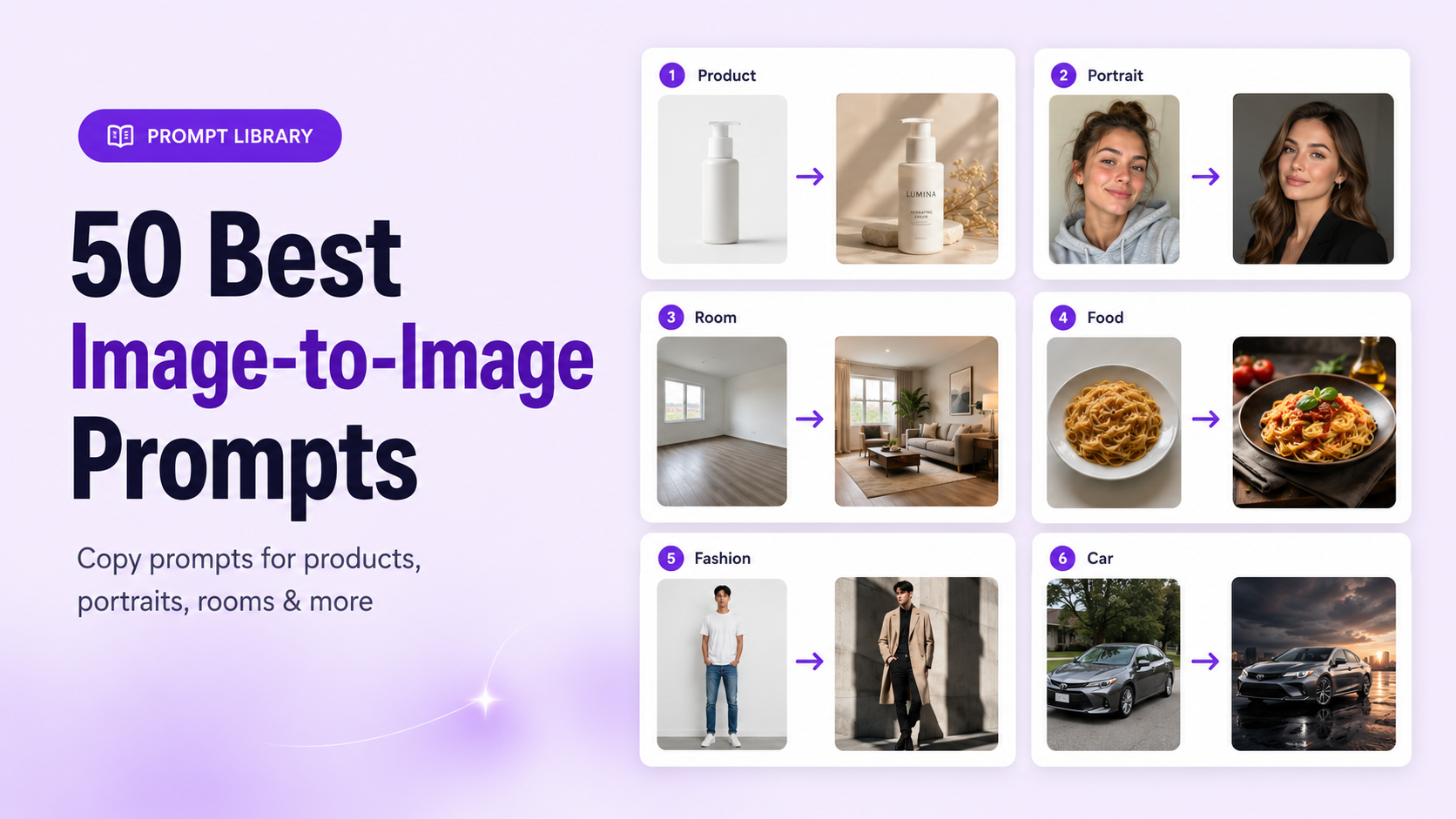
Strong example: Transform this basic skincare bottle photo into a premium ecommerce hero image on warm beige stone, with soft studio lighting, realistic contact shadows, a minimal cream background, and subtle botanical details. Keep the bottle shape, cap, label, logo placement, product color, proportions, and camera angle unchanged.

Product Photography Prompts
1. Clean White Studio Product Photo
Transform this product photo into a clean white studio image with soft diffused lighting, a seamless white background, realistic contact shadows, and a centered ecommerce composition. Keep the product shape, color, label, logo, proportions, material, and camera angle unchanged.
2. Luxury Stone Product Scene
Place this product on a premium light-stone pedestal in a refined neutral studio with soft side lighting, gentle shadows, and an elegant editorial composition. Keep the original product, packaging, label, cap, texture, dimensions, and color unchanged.
3. Lifestyle Bathroom Scene
Transform this skincare product photo into a bright luxury bathroom scene with natural stone, soft towels, subtle greenery, warm daylight, and a realistic lifestyle composition. Keep the bottle, label, logo, cap, product color, and proportions unchanged.
4. Minimal Gradient Advertisement
Create a modern product advertisement with a smooth beige-to-cream gradient background, soft spotlight, realistic floor shadow, clean negative space, and premium commercial styling. Keep the product completely recognizable and do not alter the label or packaging.
5. Water Splash Product Visual
Transform this product image into a fresh water-themed campaign with controlled splashes, small droplets, a cool blue background, crisp lighting, and realistic reflections. Keep the product shape, label, logo, cap, material, and original colors unchanged.
6. Botanical Beauty Campaign
Place this beauty product in a refined botanical scene with soft leaves, subtle flowers, warm natural light, a cream background, and realistic premium styling. Keep all packaging details, text placement, product color, and proportions unchanged.
7. Seasonal Holiday Product Image
Transform this product photo into an elegant winter holiday campaign with soft warm lights, restrained festive details, a deep neutral background, and premium studio lighting. Keep the product, packaging, branding, label, and exact shape unchanged.
Create a bold social media product image with a colorful studio background, dynamic but clean composition, strong commercial lighting, realistic shadows, and clear space for marketing text. Keep the product accurate and unchanged.
Prefer not to write product prompts manually? GenImagePro lets you upload a product photo and begin from a ready-made commercial template.
Portrait Transformation Prompts
9. Professional Headshot
Transform this casual portrait into a professional headshot with a soft neutral studio background, flattering directional lighting, realistic skin texture, and a polished corporate finish. Keep the same person, facial features, hairstyle, skin tone, eye color, and natural expression unchanged.
10. Editorial Fashion Portrait
Transform this portrait into a high-end fashion editorial with clean dramatic lighting, a refined dark studio background, elegant composition, and premium magazine styling. Keep the same face, hair, body proportions, skin tone, and identity unchanged.
11. Soft Natural Portrait
Create a soft natural-light portrait with a warm cream background, gentle window lighting, realistic skin texture, subtle depth of field, and a calm editorial mood. Preserve the person's identity, facial structure, hairstyle, eye color, and expression.
12. Cinematic Night Portrait
Transform this portrait into a cinematic night scene with controlled blue and amber lighting, a dark urban background, realistic skin tones, and a premium film-like atmosphere. Keep the same person, face, hair, clothing shape, and body proportions unchanged.
13. Studio Beauty Portrait
Create a clean beauty portrait with soft frontal lighting, a smooth neutral background, refined skin detail, glossy but realistic highlights, and close-up editorial composition. Preserve the face, features, skin tone, hair, and identity.
14. Creative Color Portrait
Transform this portrait using soft purple and blue studio lighting, a minimal gradient background, realistic facial detail, and a modern creative campaign style. Keep the same person, face shape, hairstyle, eyes, skin tone, and expression unchanged.
15. Professional Profile Photo
Turn this photo into a polished professional profile image with a simple light background, balanced lighting, natural skin texture, clean clothing presentation, and a confident but approachable mood. Keep the person's identity and facial features unchanged.
Background Replacement Prompts
16. Neutral Studio Background
Replace only the background with a soft neutral studio in warm beige tones, using natural shadows and subtle depth. Keep the main subject, pose, clothing, product details, colors, proportions, and camera angle unchanged.
17. Beach Background
Replace only the background with a realistic quiet beach at golden hour, including soft sand, calm water, warm sunlight, and natural atmospheric depth. Keep the person or product fully unchanged and preserve the original perspective.
18. Modern Office Background
Replace only the background with a bright modern office featuring soft daylight, clean architecture, neutral materials, and subtle depth of field. Keep the subject, face, clothing, pose, product details, and proportions unchanged.
19. Luxury Interior Background
Replace only the background with an elegant luxury interior using warm stone, soft textiles, refined furniture, and natural ambient lighting. Keep the original subject completely unchanged.
Replace only the background with a dark navy premium studio, soft edge lighting, subtle floor reflection, and cinematic depth. Preserve the subject, product, pose, color, logo, label, and camera angle.
21. Outdoor Garden Background
Replace only the background with a realistic green garden in soft morning light, natural foliage, gentle depth of field, and believable shadows. Keep the original person or object unchanged.
Interior and Room Design Prompts
22. Warm Modern Living Room
Redesign this room in a warm modern style with a neutral sofa, natural wood furniture, textured fabrics, soft daylight, and minimal décor. Keep the walls, windows, doors, floor, room dimensions, and camera perspective unchanged.
Transform this room into a bright Scandinavian interior with pale wood, white walls, simple furniture, soft textiles, natural daylight, and uncluttered styling. Preserve the architecture, layout, openings, floor, and camera angle.
24. Luxury Contemporary Room
Redesign this room as a luxury contemporary interior with refined stone, warm indirect lighting, premium furniture, subtle metallic details, and balanced composition. Keep the room structure, windows, doors, floor plan, and perspective unchanged.
25. Cozy Bedroom Design
Transform this bedroom into a calm cozy space with layered neutral bedding, warm wood, soft lamps, textured fabrics, and gentle evening lighting. Preserve the walls, windows, floor, ceiling, room proportions, and camera position.
26. Minimal Home Office
Redesign this room as a clean home office with a simple desk, ergonomic chair, organized shelving, neutral colors, daylight, and minimal accessories. Keep all architectural elements and the original perspective unchanged.
27. Modern Restaurant Interior
Transform this empty commercial room into a modern restaurant with warm lighting, elegant tables, natural materials, balanced seating, and a refined hospitality atmosphere. Preserve the walls, windows, columns, floor, and camera angle.
Food Photography Prompts
Transform this casual food photo into a professional restaurant menu image with appetizing natural light, realistic texture, a clean tabletop, balanced color, and subtle depth of field. Keep the dish, ingredients, portion size, plate shape, and arrangement recognizable.
29. Dark Moody Food Photo
Create a dark moody food photograph with directional side lighting, a deep textured background, realistic steam, controlled highlights, and premium editorial styling. Keep the actual food, plate, ingredients, and portion unchanged.
30. Bright Delivery App Image
Transform this dish into a bright commercial delivery-app photo with clean overhead lighting, accurate colors, a simple background, sharp detail, and centered composition. Keep the food arrangement, serving size, ingredients, and container unchanged.
31. Rustic Table Scene
Place this dish in a warm rustic table setting with natural wood, soft daylight, subtle utensils, realistic shadows, and an inviting editorial composition. Keep the dish and food presentation unchanged.
32. Luxury Dessert Campaign
Transform this dessert photo into a premium campaign image with elegant soft lighting, refined plating context, a minimal dark background, and realistic glossy detail. Preserve the dessert shape, decoration, ingredients, color, and portion size.
Fashion and Clothing Prompts
33. Fashion Editorial
Transform this fashion photo into a clean magazine editorial with refined studio lighting, a minimal architectural background, elegant composition, and realistic fabric detail. Keep the same model, outfit, garment shape, color, print, and fit unchanged.
34. Street Style Campaign
Place the subject in a modern urban street-style scene with natural daylight, realistic city depth, confident composition, and premium campaign styling. Preserve the person, face, hairstyle, outfit, accessories, and clothing colors.
35. Luxury Boutique Scene
Transform this clothing image into a luxury boutique campaign with warm interior lighting, elegant materials, soft background blur, and polished fashion styling. Keep the garment design, texture, color, length, and proportions unchanged.
36. Minimal Lookbook Image
Create a clean fashion lookbook image with a light neutral studio background, soft even lighting, realistic fabric texture, and centered full-body composition. Keep the model, pose, garment, fit, and colors unchanged.
37. Seasonal Outdoor Fashion
Transform this fashion image into an autumn outdoor campaign with warm natural light, subtle foliage, realistic atmosphere, and refined editorial composition. Keep the person, clothing, hairstyle, accessories, and body proportions unchanged.
Car Photography Prompts
Transform this car photo into a premium dark studio advertisement with controlled reflections, soft edge lighting, a clean floor, and cinematic composition. Keep the exact car model, body shape, paint color, wheels, lights, badges, and camera angle unchanged.
39. Coastal Road Campaign
Place this car on a scenic coastal road at golden hour with realistic sunlight, natural reflections, subtle motion atmosphere, and a polished commercial look. Preserve the vehicle model, body, color, wheels, windows, and proportions.
40. Urban Night Car Image
Transform this vehicle photo into a modern city-night campaign with controlled neon reflections, wet pavement, cinematic lighting, and realistic depth. Keep the car fully accurate and unchanged.
41. Clean Marketplace Car Photo
Create a clean vehicle listing image with a bright neutral outdoor background, even daylight, accurate paint color, realistic shadows, and clear full-car visibility. Keep the exact car, wheels, body panels, lights, and proportions unchanged.
Sketch-to-Image Prompts
42. Product Sketch to Realistic Render
Transform this product sketch into a realistic commercial render with accurate proportions, refined materials, clean studio lighting, a neutral background, and professional industrial-design presentation. Preserve the original silhouette, structure, and key design features.
43. Interior Sketch to Real Room
Convert this interior sketch into a realistic modern room with natural materials, soft daylight, believable furniture, and accurate architectural perspective. Keep the original layout, walls, openings, and major furniture placement.
44. Fashion Sketch to Editorial Look
Transform this fashion sketch into a realistic editorial photograph with premium fabric, accurate garment construction, elegant studio lighting, and a clean runway-inspired composition. Preserve the original silhouette, cut, proportions, and design details.
45. Character Sketch to 3D Render
Convert this character sketch into a polished 3D-style render with realistic materials, controlled lighting, a simple background, and clear full-body presentation. Preserve the character silhouette, clothing design, proportions, and distinctive features.
46. Instagram Product Campaign
Transform this product photo into a bold Instagram campaign with a vibrant but premium background, strong commercial lighting, realistic shadows, dynamic composition, and clear negative space for short copy. Keep the product, label, branding, color, and proportions unchanged.
47. Pinterest Lifestyle Image
Create a vertical lifestyle image for Pinterest with a clean aspirational environment, soft natural light, balanced composition, and clear space for a headline. Keep the main subject recognizable and preserve important product or facial details.
48. Website Hero Image
Transform this image into a wide website hero visual with premium lighting, refined depth, uncluttered composition, and generous negative space on one side for text and a call-to-action. Keep the main subject accurate and prominent.
Create a high-impact paid social advertisement with a strong focal point, controlled contrast, clear product visibility, modern commercial styling, and space for promotional copy. Preserve all essential brand and product details.
50. Seasonal Campaign Variation
Transform this image into a tasteful seasonal campaign using subtle themed details, coordinated colors, premium lighting, and a polished advertising composition. Keep the original subject, branding, facial identity, product information, and proportions unchanged.
How to Improve These Prompt Examples
Common Prompting Mistakes
Final Recommendation
For faster results, GenImagePro provides a template-first workflow for products, portraits, backgrounds, room design, food, fashion, cars, beauty, and other image transformations. You can upload an image, choose a visual direction, and generate variations without writing every prompt from scratch.
FAQ
What is an image-to-image prompt?
An image-to-image prompt tells an AI generator how to transform an uploaded image. It should explain what should change, how the result should look, and which details must remain unchanged.
How do I write a good image-to-image prompt?
Describe the source subject, requested transformation, environment, lighting, visual style, composition, final use, and protected details. Use specific visual language instead of vague words such as better or professional.
How do I keep the same face in an AI image?
Use a clear portrait and state that facial identity, face shape, eyes, skin tone, hairstyle, and expression must remain unchanged. Avoid requesting too many major changes at once.
How do I preserve product details in image-to-image AI?
List the product details that must remain fixed, including shape, label, logo, color, material, cap, proportions, and camera angle. Compare every generated result with the original product photo.
Can I use image-to-image prompts for ecommerce?
Yes. They can help create listing photos, lifestyle scenes, seasonal campaigns, advertisements, and social content from existing product images. The final image should still represent the real product accurately.
Can I use these prompts in GenImagePro?
Yes. Upload your photo in GenImagePro, paste or adapt a prompt from this guide, and generate. You can also start from a ready-made template and refine with these prompts when you need more control.