
Furniture is one of the hardest ecommerce categories to photograph well. A bottle can sit on a tabletop studio set. A sofa may require an entire room, controlled lighting, transport, styling, multiple camera angles, and enough physical space to photograph it properly.
AI furniture photography changes that workflow. Start with an existing photo of a chair, sofa, table, lamp, cabinet, bed, shelving unit, or other home product and create studio shots, realistic room scenes, campaign imagery, catalog variations, and advertising assets without rebuilding a physical set for every image.
The difficult part is not simply generating a beautiful room. The tool also has to keep the furniture recognizable. Product shape, proportions, upholstery, wood grain, legs, hardware, materials, stitching, color, texture, and distinctive construction details all matter when the generated image represents something a customer can actually buy.
We compared nine AI tools based on furniture-specific workflows, product preservation, realistic scene generation, editing capabilities, catalog scalability, creative control, and what you can do after the first image is generated.
Disclosure: This guide is published by GenImagePro, which is included in the comparison. Rather than treating one platform as the best choice for every business, we have separated the tools by the workflows they are particularly well suited to.
For broader ecommerce tool comparisons, see our guide to the best AI product photography tools. For lifestyle scene strategy beyond furniture, see the lifestyle product photography guide.
Best AI furniture photography tools at a glance
[GenImagePro](/) — Best all-in-one furniture product photography workflow with Home & Furniture templates and conversational editing. OmniRoom — Best dedicated furniture-only AI staging platform, with measurements, multi-angle white backgrounds, and collection scenes. Furniture Connect — Best for enterprise furniture catalogs, fabric variants, and catalog-linked asset workflows. Photoroom — Best for high-volume ecommerce furniture catalogs with strong batch and API infrastructure. Claid — Best when you need a clear choice between strict product preservation and more creative scenes. Pixelcut — Best for marketplace furniture listings and dimension graphics. Flair — Best for art-directed furniture campaigns and seasonal concepts. Pebblely — Best for simple furniture lifestyle backgrounds with a low learning curve. Caspa AI — Best for broader furniture listing creatives alongside general ecommerce tools.
What makes furniture photography different from normal AI product photography?
Furniture exposes mistakes that can remain hidden with smaller products.
Scale has to feel believable
A lounge chair cannot appear the size of a dining chair. A bedside lamp has to relate correctly to the table and bed around it. Buyers subconsciously use doors, windows, tables, people, rugs, and surrounding objects to understand scale.
Perspective has to match the room
Furniture has long straight edges and familiar proportions. Incorrect camera perspective can make a table warped, stretch a sofa, bend chair legs, or make a cabinet look as if it is floating instead of standing on the floor.
Materials need to remain recognizable
Velvet, boucle, leather, polished chrome, glass, oak, walnut, lacquer, stone, woven textiles, and brushed metal all respond differently to light. A convincing room is not enough if the AI turns walnut into generic brown wood or removes the texture customers are paying for.
The product itself should not be redesigned
Generative tools sometimes make subtle changes that improve the composition while making the product less accurate: different legs, altered upholstery seams, changed handles, additional cushions, different lamp geometry, or slightly modified proportions. Product photography needs more restraint than concept generation.
1. GenImagePro — Best all-in-one furniture product photography workflow
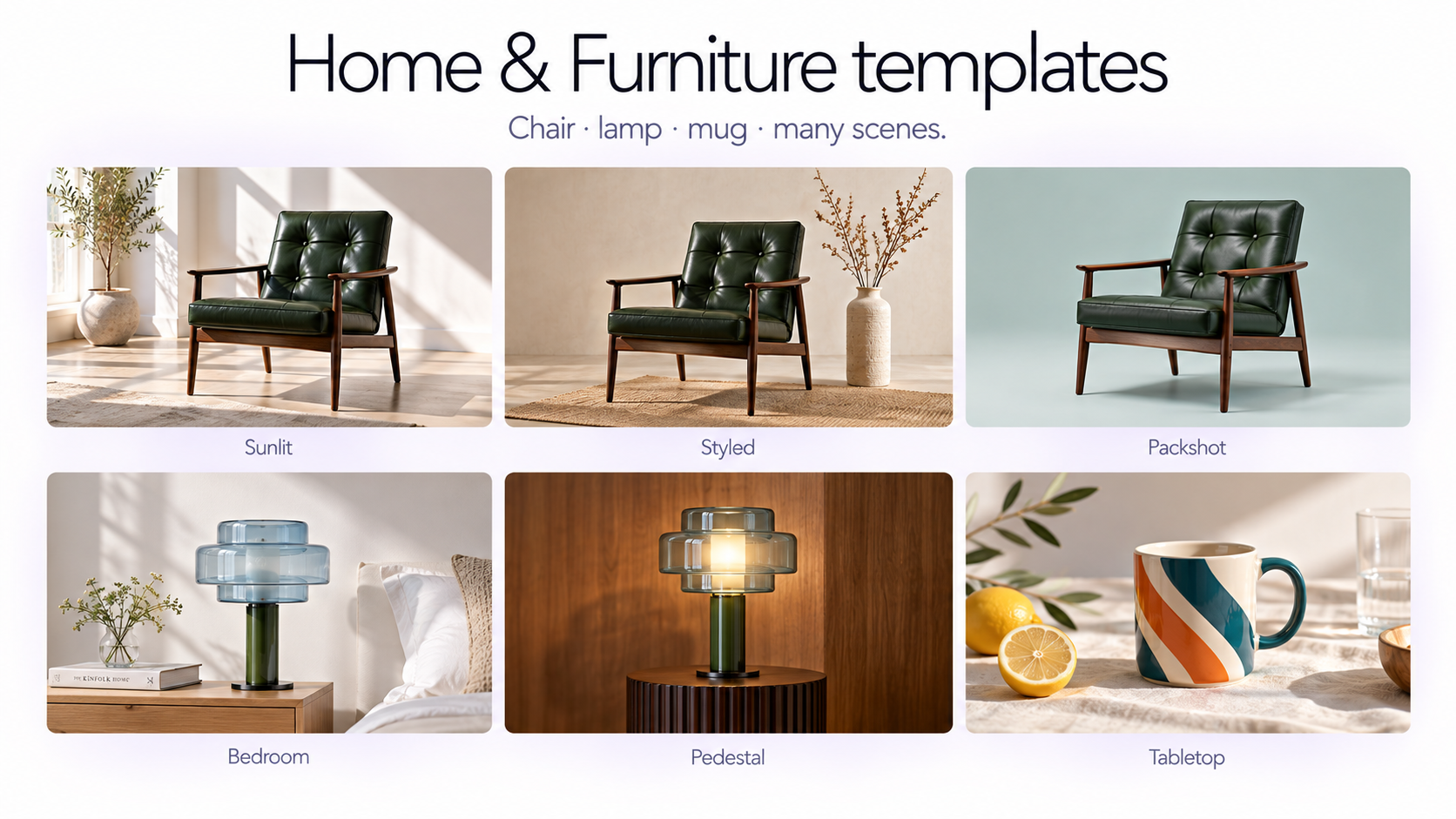
GenImagePro combines template-based furniture photography with more flexible AI editing. Instead of requiring every furniture seller to describe an interior from scratch, users can open the Product Photoshoot workflow, choose the Home & Furniture category, select an existing visual direction, and upload their product.
The templates are built to work across different kinds of furniture and home products rather than being tied to one specific chair or lamp. This lets the same visual concept adapt to sofas, armchairs, tables, lighting, storage, decor, home accessories, and other products.
Available visual directions can range from minimal studio setups and simple colored environments to natural interiors, warm bedroom scenes, editorial room photography, contextual lifestyle images, close product framing, and interaction-based compositions.
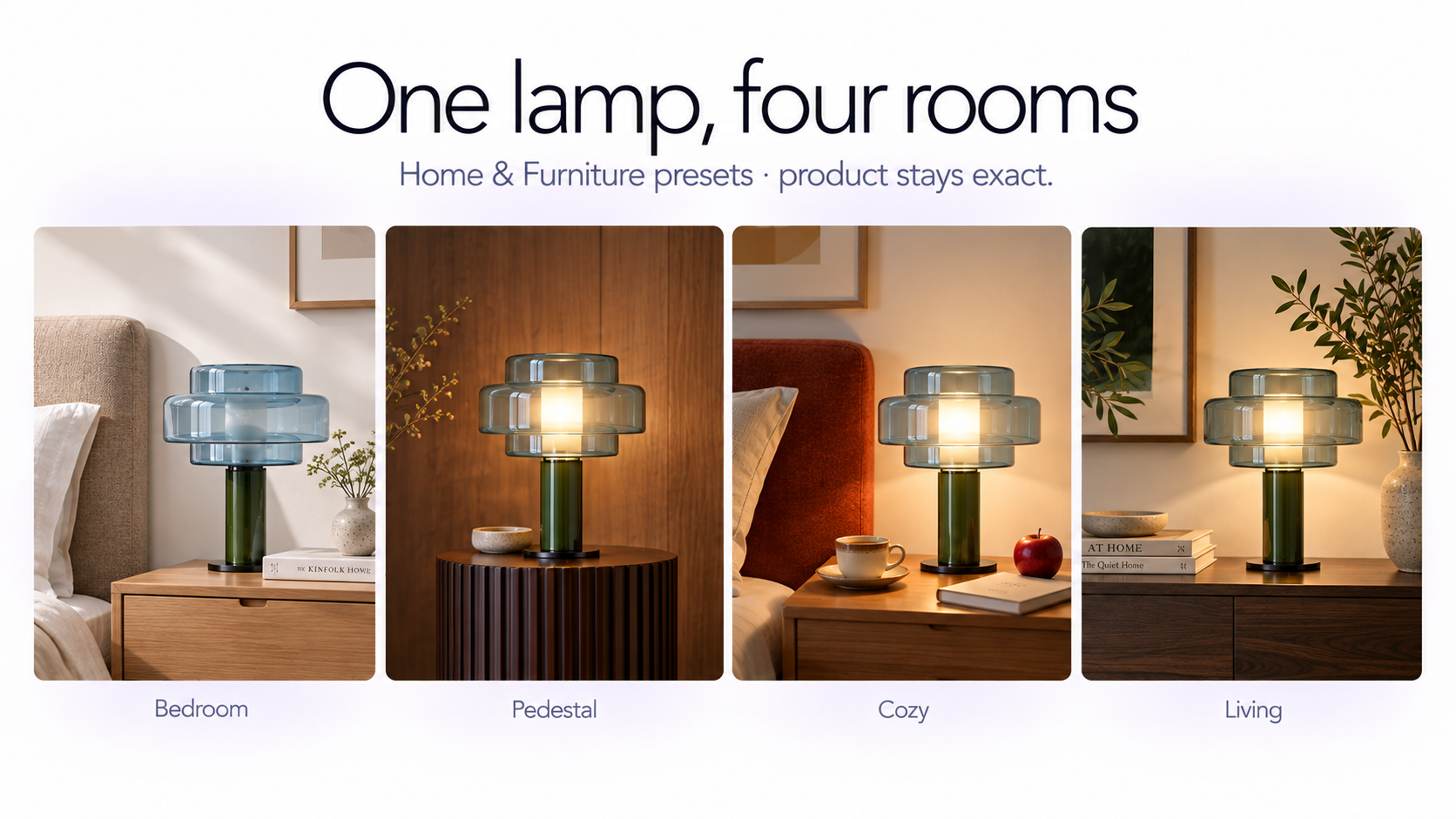
The uploaded furniture remains the product reference. The workflow is designed to preserve its recognizable shape, proportions, color, materials, texture, upholstery, legs, hardware, and other defining construction details while changing the surrounding photography.
You can also start from AI product photography or the lifestyle product photo generator when you need broader product or lifestyle directions that still work for home goods.
The advantage: the first generation is not the end
Where GenImagePro becomes more useful than a simple furniture background generator is after the initial photoshoot.
Users can continue editing the generated image conversationally. You can ask to change the background, adjust lighting, remove or add surrounding objects, change the styling, modify the room atmosphere, reposition visual elements, simplify the scene, or correct individual details.
For example, you might begin with a ready-made living-room template and then ask: “Make the room brighter with natural morning light.” “Remove the plant behind the chair.” “Use a warmer plaster wall.” “Make the room more minimal but keep the chair unchanged.” “Add a small side table to show scale.”
The same workspace can also continue beyond still photography into additional product visuals and image-to-video workflows.
GenImagePro strengths
• Dedicated Home & Furniture product photography category • Ready-made templates with no prompt required • Works across different furniture and home-product types • Studio, lifestyle, editorial, contextual, and campaign imagery • Product identity remains the central reference • Background, lighting, props, composition, and environment can be changed • Conversational follow-up editing after generation • Multiple visual directions from the same source product • Can continue from a still image into additional creative and video workflows
Where another tool may be better
Furniture Connect and OmniRoom provide deeper furniture-industry infrastructure for operations such as dimensional assets, measured rendering, material catalogs, and large enterprise furniture pipelines. Photoroom and Claid also offer more mature high-volume automation and API infrastructure for companies processing very large image catalogs.
Best for: Furniture and home brands that want a flexible creative workflow covering ready-made photoshoots, custom scenes, conversational editing, campaign imagery, and additional visual creation rather than a single-purpose staging tool.
2. OmniRoom — Best dedicated furniture-only AI staging platform
OmniRoom is unusually focused: it is built specifically for furniture sellers, retailers, and manufacturers rather than general product photography.
From one furniture image, its current platform can create lifestyle scenes, six-angle white-background imagery, collection shoots containing multiple products, product videos, and edited variations. Users can also enter the product's real measurements to help preserve believable sizing inside generated scenes.
That measurement feature is particularly relevant to furniture because visual scale is part of the product information, not merely an aesthetic decision.
OmniRoom also supports furniture categories ranging from sofas and chairs to beds, wardrobes, shelving, outdoor furniture, tables, and storage.
Best for: Furniture-only businesses that want specialized staging controls and care heavily about room scale, multiple furniture angles, collection imagery, and furniture-specific outputs.
3. Furniture Connect — Best for enterprise furniture catalogs
Furniture Connect approaches AI photography as part of a larger furniture catalog operation.
Its AI Studio can turn an existing product cutout into lifestyle imagery, change rooms and lighting, generate new perspectives, swap fabrics and materials, remove backgrounds, upscale images, create technical-style drawings, edit specific areas, and support conversational editing.
The platform becomes especially interesting for manufacturers and larger retailers because those images can stay tied to product data through its wider catalog and digital asset management system.
Furniture Connect also describes batch workflows that can queue hundreds of products and output imagery for web, marketplaces, social, and print.
Best for: Large furniture manufacturers, retailers, catalog teams, and businesses managing substantial SKU and material-variant libraries.
4. Photoroom — Best for high-volume ecommerce furniture catalogs
Photoroom is not furniture-only, but it has developed a substantial Home & Furniture and ecommerce production workflow.
AI Product Staging can place an existing furniture product into realistic environments, while AI Backgrounds, shadows, object removal, editing, resizing, and other ecommerce tools can handle the surrounding production work.
Its strongest advantage is scale. Photoroom's current Batch workflow can apply Product Staging, Edit with AI, Recolor, background operations, and other ecommerce transformations to as many as 250 images at once.
For larger organizations, Photoroom also provides visual quality-assurance systems, product-fidelity checks, APIs, marketplace workflows, and automated production infrastructure.
Best for: Ecommerce teams managing large furniture catalogs alongside other product categories and needing strong batch-processing infrastructure.
5. Claid — Best for choosing between strict product preservation and creative scenes
Claid's AI Photoshoot provides a useful distinction that matters for furniture: Precise and Creative modes.
Precise mode lets you position the product on the canvas and keeps its existing shape and angle while building a new scene around it. This makes it appropriate when the original furniture view needs to remain closely controlled.
Creative mode gives the AI more freedom to change the product angle and overall composition. That is more useful for campaign exploration but also means the resulting furniture should be checked more carefully against the actual SKU.
Claid additionally supports inspiration images, existing background references, product swapping, background removal, enhancement, outpainting, editing, image-to-video, and product-photography APIs.
Best for: Ecommerce teams that want explicit control over when the AI should preserve an existing product view and when it can reinterpret the composition.
6. Pixelcut — Best for marketplace furniture listings and dimension graphics
Pixelcut has a dedicated AI furniture photography workflow built around its Home Decor templates.
A furniture seller can upload a chair, sofa, table, lamp, or other home product and move between simple packshots and styled room scenes. Pixelcut states that its furniture templates are designed to keep the uploaded product's real shape, proportions, color, texture, and visible labels while changing the environment.
Pixelcut is particularly interesting for marketplace sellers because its wider toolset includes a Graphics feature for producing furniture dimension graphics with labeled height, width, and depth.
Product Studio can also generate high-resolution product imagery, while bulk editing and API tools handle operations such as background generation, resizing, upscaling, and broader catalog processing.
Best for: Smaller and mid-sized furniture sellers that need lifestyle photos and practical marketplace assets such as dimension graphics from one general product-content platform.
7. Flair — Best for art-directed furniture campaigns
Flair has a dedicated AI Furniture category aimed at creating furniture imagery in different environments and from different visual directions.
Its furniture workflow emphasizes photorealistic settings, different interior design contexts, catalog consistency, seasonal environments, and visualization of alternative colors and materials.
- The wider Flair platform includes editing tools, camera-angle changes, variations, bulk content generation, product video, and an API.
- That makes Flair particularly relevant when the creative team wants more art direction than a simple one-click background replacement workflow.
- Best for: Creative teams producing editorial furniture campaigns, new visual concepts, seasonal collections, and highly art-directed marketing imagery.
8. Pebblely — Best for simple furniture background generation
Pebblely keeps the workflow relatively simple: upload the product, describe the setting you want, and let AI generate the surrounding scene.
It has a dedicated furniture category with examples spanning living rooms, window-lit interiors, modern spaces, cozy homes, colored rooms, and other everyday furniture settings.
Pebblely's current paid plans also support custom prompts, reference images, different output sizes, and bulk generation.
It does not provide the same furniture-specific operational depth as platforms such as Furniture Connect or OmniRoom, but that simplicity can be an advantage when the main requirement is turning a basic furniture photo into several lifestyle backgrounds quickly.
Best for: Smaller sellers who primarily need affordable, straightforward lifestyle backgrounds rather than a complete furniture catalog production system.
9. Caspa AI — Best for broader furniture listing creatives
Caspa AI includes furniture as a dedicated product-photography use case and provides furniture-oriented templates alongside its wider ecommerce photography platform.
Its editing tools cover operations such as background removal, lighting adjustments, enhancement, upscaling, and general product-scene generation.
Caspa is also oriented toward creating broader ecommerce marketing material rather than only a single furniture hero shot, making it relevant when a brand needs a mix of product imagery and listing creatives.
Best for: Ecommerce sellers wanting furniture templates alongside broader AI product-photography and marketing tools.
Which AI furniture photography tool should you choose?
The right choice depends less on which tool can generate the prettiest demonstration image and more on the workflow surrounding your actual furniture catalog.
If you want to upload furniture, choose ready-made visual directions without writing prompts, create multiple types of product imagery, and then continue refining those results conversationally, GenImagePro offers a particularly flexible all-in-one creative workflow.
If your company sells only furniture and you want specialized controls such as measurements, multi-angle catalog imagery, and collection scenes, OmniRoom deserves a close look.
If you manage a large manufacturer or retailer with hundreds or thousands of products, fabric variants, product data, technical assets, and team workflows, Furniture Connect is much closer to enterprise furniture infrastructure than a conventional AI photo generator.
If catalog throughput is the main requirement and furniture is one of several ecommerce categories you sell, Photoroom's mature batch and automation workflows are highly relevant.
If you need a strict choice between preserving the existing furniture shot and letting AI explore new perspectives, Claid's Precise and Creative modes provide a clear workflow distinction.
If marketplace listings are your focus, Pixelcut combines furniture room scenes with practical catalog assets such as dimensions graphics.
What should you test before choosing a furniture AI tool?
1. Start with your hardest product
Do not test only a simple wooden stool. Use the item most likely to expose AI mistakes: a patterned armchair, boucle sofa, polished chrome table, transparent glass piece, unusual lamp, intricate cabinet, or product with recognizable stitching and hardware.
2. Compare the generated product with the original
Check legs, cushions, seams, handles, hardware, number of drawers, curvature, thickness, upholstery pattern, wood grain, color, and distinctive construction details.
3. Check physical contact
Furniture should sit on the floor rather than float above it. Look closely at contact shadows, rug interaction, table-leg placement, wall clearance, and how objects overlap.
4. Check room scale
Doors, side tables, windows, lamps, rugs, people, and architecture provide visual scale references. If these relationships are wrong, a technically attractive image can still misrepresent the product.
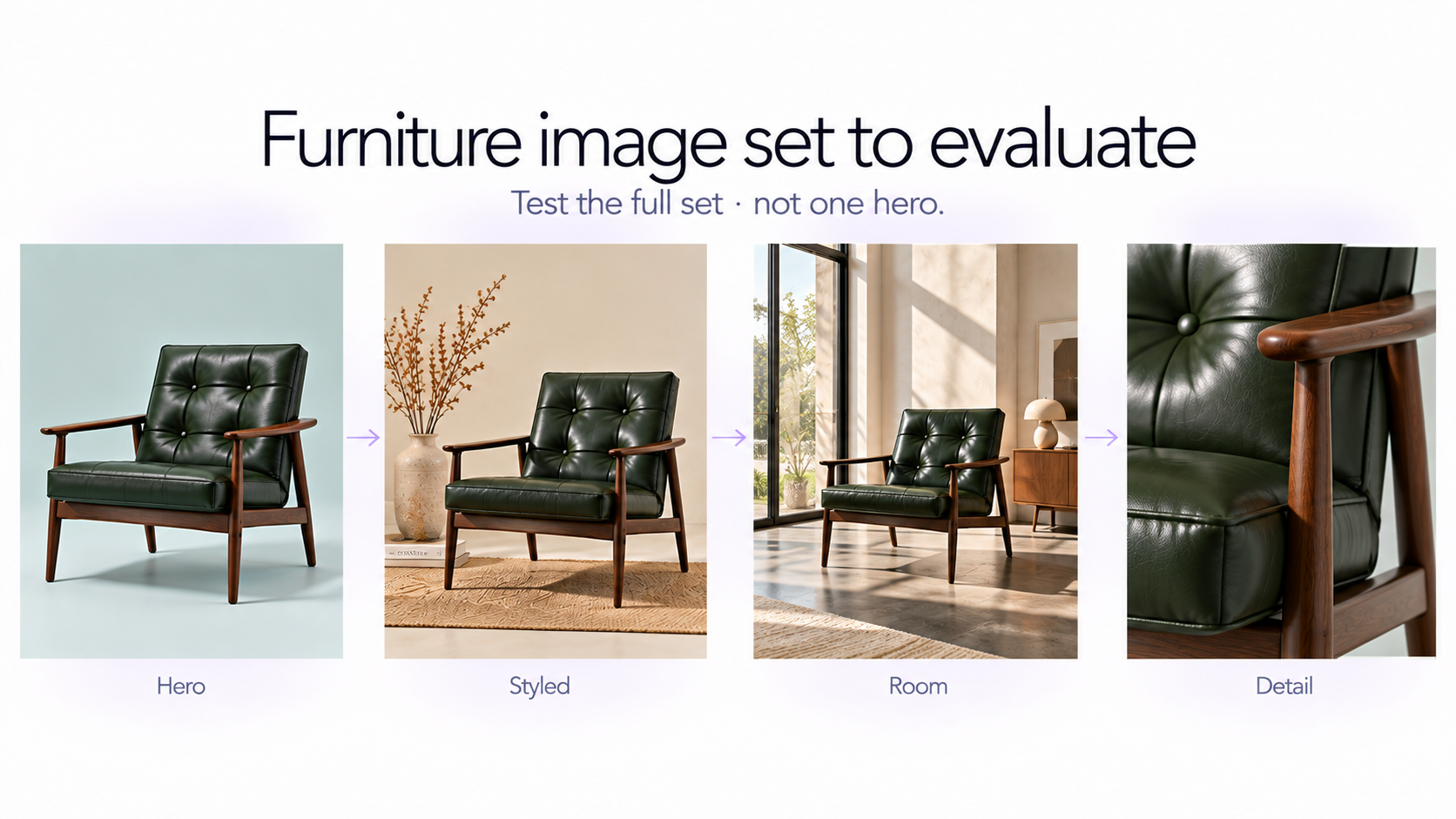
5. Test multiple outputs, not one hero image
A furniture listing rarely needs only one picture. Test whether the workflow can produce a clean product shot, three-quarter view, room scene, close-up, alternative campaign visual, and appropriate aspect ratios while keeping the product coherent.
How to create AI furniture photography with GenImagePro
The simplest workflow does not require prompt engineering.
1. Open Product Photoshoot in GenImagePro. 2. Choose the Home & Furniture category. 3. Browse the available furniture and home-product photography templates. 4. Select the visual direction that suits the product. 5. Upload a clear image of your sofa, chair, lamp, table, cabinet, bed, shelf, decor item, or other home product. 6. Generate the first furniture photo. 7. Review product shape, color, materials, texture, legs, hardware, and other defining details. 8. Continue editing the result conversationally if you want to adjust the background, lighting, props, styling, or composition. 9. Generate additional scenes or continue into other image and video workflows when needed.
A good furniture source photo still matters
AI reduces the need for a complete studio setup, but the source image remains the visual reference for the real product.
Use an image where the full furniture piece is visible, the silhouette is easy to understand, major construction details are sharp, and the color is reasonably accurate.
Avoid heavily distorted wide-angle photos when possible. If chair legs, table edges, or cabinet proportions are already obscured in the source image, the AI has less reliable information to preserve.
AI furniture photography vs. virtual staging
These terms overlap, but they describe different starting points.
Furniture product photography starts with a specific product and asks AI to photograph or stage that product in new environments.
Virtual staging usually starts with a room — often an empty real-estate photograph — and adds plausible furniture to make the space feel furnished. For that workflow, see how to virtually stage a room and virtual staging vs traditional staging.
If you are selling a specific sofa, table, lamp, or chair, use a product-centered tool. A beautiful AI sofa that merely resembles your SKU is not an accurate product photograph.
Can AI completely replace furniture photography?
AI can replace a substantial amount of scene staging, background production, campaign variation, and repetitive catalog work, but exact product representation still requires review.
For technical documentation, exact dimensional proof, legally sensitive claims, or cases where material accuracy must be guaranteed, retain verified source photography, measurements, CAD data, or other authoritative product references.
A practical approach is to use the real product photo as the source of truth and AI as the production layer around it. For more ecommerce image planning ideas, see 50 product photography ideas.
Frequently Asked Questions
What is the best AI tool for furniture photography?
It depends on the workflow. GenImagePro is designed for an all-in-one creative workflow using ready-made furniture templates and conversational editing. OmniRoom specializes exclusively in furniture staging. Furniture Connect targets larger furniture catalogs and enterprise operations, while Photoroom is strong for high-volume ecommerce production.
Can AI put my furniture into a realistic room?
Yes. Modern furniture product-photography tools can start from an uploaded sofa, chair, table, lamp, cabinet, bed, or other product and create a new interior around it. Always review scale, perspective, materials, construction details, and product color before publishing.
Can I create furniture product photos without writing prompts?
Yes. GenImagePro's Product Photoshoot workflow includes a Home & Furniture category with ready-made visual templates. You can choose a photography direction, upload the furniture image, and generate without describing the complete scene manually.
Can AI keep my furniture design unchanged?
Reference-based product photography tools are designed to preserve the uploaded product, but generative outputs should still be reviewed. Pay particular attention to proportions, upholstery patterns, seams, legs, handles, wood grain, hardware, colors, and other construction details.
What is the best AI furniture tool for large catalogs?
Furniture Connect is particularly focused on furniture catalog infrastructure and large product ranges, while Photoroom provides strong batch and API workflows across furniture and other ecommerce categories. The best choice depends on whether your operation is furniture-specific or cross-category.
What is the best AI furniture photography tool for Amazon or marketplace listings?
Pixelcut is particularly useful for marketplace-oriented furniture workflows because it combines furniture photography templates with tools such as dimension graphics. Photoroom also provides marketplace-focused image standardization and large-scale catalog processing.
Can AI create different interior styles for the same furniture?
Yes. The same furniture reference can be shown in styles such as Scandinavian, Japandi, mid-century, warm minimal, contemporary, rustic, luxury, Mediterranean, or other interior directions without physically restaging the product.
Can AI change the lighting without changing the furniture?
Yes. AI editors can reinterpret the surrounding lighting and environment while using the original furniture as the reference. In GenImagePro, generated furniture images can also be refined with follow-up conversational instructions.
Can I turn AI furniture photos into videos?
Yes. Some platforms now extend furniture imagery into product video. GenImagePro supports image-to-video workflows, while tools such as OmniRoom, Pixelcut, Flair, and Photoroom also provide video-related product content capabilities.
What furniture works with AI product photography?
Common examples include sofas, chairs, dining tables, coffee tables, beds, cabinets, shelving, desks, wardrobes, lamps, stools, outdoor furniture, storage products, and smaller home or decor items. A clear source photo generally makes preservation easier.