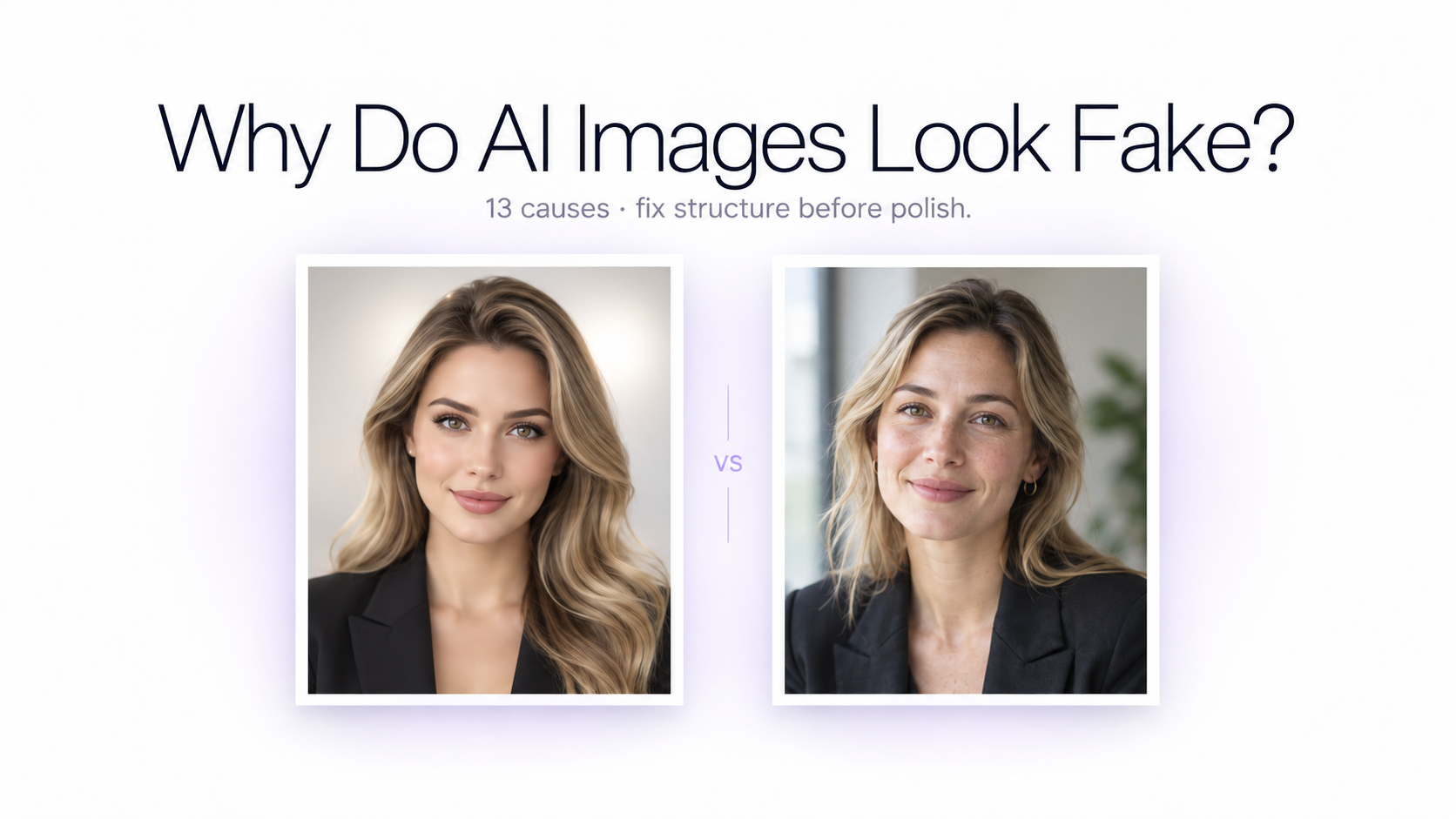
You generate an image that appears impressive at first glance. The face is sharp, the lighting is dramatic, and the background contains plenty of detail. But something still feels wrong. It looks generated.
The problem is usually not a simple lack of detail. Modern AI image models can generate extremely detailed faces, products, rooms, landscapes, clothing, and materials. The more common problem is that the details do not fully agree with one another.
A face may look realistic while the skin is unnaturally smooth. A product may be beautifully rendered while its reflection contradicts the lighting. An interior may contain individually realistic furniture while several objects appear to follow slightly different perspectives. Your brain notices these inconsistencies even when you cannot immediately explain what is wrong.
Research into AI-generated image perception supports this broader explanation. Studies have identified recurring problems involving anatomy, surface appearance, object function, physics, spatial relationships, lighting, reflections, and contextual plausibility. At the same time, modern AI images can sometimes be difficult for people to distinguish from photographs, which means there is no single visual feature that automatically makes an image look AI-generated.
Why Do AI Images Look Fake? Quick Answer
AI images usually look fake when individually convincing details become inconsistent as a complete scene. The most common problems include overly smooth textures, images that look too perfect, lighting without a believable source, shadows pointing in the wrong direction, impossible reflections, weak perspective, incorrect anatomy, unrealistic object interactions, artificial materials, broken text, and excessive scene complexity.
The best way to fix a fake-looking AI image is therefore not to add more words such as realistic, 8K, masterpiece, or ultra detailed. First identify which visual system is failing. Fix the structure, physics, materials, or photographic treatment causing the problem — then use a practical follow-up guide such as how to make AI images look more realistic.
The Real Problem: The Details Do Not Agree With Each Other
A photograph contains many connected systems. Camera position determines perspective. Lighting determines highlights and shadows. Material determines how that light is reflected or absorbed. Object position determines occlusion. Distance from the camera affects apparent size and focus. Gravity affects clothing, hair, furniture, liquids, and bodies.
When those relationships are coherent, the image feels physically believable. When several relationships disagree, the result can feel synthetic even if every individual element appears impressive.
This explains why adding more detail can sometimes make the problem worse. A perfectly rendered metal bottle with physically impossible reflections is not more convincing because its label is sharper. A highly detailed face with incompatible lighting is not fixed by adding pores.
1. Everything Looks Too Perfect
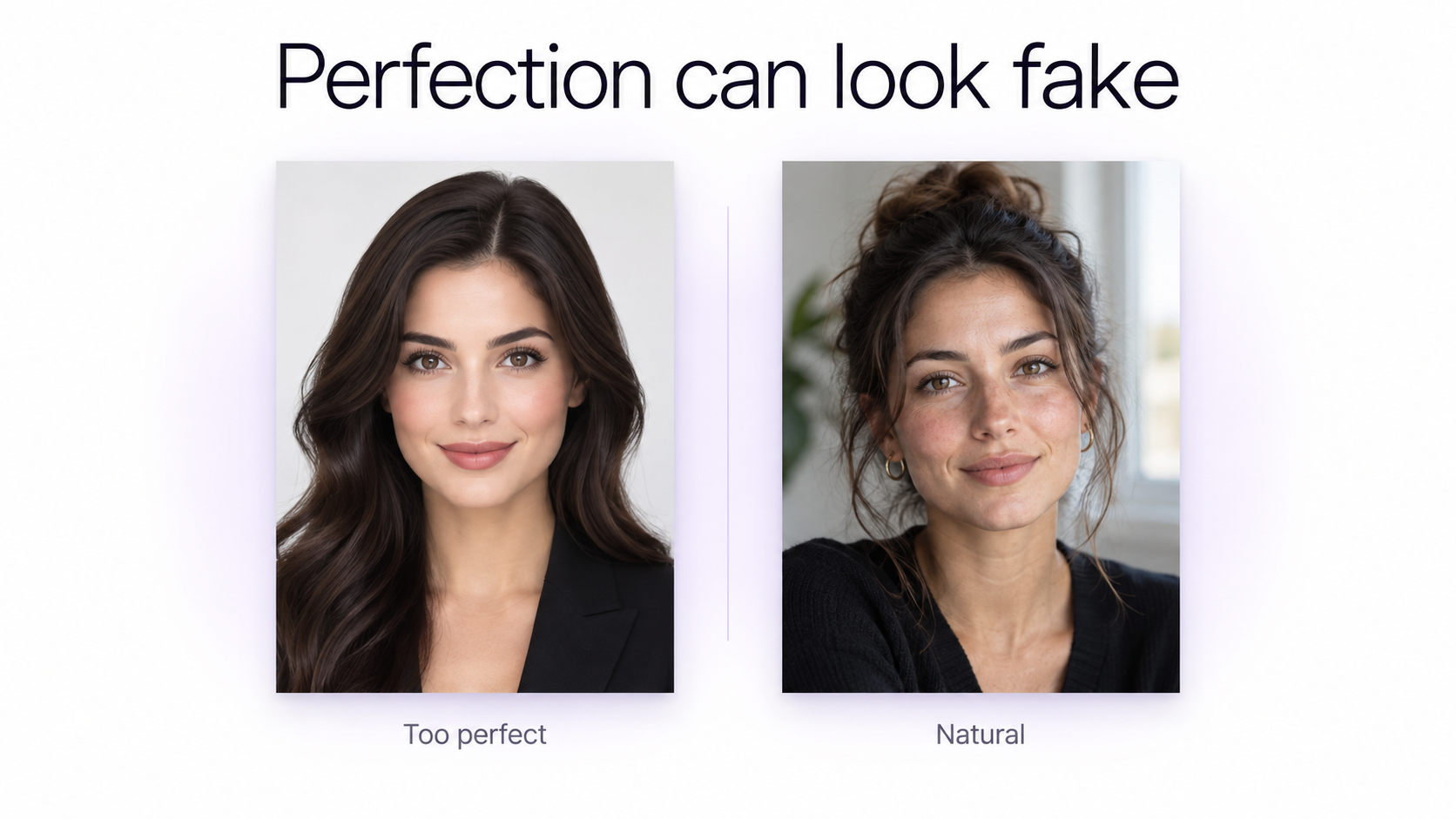
One of the newer signs of an AI-generated image is not obvious distortion. It is excessive perfection.
A scene may have perfectly balanced objects, spotless surfaces, symmetrical composition, flawless clothing, completely controlled hair, equally polished materials, perfect highlights, and an environment without the small irregularities that normally appear in photography.
Human perception research has found that people sometimes describe generated images as suspicious because they appear too polished, too orderly, too smooth, or too picturesque. As image generators improve at avoiding obvious anatomical errors, these subtler stylistic cues become more important.
How to Fix an AI Image That Looks Too Perfect
Do not solve this by adding random dirt, scratches, wrinkles, and damage to everything. Realism comes from natural variation, not artificial imperfection.
Use slightly asymmetric framing, naturally uneven light, ordinary fabric folds, subtle hair flyaways, small variations in surface reflections, realistic skin texture, imperfect object spacing, natural exposure differences, and believable depth of field.
Instead of asking for a perfect cinematic portrait, describe the circumstances of an ordinary photograph: a person standing beside a window on an overcast morning, soft daylight from one side, relaxed posture, slightly off-center framing, natural skin texture, and restrained contrast.
2. Skin Looks Plastic, Waxy, or Airbrushed
Plastic-looking skin remains one of the most recognizable AI portrait problems. The face can have correct proportions and sharp eyes while still looking like wax, porcelain, or polished plastic.
Real skin is not one perfectly smooth surface. It contains pores, fine facial hair, subtle color variation, small wrinkles, changes in roughness, different levels of oiliness, tiny shadows, and variations in how light reflects from different areas of the face.
AI images can compress those differences into a uniform surface. Prompts containing phrases such as flawless skin, perfect beauty, porcelain skin, glowing skin, hyper-detailed beauty portrait, or heavy retouching language can make the effect stronger.
How to Fix Plastic AI Skin
Describe natural skin rather than simply requesting more detail. Useful directions include natural skin texture, subtle complexion variation, visible but restrained pores, fine facial hair, realistic under-eye detail, natural highlights, and minimal retouching.
Avoid overcorrecting. Extremely sharpened pores covering every part of a face can look just as synthetic as completely smooth skin. Realism requires variation and restraint. When identity also matters, pair texture fixes with guidance on how to keep the same face in AI images.
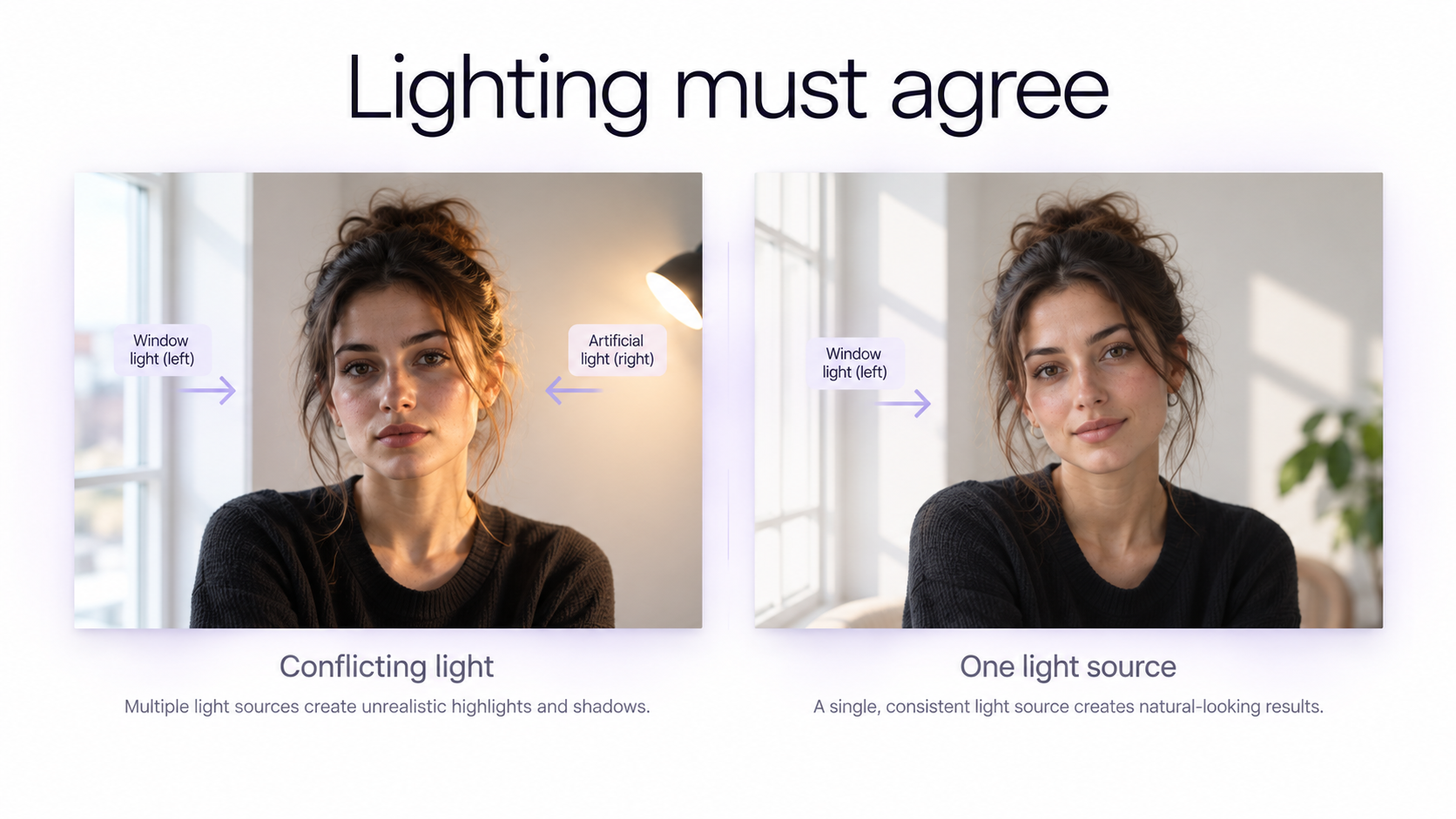
3. The Lighting Has No Clear Source
Lighting is one of the fastest ways for an otherwise impressive AI image to stop feeling believable.
Sometimes one side of a person's face is brightly illuminated while the surrounding room suggests light from another direction. A product may have several strong highlights without any corresponding windows or lights. A subject can appear photographed in a studio while the background appears lit by natural daylight.
The problem is not that multiple light sources are unrealistic. Real photography frequently uses several. The problem is that each visible effect should be explainable by the environment.
How to Fix Fake AI Lighting
Think about lighting as a system. Define the primary light source, where it is positioned, whether it is hard or soft, how strong it is, and what shadows should result from it.
For example: large north-facing window camera-left, soft diffused daylight across the face, gentle falloff toward camera-right, weak room bounce filling the shadows.
That description gives the model a physical lighting relationship. A vague instruction such as cinematic lighting does not. More concrete edit wording is covered in our AI photo editing prompts guide.
4. Shadows Do Not Match the Lighting
A shadow is not simply a dark shape beneath an object. Its direction, softness, density, and location tell the viewer where the object is located and where the light originates.
Common AI shadow problems include shadows pointing in different directions, shadows appearing too dark for soft lighting, missing shadows beneath objects, floating subjects, duplicated shadows, and cast shadows whose shapes do not correspond to the object creating them.
Contact shadows are particularly important. A bottle sitting on a counter, a shoe touching the ground, or a person sitting on a chair normally creates a small area of occlusion and shadow immediately around the contact point.
How to Fix AI Shadows
Start with the contact point. Does the object look like it is actually touching the surface? Then look at the larger cast shadow. Does its direction agree with the main light source?
For product photography, useful instructions include soft contact shadow directly beneath the product, large diffused window light from camera-left, and a low-contrast cast shadow extending slightly camera-right.
5. Reflections Are Physically Impossible
Mirrors, polished metal, glass, water, glossy packaging, cars, jewelry, and reflective furniture are difficult because they force the image to maintain several relationships at the same time.
A reflection depends on the position of the object, reflecting surface, environment, light source, and camera. Small geometric inconsistencies can make an otherwise photorealistic image feel wrong.
Typical AI failures include missing reflected objects, reflections facing the wrong direction, people appearing differently inside mirrors, objects duplicated in reflective surfaces, reflections showing an environment that does not exist, and text changing when reflected.
How to Fix Bad AI Reflections
Describe what the reflective surface should actually reflect rather than writing realistic reflections.
For example: the stainless-steel bottle has one narrow window highlight along its left edge and a soft low-contrast reflection from the pale stone counter beneath it.
If the image is already good and only a mirror or reflection is wrong, edit that region rather than regenerating the entire scene.
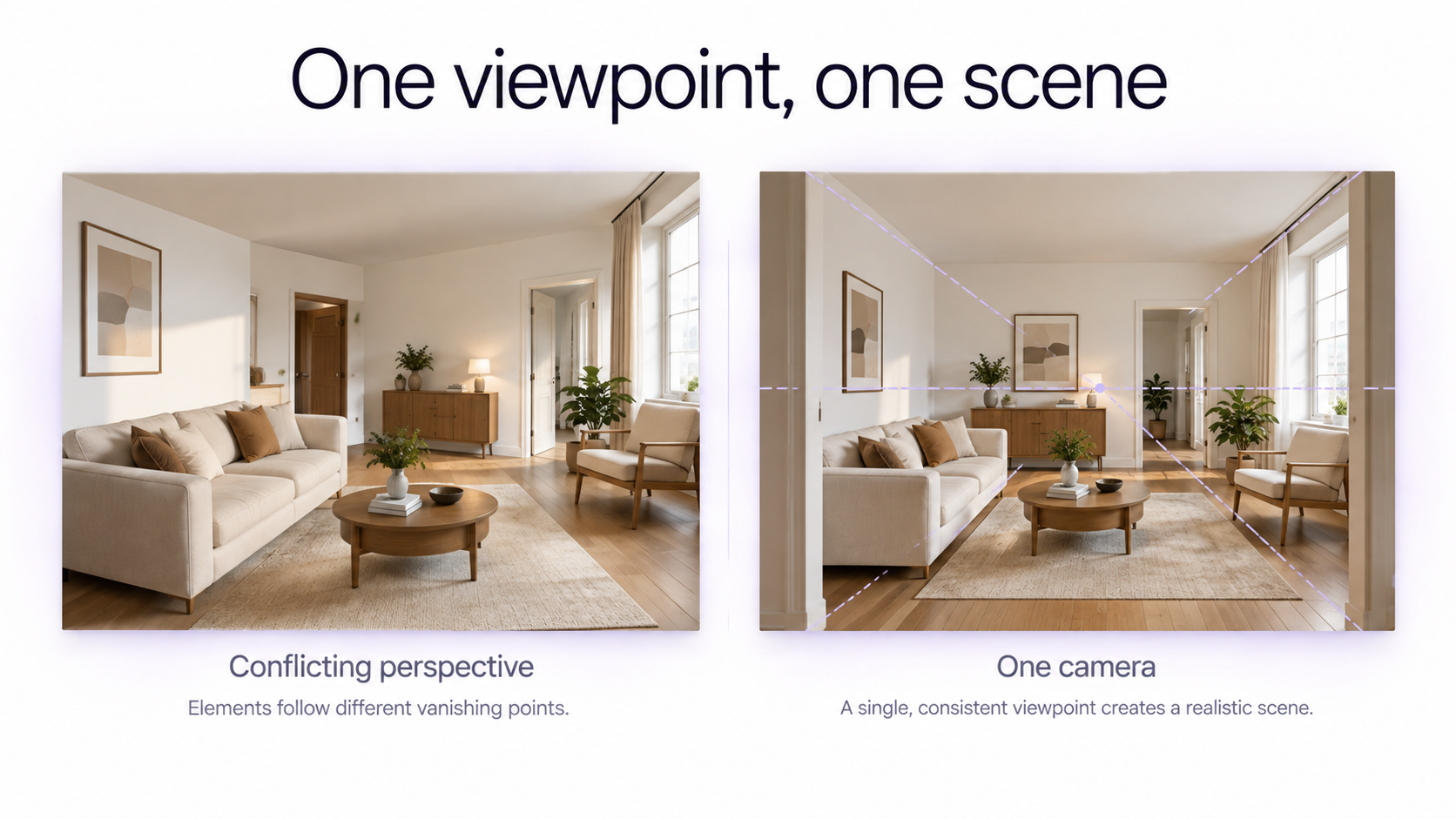
6. Perspective and Scale Do Not Agree
Perspective errors can be subtle because each individual object may still look realistic.
A table can look like a real table. A sofa can look like a real sofa. A room can look like a real room. But if those objects imply slightly different camera positions or vanishing directions, the scene can feel synthetic.
Perspective problems are particularly noticeable in interiors, architecture, furniture, vehicles, tables, shelves, and ecommerce compositions containing several objects.
How to Fix AI Perspective
Define the camera before describing all of the objects.
For an interior, you might specify an eye-level photograph from approximately 1.5 meters high, viewed from the doorway, with a natural wide-angle perspective and straight architectural verticals.
Then describe the furniture, materials, and decorative elements. Starting from one camera viewpoint gives the scene a stronger geometric foundation.
7. Objects Look Correct but Do Not Work Correctly
Some AI mistakes are not visual quality problems at all. They are functional problems.
A chair may have impossible supports. A cable may connect to nowhere. A handbag strap may merge into clothing. A spoon may pass through a cup. A hand may contain five normal-looking fingers while holding an object in a mechanically impossible way.
Research on AI image artifacts describes this type of problem as functional implausibility. The object looks familiar, but it would not actually work in the physical world.
How to Fix Broken Object Interactions
Ask a simple question: could this object actually function like this?
Check grips, hinges, wheels, straps, cables, chair legs, utensils, zippers, handles, clothing closures, tools, furniture joints, and anywhere one object touches another.
When the interaction itself is important, describe it explicitly. Instead of person holding a coffee cup, specify right hand wrapped naturally around the ceramic mug handle, thumb resting on top of the handle, fingers visible on the opposite side.
8. Hands, Faces, Teeth, and Accessories Look Wrong
Hands are one of the most famous AI image problems, but simply counting fingers is no longer enough.
Modern image models frequently generate normal-looking hands. The subtler problems are finger length, joint orientation, grip, wrist alignment, contact with objects, and whether the hand makes sense from the current viewing angle.
The same principle applies to faces and accessories. Inspect teeth, eyes, ears, glasses, earrings, necklaces, collars, hairlines, and any place where small structures overlap. Portrait workflows such as creating a professional headshot from a selfie are especially sensitive to these details.
How to Fix AI Anatomy
If the face, composition, clothing, background, and lighting are already good, do not automatically regenerate the complete image because one hand failed.
Use a targeted edit instead. For example: correct only the right hand holding the coffee cup. Preserve the face, pose, clothing, background, camera angle, lighting, and composition.
Small corrections reduce the chance of fixing one problem while introducing five new ones.
9. Text, Signs, and Logos Fall Apart
Image generation models have improved substantially at producing text, but exact typography remains a difficult problem, especially when a scene contains multiple signs, long phrases, stylized lettering, curved labels, or small background text.
A photorealistic street can immediately look AI-generated when shop signs contain invented words. A realistic skincare bottle can become unusable when the label changes. Menus, posters, book covers, packaging, road signs, and branded products are especially sensitive.
How to Fix AI Text
If the exact wording matters, do not force the generator to solve every part of the image at once.
Generate or edit the photographic scene first, then correct important text separately. If you are working from an existing real product, preserving the original packaging can be more reliable than asking AI to reconstruct the label.
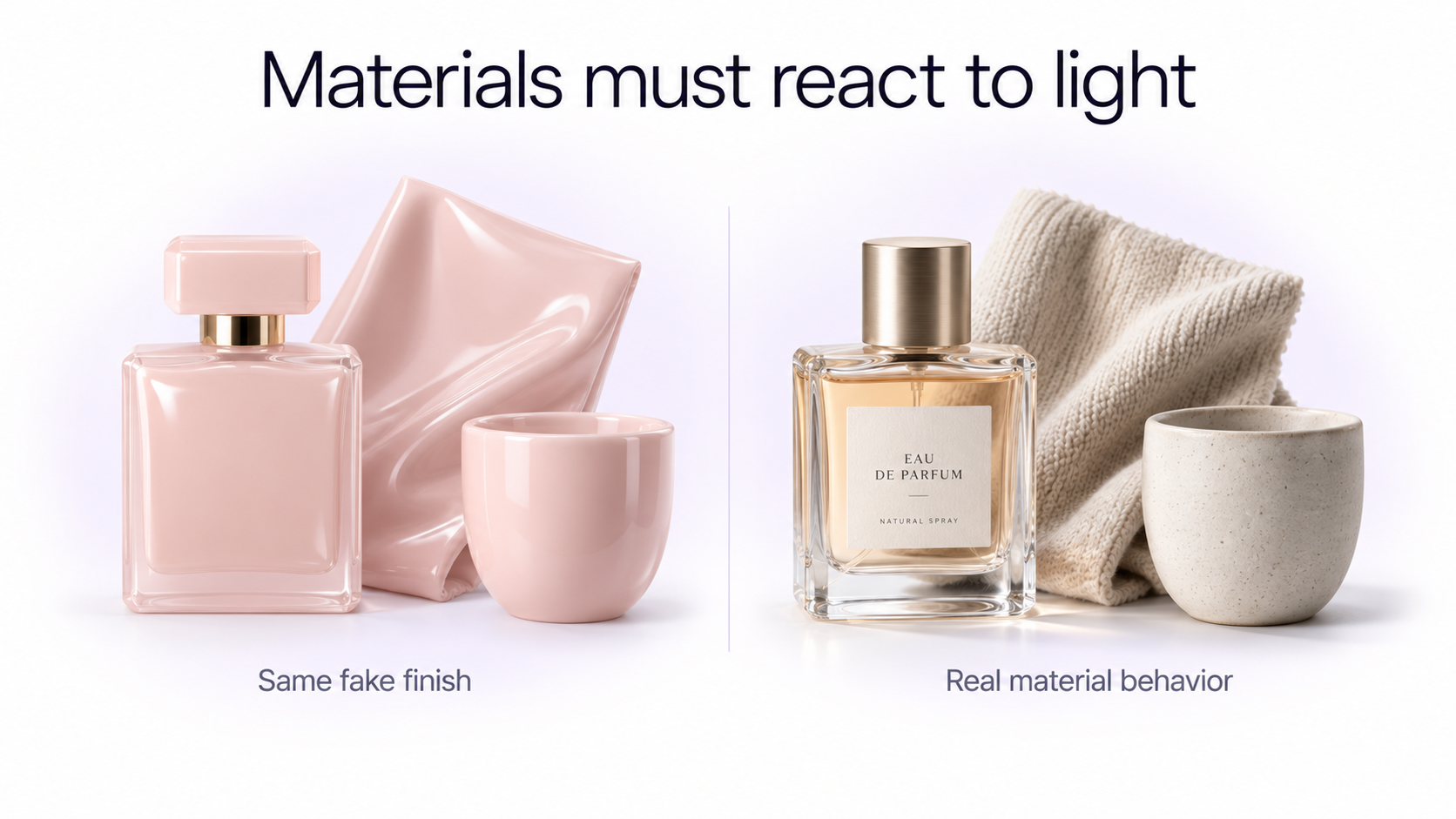
10. Materials Do Not Behave Like Real Materials
Realism depends heavily on how surfaces react to light.
Glass should not look like plastic. Cotton should not shine like satin. Matte ceramic should not reflect light like polished chrome. Leather should not have the same texture as rubber.
AI images sometimes give several materials a similar smooth, glossy, highly processed appearance. The individual objects are recognizable, but the physical surface properties do not feel convincing.
How to Fix Fake AI Materials
Describe how the material interacts with light, not simply what the object is made from.
Instead of realistic luxury perfume bottle, try thick transparent glass with visible edge refraction, subtle internal reflections, matte paper label, and brushed aluminum cap with restrained directional highlights.
For clothing, describe material-specific behavior such as soft cotton knit with visible fibers and diffused highlights or smooth satin with controlled directional sheen.
11. Depth of Field Looks Artificial
Depth of field is frequently used as a shortcut for making AI images look photographic. The result can become less realistic when blur behaves like a visual effect rather than a property of a lens.
Common problems include eyelashes and distant walls appearing equally sharp, hair surrounded by an artificial blur halo, objects at the same distance receiving different levels of blur, and backgrounds turning into extreme cream-like bokeh even when the scene resembles casual phone photography.
How to Fix AI Depth of Field
Describe the focus plane instead of merely writing shallow depth of field.
For a portrait, specify focus on the near eye, both eyes sharp, ears slightly softer, and the background gradually losing detail with distance.
For a product image, you might specify product label and front edge sharp, rear edge slightly softer, background progressively out of focus.
12. The Scene Is Too Complex
Every object added to an image introduces additional relationships the model must maintain.
Each object has a position, size, perspective, lighting relationship, shadow, material, possible reflection, interaction with nearby objects, and level of focus. Add ten unnecessary objects and you create dozens of additional opportunities for inconsistency.
This is one reason busy AI-generated cafés, streets, kitchens, offices, shops, crowds, and product scenes often contain small anomalies in the background.
How to Fix an Overcomplicated AI Scene
Remove anything that does not contribute to the image.
For example, instead of requesting a busy café filled with customers, menus, shelves, signs, lamps, plants, pastries, bottles, posters, books, and decorations, request a simple coherent café interior with a few softly blurred background elements and no readable signage.
Reducing complexity can improve realism more effectively than adding more realism-related prompt words.
13. AI Recreated Something That Was Already Correct
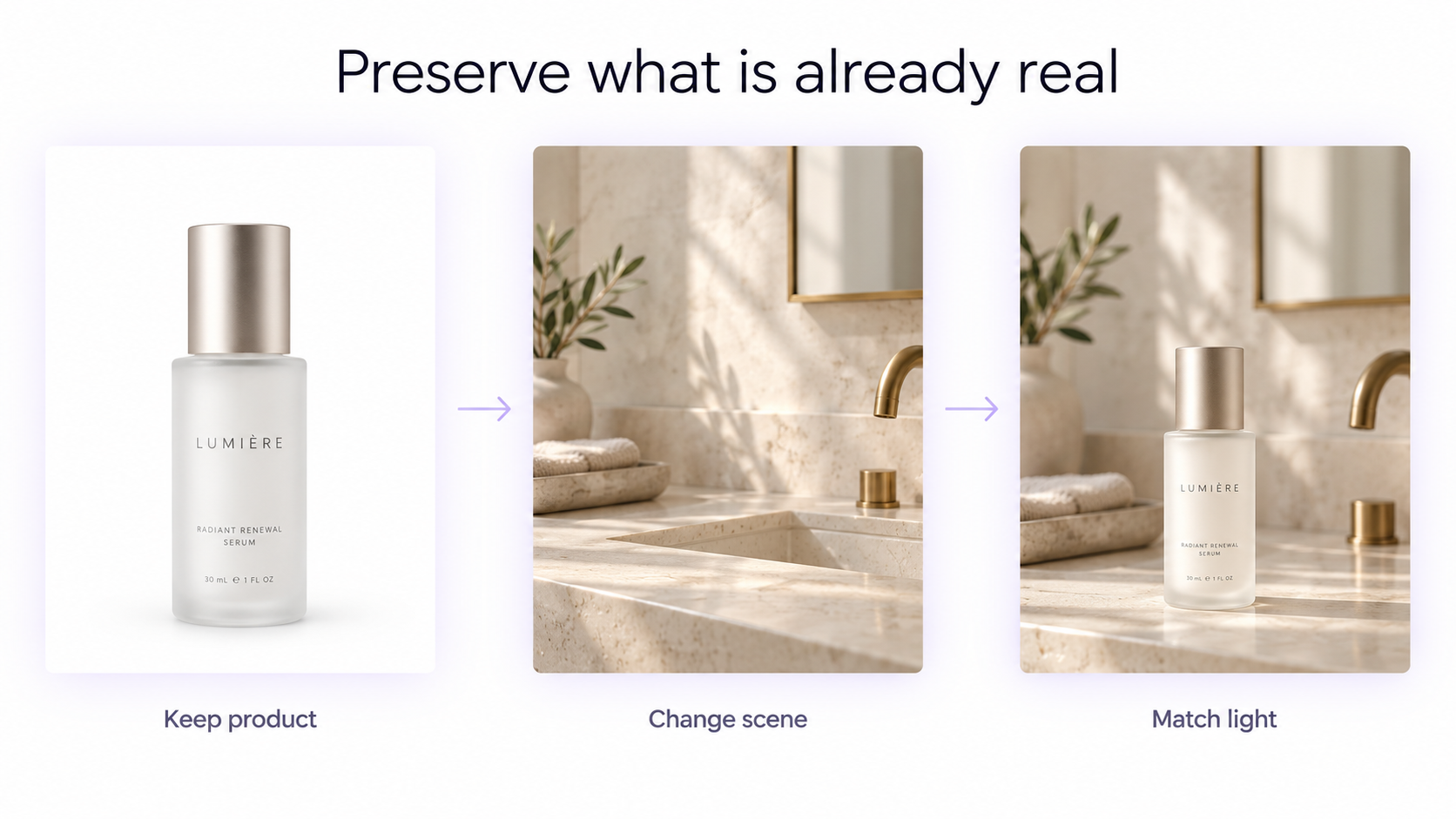
One of the most avoidable AI image problems happens when the model is asked to recreate something that already exists in a perfectly usable photograph.
Suppose you have a real photograph of a skincare bottle. The bottle shape, label, logo, cap, proportions, and material are already correct. If you ask AI to regenerate the entire bottle from text just because you want a different bathroom background, you create unnecessary opportunities for the product to change.
The same applies to faces, fashion items, cars, furniture, rooms, food, and branded products.
How to Preserve What Is Already Real
Start from the real image and change only what needs changing. This is the core advantage of image-to-image AI workflows.
Instead of asking AI to create a realistic version of your product in a bathroom, keep the original product and change the photo background with AI. Match the new environment's lighting, shadows, reflections, and color temperature to the preserved object.
Reference-based and image-to-image workflows are particularly useful when identity, product geometry, packaging, room structure, clothing, or another important part of the source image needs to remain recognizable.
Why AI Portraits Sometimes Look Uncanny
The uncanny valley is often used to explain why some synthetic people feel disturbing or artificial. It is relevant, but it should not be treated as the explanation for every fake-looking AI image.
Portraits are unusually sensitive because humans have extensive experience examining faces. Tiny inconsistencies involving eye direction, teeth, skin, facial symmetry, expression, ears, hairlines, shadows, or head-to-body relationships can therefore attract attention.
At the same time, research has shown that some synthetic faces can be difficult to distinguish from real people, and certain studies have even found generated faces judged as human more often than actual photographs. The problem is therefore not simply that AI faces always look fake.
A better way to think about it is that human faces have a very small tolerance for inconsistency. When everything agrees, the result can be extremely convincing. When several subtle cues disagree, the face quickly feels wrong.
How to Make AI Portraits Look Less Fake
Use a real reference when identity matters. Keep skin treatment restrained. Avoid perfectly mirrored facial lighting. Check eye direction, teeth, ears, hairline, jewelry, glasses, neckline, hands, and any place where the person touches another object.
Also avoid trying to improve every facial feature simultaneously. A real professional portrait does not require perfectly white teeth, perfectly smooth skin, perfect symmetry, perfect hair, and maximum eye sharpness.
Why AI Product Photos Often Look Like 3D Renders
Product images have a different failure pattern from portraits. The product may have clean geometry and professional lighting but still resemble a 3D render rather than a photograph.
Common causes include overly perfect edges, uniformly smooth materials, weak contact shadows, flawless labels, impossible reflections, excessively clean backgrounds, repeated specular highlights, perfect symmetry, and a lack of small optical variation.
Transparent and reflective products are especially difficult because glass, glossy plastic, liquid, chrome, polished metal, and translucent materials require accurate relationships between the product and its environment. Dedicated AI product photography workflows help when you need commercial-ready results without rebuilding the product from scratch.
How to Make AI Product Images Look More Photographic
Preserve real product geometry whenever possible. Describe the light source, contact shadow, reflective environment, material behavior, camera position, and surface beneath the object.
For example: original frosted glass serum bottle preserved exactly, pale stone vanity, large diffused window camera-left, soft contact shadow beneath the bottle, subtle window reflection on the glass edge, matte label without glare, shallow but realistic background focus.
How to Fix an AI Image Without Starting Over
One of the biggest mistakes in AI image editing is regenerating an entire successful image because one small element looks wrong.
Every full regeneration gives the model another opportunity to change the person's identity, product shape, composition, clothing, lighting, camera angle, background, colors, or other details you already liked.
1. Identify the Exact Failure
Do not begin with make this more realistic. Decide what specifically looks unrealistic.
Is it the hand? Reflection? Skin? Product label? Shadow? Perspective? Background? Lighting? Material?
2. Preserve Everything Else
Explicitly state what should remain unchanged.
For example: preserve the person's face, pose, expression, hairstyle, clothing, background, camera angle, crop, and lighting. Correct only the right hand.
3. Make One Major Correction at a Time
If you simultaneously change the face, lighting, clothes, background, camera angle, hairstyle, and hand, it becomes difficult to determine which instruction improved or damaged the result.
Smaller edits are easier to evaluate and easier to reverse.
Fix AI Image Problems in This Order
Not every realism problem deserves equal priority. Fix structural problems before cosmetic ones.
Step 1: Structure
Check anatomy, object shape, perspective, proportions, scale, spatial relationships, and whether objects physically connect correctly.
Step 2: Physics
Correct the light source, shadows, contact shadows, reflections, gravity, object interactions, and environmental illumination.
Step 3: Surfaces
Inspect skin, hair, glass, metal, fabric, food, wood, stone, plastic, liquid, and other material-specific textures.
Step 4: Photographic Finish
Only after the structure and physics work should you fine-tune contrast, color grading, exposure, sharpening, grain, depth of field, and upscale.
Why Adding '8K' and 'Ultra Realistic' Often Does Not Work
Quality words can influence the overall style of a generated image, but they do not explain the physical relationships that make photography believable.
An 8K image can contain an impossible reflection. An ultra-detailed face can still have plastic skin. A masterpiece interior can still have conflicting perspective.
Specific photographic information is usually more useful than stacking quality adjectives.
Instead of ultra realistic cinematic 8K portrait, describe an eye-level waist-up portrait photographed beside a large apartment window, soft daylight from camera-left, natural skin texture, restrained contrast, realistic fabric folds, and a softly out-of-focus room in the background.
60-Second AI Image Realism Check
Before regenerating an image, inspect these eight areas.
1. Face and Hands
Do the anatomy, joints, expressions, teeth, fingers, grip, accessories, and overlaps make physical sense?
2. Main Light
Can you identify where the dominant illumination is coming from?
3. Shadows
Do the cast and contact shadows agree with that light source?
4. Reflections
Do glass, mirrors, metal, water, screens, and glossy surfaces reflect the scene that actually exists?
5. Perspective
Do all objects appear to share one camera position and believable scale?
6. Materials
Do different materials react differently to light, or does everything have the same smooth AI finish?
7. Focus
Is there a believable focal plane with gradual depth-of-field behavior?
8. Background
Inspect signage, furniture, repeated objects, people, architecture, text, shelves, plants, and other secondary details.
If only one area fails, edit that area. If several structural systems fail simultaneously, returning to an earlier version or the original reference image may be faster than repairing the final result.
When Should You Use a Reference Image?
Reference images are most valuable when something important must remain consistent. See how to use reference images in AI for a full workflow.
Use a reference when you need to preserve a person's identity, product geometry, package design, clothing item, vehicle, room layout, furniture, food presentation, pose, composition, or another recognizable subject.
Starting with a reference does not automatically guarantee accuracy, so the output still needs inspection. It does reduce the amount of visual information the model must invent from scratch.
Using GenImagePro to Fix Fake-Looking AI Images
GenImagePro is designed around working from existing images rather than requiring every visual to be created from a blank prompt. Its template-first image-to-image workflow helps you preserve what already looks real and transform only the parts that need changing.
Upload a photo, choose a guided visual direction, and generate variations across portraits, products, fashion, beauty, rooms, food, cars, backgrounds, and creative projects. That is especially useful when the face, product geometry, packaging, or composition is already correct and the failure is limited to lighting, background, wardrobe, or style.
For example, if you already have an accurate product photograph, you can keep the product and create a new photoshoot environment without regenerating the bottle or label. If you already have a portrait with the correct identity and expression, you can improve the background, outfit direction, lighting treatment, or professional style — including dedicated AI headshot and background replacement workflows.
The practical GenImagePro principle is simple: preserve the parts you trust, edit one major issue at a time, and use ready-made templates when you want commercial-ready direction without stacking empty quality words like 8K or ultra realistic.
Research Behind These AI Image Problems
Research into AI-generated image realism increasingly supports a broader view of AI artifacts. Problems are not limited to hands or distorted faces. Studies have identified anatomical errors, unnatural textures, implausible object function, inconsistent physics, unusual context, perspective problems, lighting inconsistencies, reflection errors, spatial reasoning failures, and difficulties with complex text.
Large-scale perception studies also show that humans are not perfect AI-image detectors. Modern generated images can sometimes be difficult to distinguish from photographs. This means that no single artifact, such as smooth skin or unusual fingers, should be treated as universal proof that an image is AI-generated.
Useful research for further reading includes Characterizing Photorealism and Artifacts in Diffusion Model-Generated Images, published through CHI 2025; What You See Is Not What You Get Anymore, published in Frontiers in Artificial Intelligence; research on human detection of AI-generated images; work on synthetic-face realism; research into hand restoration, perspective constraints, spatial reasoning, and text rendering; and official image-generation guidance from OpenAI and Adobe.
Final Takeaway
AI images do not become realistic simply by containing more detail. A convincing image needs its anatomy, geometry, lighting, shadows, reflections, materials, perspective, focus, and context to describe the same physical scene.
When an image feels fake, avoid immediately adding more realism keywords or regenerating everything. Identify what is actually breaking the illusion.
Fix structural errors first. Then fix physics. Then materials and textures. Only after those elements are coherent should you worry about color grading, sharpening, film grain, or upscaling.
And when you already have a real subject or product that is correct, consider preserving it with GenImagePro instead of asking AI to recreate reality you already have.
Frequently Asked Questions
Why do AI-generated images look fake?
AI-generated images often look fake because different parts of the image are inconsistent. Common problems include overly smooth textures, conflicting lighting and shadows, impossible reflections, incorrect anatomy, weak perspective, unrealistic object interactions, artificial materials, broken text, and excessive visual perfection.
Why does AI skin look plastic?
AI portraits can make skin too uniform by reducing natural variation in pores, fine hair, complexion, roughness, oiliness, highlights, and small shadows. Using more restrained beauty language and requesting natural skin texture and subtle complexion variation can help.
Why do AI images look too perfect?
Generated images can contain excessive symmetry, immaculate surfaces, perfect object placement, flawless clothing, uniformly polished materials, and highly controlled lighting. Real photographs usually contain more natural variation in framing, texture, exposure, spacing, and surface appearance.
Why do AI hands still look weird?
Hands involve complex anatomy, joint orientation, perspective, occlusion, and interaction with objects. Even when an AI-generated hand has the correct number of fingers, the grip, finger lengths, wrist position, or contact with an object can still be physically implausible.
How can I make an AI image look less fake?
First identify the specific problem instead of simply requesting more realism. Fix anatomy and geometry first, then lighting, shadows and reflections, followed by materials and textures. Adjust color, contrast, grain, sharpening, and upscale only after the structural problems are solved. GenImagePro is useful when you want to start from an existing photo, preserve what already works, and edit only the failing region or style.
Does adding '8K' make an AI image more realistic?
Not necessarily. Resolution and detail do not correct impossible perspective, broken anatomy, conflicting lighting, incorrect reflections, or unrealistic materials. Specific descriptions of composition, lighting, camera position, surface behavior, and physical relationships are generally more useful.
Why do AI product photos look like 3D renders?
AI product images can look rendered when edges are too perfect, materials are too smooth, reflections are physically inconsistent, contact shadows are weak, surfaces are spotless, or every part of the product has the same polished finish. Preserving a real product photo and changing only the surrounding scene can reduce these problems.
Why do AI portraits look uncanny?
People are highly sensitive to small inconsistencies in faces. Eye direction, teeth, skin texture, facial symmetry, ears, hairlines, accessories, lighting, and head-to-body relationships can all contribute. However, modern synthetic faces can also be extremely convincing, so uncanny appearance is not universal.
Should I regenerate an AI image when one part looks wrong?
Usually not if the rest of the image is successful. A targeted edit can preserve the face, composition, lighting, product, clothing, and background while correcting only the failed region. Full regeneration can introduce new errors into elements that were already correct.
Are AI-generated images always easy to recognize?
No. Research has shown that people can struggle to distinguish modern synthetic images and faces from real photographs. Obvious artifacts remain possible, but there is no single visual cue that reliably identifies every AI-generated image.
Should I use a real photo as a reference?
Use a reference image when identity, product shape, packaging, clothing, room layout, composition, or another important visual element needs to remain consistent. Starting from a real image reduces the amount of information the AI must invent.
What should I fix first in a fake-looking AI image?
Start with structure: anatomy, geometry, perspective, scale, and object relationships. Next fix lighting, shadows, reflections, and other physical inconsistencies. Then correct materials, textures, skin, and hair. Leave color grading, grain, sharpening, and upscale until the end.