Shot type is one of the simplest ways to make an AI video prompt more precise. Instead of telling a video model to create a cinematic scene, you can specify exactly how much of the subject should appear in the frame.
A wide shot can emphasize environment and scale. A medium shot gives more attention to the subject. A close-up focuses on expression or product detail. Even when everything else in the prompt remains unchanged, changing the shot type can create a completely different video.
This guide explains 15 useful AI video shot types and gives prompt examples you can adapt for image-to-video generation, product videos, fashion content, portraits, advertising, and cinematic scenes.
For a broader guide covering shot types together with camera movement, lighting, angles, and subject motion, see our cinematic AI video prompts guide.
What Is a Shot Type in AI Video?
A shot type describes how the subject is framed inside the video. In practical terms, it tells the AI how close or far the virtual camera should be from the subject and how much of the environment should remain visible.
Shot type is different from camera angle and camera movement. A close-up describes framing. A low angle describes where the camera is positioned. A dolly-in describes how the camera moves.
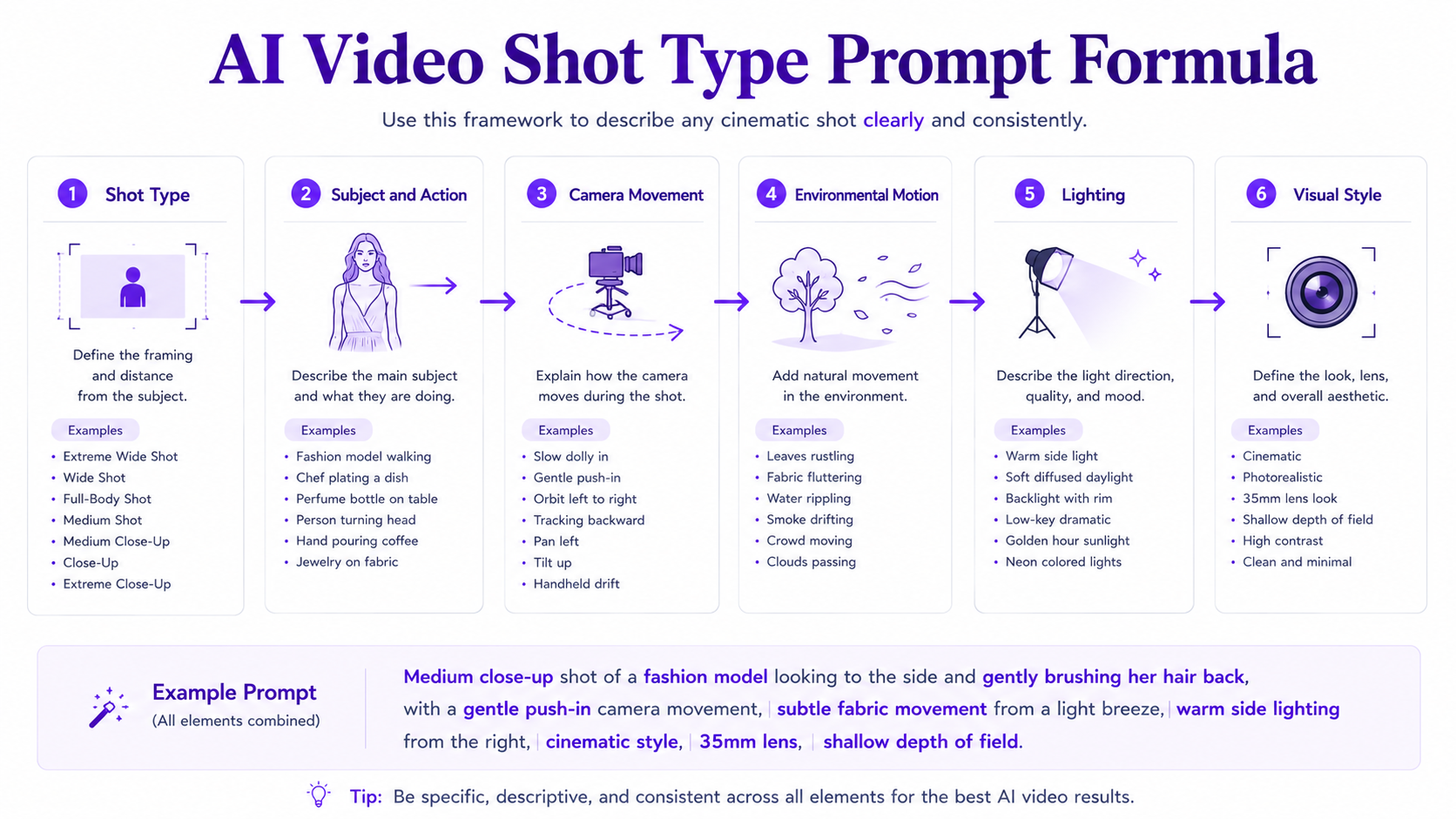
Quick AI Video Shot Type Prompt Formula
A simple structure is: [Shot type] of [subject and action], [camera movement], [environmental motion], [lighting], [visual style].
Example: Medium close-up of a fashion model turning slowly toward camera, subtle hair movement, gentle push-in, warm side lighting, shallow depth of field, polished editorial fashion-film aesthetic.
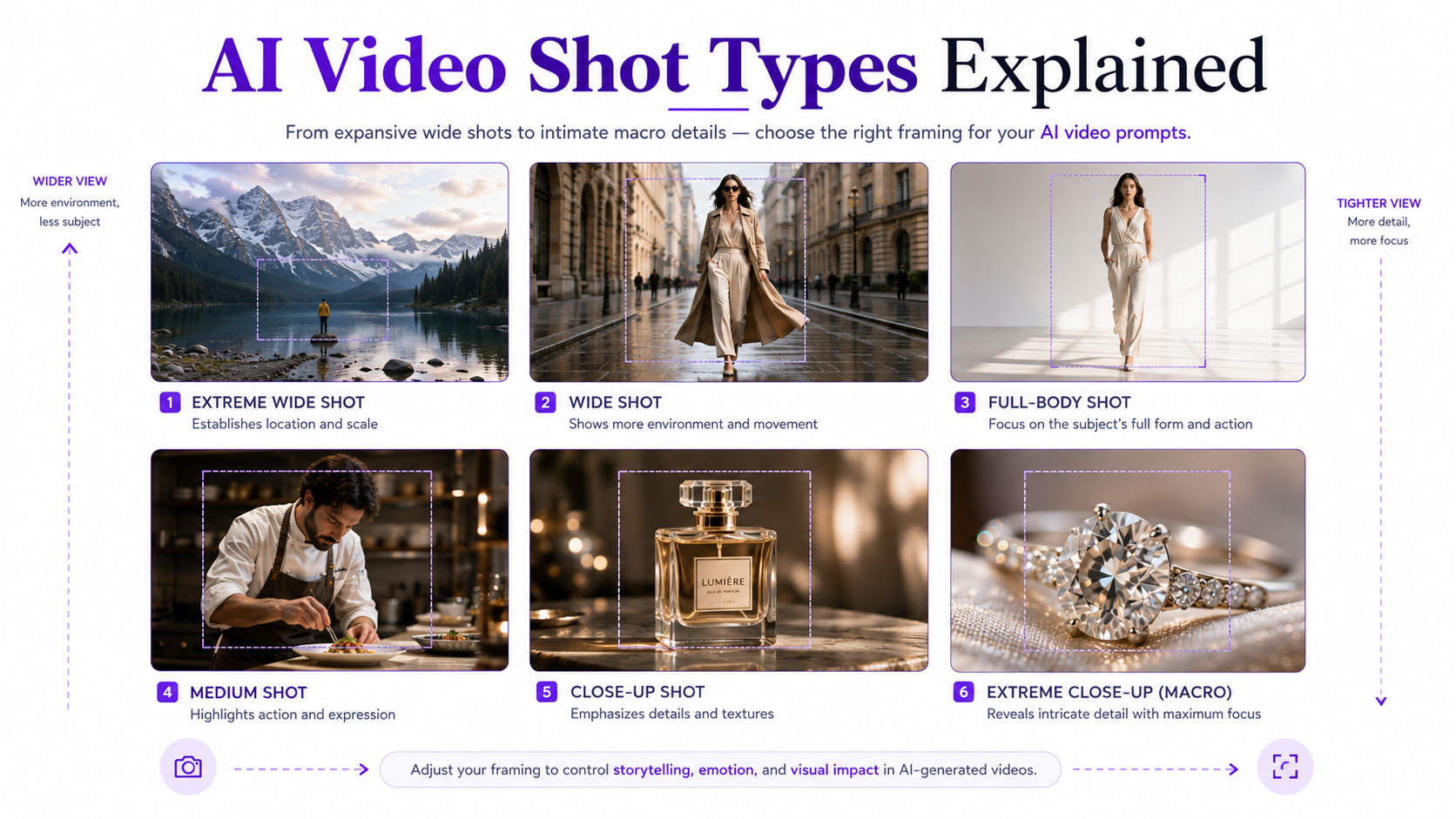
1. Extreme Wide Shot
An extreme wide shot places the environment ahead of the subject in visual importance. The person, product, vehicle, or other main subject may occupy only a small part of the frame.
Use it for establishing locations, dramatic landscapes, architecture, travel sequences, or scenes where scale matters.
Prompt example: Extreme wide cinematic shot of a lone traveler standing on a mountain ridge at sunrise, subject small within the expansive landscape, clouds moving slowly through the valley, gradual camera push forward, warm atmospheric light and natural cinematic depth.
2. Wide Shot
A wide shot usually shows the full subject together with enough surrounding space to establish context. It works well when the environment and the subject are both important.
Prompt example: Wide shot of a model walking through a minimalist concrete gallery, full figure visible with surrounding architecture, smooth side tracking camera, clothing moving naturally with each step, soft editorial lighting.
3. Full Shot
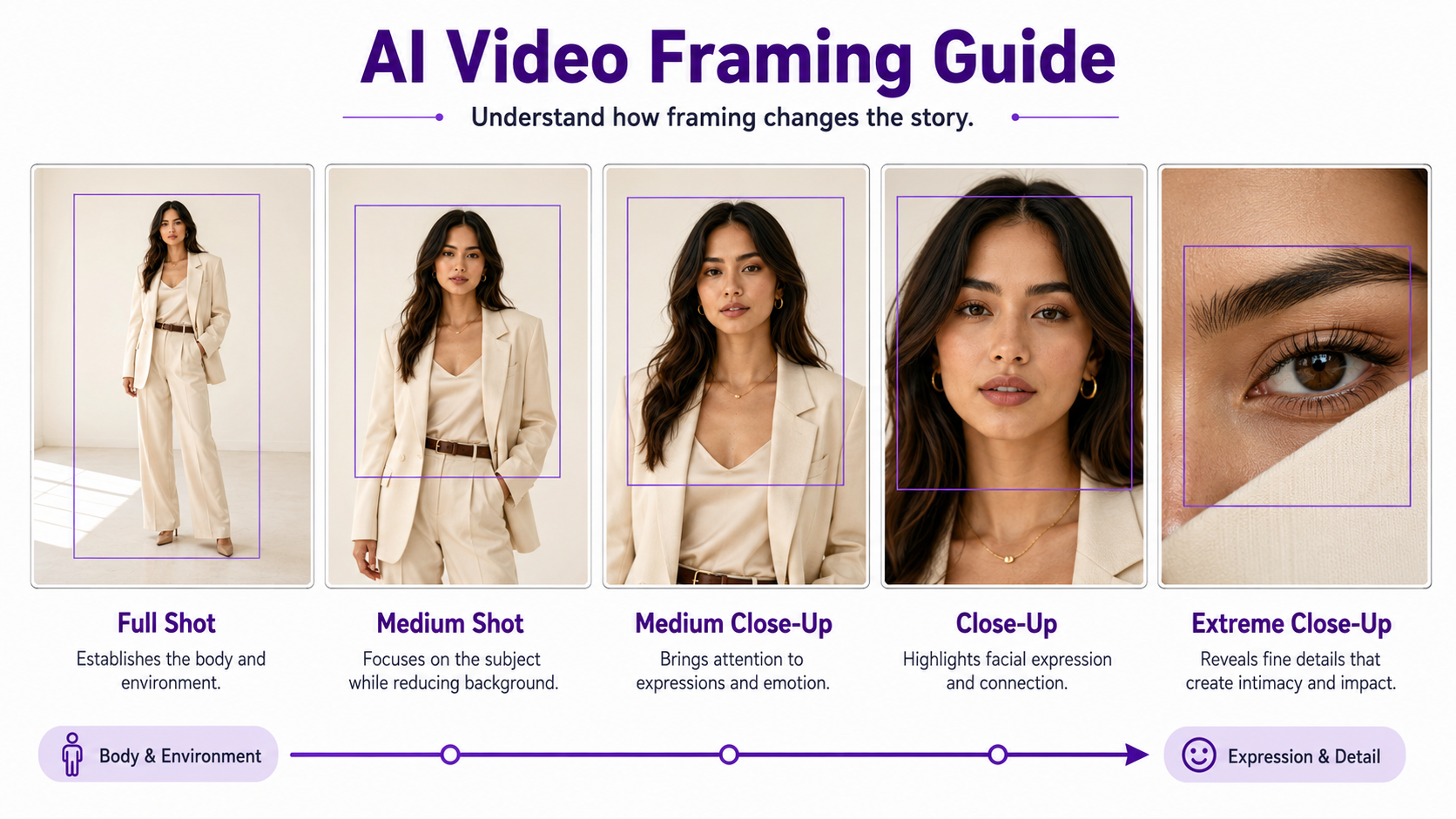
A full shot frames the entire subject from head to toe while giving less visual emphasis to the surrounding environment than a wide shot.
This is particularly useful for fashion videos because viewers can see the entire garment, pose, and body movement.
Prompt example: Full-body shot of a fashion model taking three natural steps toward camera, entire outfit visible from head to toe, realistic fabric movement and weight transfer, camera tracking backward smoothly, premium editorial fashion-film lighting.
4. Cowboy Shot
A cowboy shot typically frames a person from around mid-thigh upward. It sits between a full shot and a medium shot and preserves body language while bringing the viewer closer to the subject.
Prompt example: Cowboy shot of a woman standing beside a vintage car at golden hour, framed from mid-thigh upward, subtle posture adjustment and natural hair movement, slow push-in, warm cinematic backlight.
5. Medium Shot
A medium shot commonly frames a person around the waist or chest upward. It balances facial expression, gestures, and environmental context.
Prompt example: Medium shot of a chef plating a finished dish, natural hand movement visible, gentle steam rising from the food, slow lateral camera slide, warm restaurant lighting and shallow background separation.
6. Medium Close-Up
A medium close-up moves closer to the subject, usually framing from the chest or shoulders upward. It is useful when facial expression matters but you still want some body language.
Prompt example: Medium close-up of a woman slowly turning toward the camera, subtle blink and breathing, soft hair movement, slight cinematic push-in, diffused window lighting and natural skin texture.
7. Close-Up
A close-up fills most of the frame with the subject. For people, this commonly means the face. For product videos, it can mean packaging, texture, branding, or one important feature.
Prompt example: Cinematic close-up of a perfume bottle, front label remaining sharp and readable, subtle highlights moving across the glass surface, very slow push-in, dark luxury background and shallow depth of field.
8. Extreme Close-Up
An extreme close-up isolates a very small part of the subject. Examples include an eye, lips, jewelry detail, watch dial, product texture, logo, or material surface.
Prompt example: Extreme close-up of a diamond ring, individual facets filling the frame, tiny reflections moving naturally across the stones, slow macro camera slide from left to right, dark premium jewelry-commercial lighting.
9. Detail Shot
A detail shot isolates an important visual element without necessarily using extreme macro magnification. It is especially useful in ecommerce, fashion, automotive, beauty, and food content.
Prompt example: Detail shot of the stitching and metal clasp on a luxury leather handbag, camera gliding slowly along the material, precise texture preserved, soft directional studio highlights and shallow focus.
10. Over-the-Shoulder Shot
An over-the-shoulder shot places part of one subject in the foreground while the camera looks toward another person or object. It creates depth and naturally establishes relationships between subjects.
Prompt example: Over-the-shoulder shot from behind a designer looking toward a fashion model, designer softly out of focus in the foreground, model sharp in the distance, subtle camera push forward, clean studio lighting.
11. Point-of-View Shot
A point-of-view or POV shot presents the scene as though the viewer is seeing through the eyes of a character. It can make AI videos feel more immersive and immediate.
Prompt example: First-person POV walking slowly through a luxury hotel lobby, natural forward motion with restrained head movement, hands briefly entering the lower edge of frame, realistic depth and warm ambient lighting.
12. Two-Shot
A two-shot keeps two subjects visible in the same frame. It is useful for conversations, interactions, lifestyle content, demonstrations, and scenes where the relationship between two people matters.
Prompt example: Medium two-shot of two friends sitting at an outdoor cafe, subtle natural conversation gestures and facial reactions, camera remaining mostly locked, soft afternoon sunlight and realistic background activity.
13. Tracking Shot
A tracking shot is technically defined partly by camera movement, but it is also commonly used as a shot description in AI video prompts because the camera follows a moving subject through space.
Prompt example: Full-body tracking shot of a fashion model walking along a modern city sidewalk, camera moving parallel to the subject at matching speed, natural garment motion, stable identity and controlled editorial color.
14. Establishing Shot
An establishing shot introduces the location before attention moves toward a specific person, product, or action. It is often wide or extreme wide.
Prompt example: Cinematic establishing shot of a modern coastal villa at sunrise, gentle ocean movement in the distance, curtains shifting subtly through open windows, slow aerial push toward the architecture, warm early-morning light.
15. Macro Shot
Macro shots are especially valuable for product videos because they can emphasize texture, material quality, food details, cosmetics, jewelry, electronics, and other small visual features.
Prompt example: Macro shot traveling slowly across the surface of a luxury watch, polished metal reflecting narrow strips of light, dial and engraved details remaining precise, very shallow depth of field, premium commercial cinematography.
Shot Type vs Camera Angle vs Camera Movement
These concepts are related, but they solve different parts of an AI video prompt.
Shot type controls framing: wide shot, medium shot, close-up, macro shot. Camera angle controls perspective: eye level, low angle, high angle, overhead, Dutch angle. Camera movement controls what the camera does over time: dolly in, pull back, orbit, pan, track, crane, or remain locked.
A complete direction could therefore be: Low-angle full shot of a model walking toward camera, camera tracking backward smoothly, warm backlight, subtle fabric movement, editorial cinematic style.
For a deeper breakdown of perspective, see our AI video camera angles guide.
For camera movement, lighting, and broader cinematic prompt examples, see our cinematic AI video prompts guide.
Best AI Video Shot Types for Product Videos
Product videos usually benefit from a smaller selection of deliberate shot types rather than constant framing changes.
Wide or medium shots can establish the product in an environment. Close-ups highlight the packaging or main design. Detail and macro shots reveal material quality, textures, ingredients, jewelry facets, controls, stitching, or other selling points.
For example, a skincare campaign might begin with a medium product shot on a stone pedestal, transition to a close-up of the bottle, and finish with a macro shot of condensation or texture.
For more commercial examples, see our AI product video prompts guide.
Best AI Video Shot Types for Fashion
Fashion videos need framing that shows both the garment and the model's movement. Full shots work well for walking and outfit reveals, while medium shots are useful for styling and upper-body movement.
Close-ups and detail shots can highlight accessories, fabric texture, stitching, jewelry, makeup, or individual styling elements.
For clothing-specific examples, see our AI fashion video prompts guide.
How to Choose the Right Shot Type for Image-to-Video
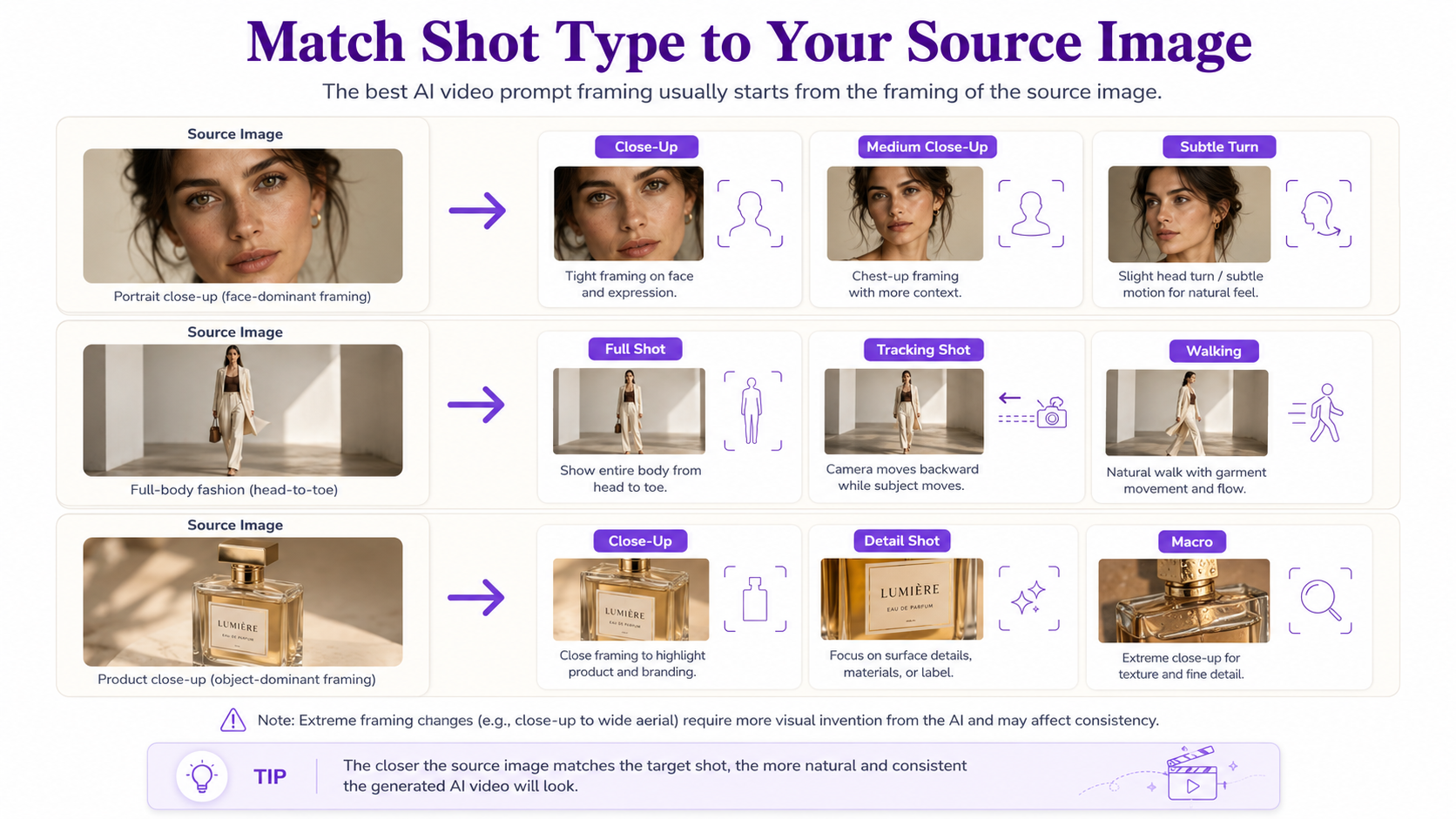
When starting from an existing image, pay attention to the framing already present in the source. Asking an AI model to turn a tightly cropped portrait into an extreme wide shot requires it to invent a large amount of unseen information.
For more stable results, keep the requested shot reasonably close to the source framing. A full-body image can naturally support full shots, tracking shots, and moderate push-ins. A close portrait is better suited to close-ups, medium close-ups, subtle turns, and restrained camera movement.
Our image-to-video prompts guide covers this source-image-first approach in more detail.
Create the Starting Image With GenImagePro
Shot selection starts before video generation. The composition of the source image determines how much information the video model already has about the subject and surrounding environment.
With GenImagePro, you can create or transform source images for product photography, fashion, portraits, beauty, food, and other visual workflows before developing them into motion-based content.
For example, you might first create a full-body fashion composition if you plan to generate a walking shot, or a carefully lit close-up product image if your final video will focus on packaging details and subtle camera movement.
Common AI Video Shot Type Mistakes
Combining Contradictory Shot Types
Avoid prompts such as extreme wide close-up or full-body macro shot. Pick one dominant framing instruction unless you are explicitly describing a transition between shots.
Changing Framing Too Aggressively
Moving from a close-up source image to an extreme wide composition may force the AI to invent the subject's body, environment, and unseen objects. This can increase inconsistency.
Confusing Zoom With a Different Shot
Shot type describes framing at a given moment. A zoom, dolly, or push-in describes how that framing changes over time. Specify both when the transition matters.
Trying to Use Every Shot in One Clip
For short AI-generated clips, one clear shot type with controlled motion is often more reliable than asking the model to produce a complete multi-shot sequence.
Quick AI Video Shot Type Cheat Sheet
Extreme wide: environment and scale. Wide: subject plus surroundings. Full shot: entire person or object. Cowboy shot: approximately mid-thigh upward. Medium shot: waist or chest upward. Medium close-up: chest or shoulders upward. Close-up: face or product fills the frame. Extreme close-up: tiny detail dominates. Detail shot: specific feature. Over-the-shoulder: foreground subject plus target. POV: viewer sees through the subject's perspective. Two-shot: two subjects together. Tracking shot: camera follows movement. Establishing shot: introduces location. Macro shot: magnifies very small product or material details.
FAQ
What are the main types of shots in AI video?
Useful AI video shot types include extreme wide shots, wide shots, full shots, medium shots, medium close-ups, close-ups, extreme close-ups, detail shots, over-the-shoulder shots, POV shots, two-shots, tracking shots, establishing shots, and macro shots.
What are the 7 basic shot types?
A simplified seven-shot progression is extreme wide shot, wide shot, full shot, medium shot, medium close-up, close-up, and extreme close-up. Other shot types can be added depending on the scene and creative purpose.
What is the difference between a shot type and a camera angle?
Shot type describes how tightly the subject is framed, such as wide, medium, or close-up. Camera angle describes where the camera is positioned relative to the subject, such as high angle, low angle, eye level, or overhead.
What is the best AI video shot type for a person walking?
A full shot or wide shot usually works well because the entire body and walking motion remain visible. Pairing it with a smooth tracking shot can create a natural fashion or lifestyle sequence.
What is the best shot type for AI product videos?
Medium product shots, close-ups, detail shots, and macro shots are especially useful. Wider shots establish the environment, while close framing highlights packaging, materials, textures, branding, and important product features.
Should I include the shot type in an AI video prompt?
Yes. Explicit framing terms such as full shot, medium close-up, or macro shot give the video model clearer visual direction than general instructions such as cinematic video.
Can I change the shot type when generating video from an image?
Yes, but large changes in framing require the model to invent information that does not exist in the original image. Keeping the requested framing relatively close to the source often produces more consistent results.
Can GenImagePro help prepare images for AI video generation?
Yes. GenImagePro can create and transform source visuals for product photography, fashion, portraits, beauty, food, and other use cases. Choosing the source composition around your intended video shot can give the generation process a clearer starting point.